Not allowed to upload files/movies

Hello, I have installed the Plex Server on a CentOS 7 Linux, following this tutorial:

https://www.vultr.com/docs/installing-plex-media-server-on-centos-7

I have installed on a dedicated remote server with static IP. So I have two issues here:

First Issue:
When I login serverIP:32400 show the message:

This application is at 104.x.x.x (I hide the IP) and is not hosted by Plex. Continue only if you recognize this server and wish to grant access.

Then I click sign in and acess to dashboard. How do I remove this message?

Second Issue:
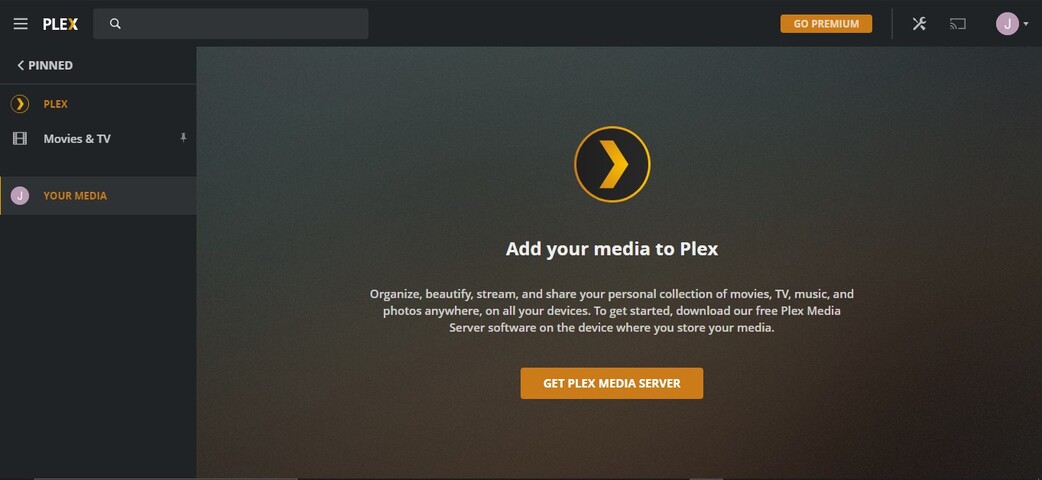
When I go to More > Your Media, shows:

Add your media to Plex

Organize, beautify, stream, and share your personal collection of movies, TV, music, and photos anywhere, on all your devices. To get started, download our free Plex Media Server software on the device where you store your media.

and the button Get PLEX Media Server. And redirect me to:
https://www.plex.tv/media-server-downloads/

How do I add media to my server?
What I am missing?

Hi, it sounds like you might not have claimed the server yet, so perhaps this support article can help, https://support.plex.tv/articles/200288586-installation/.

When you have Plex on a remote server (a VPS machine), the general configuration is much like it is locally.

  1. The server itself.
  2. The media disks.

In your case, as it does with most, it makes the most sense to either:

  1. store them on the same host provider (if you have storage there)
  2. link them to where you do have them in cloud storage.

As for getting your media there, using Google Drive as an example:

  1. I create folders (directories) in my Google drive to hold the media
  2. I then upload my local media files to my Google drive into those folders.
  3. When everthing is uploaded, (or enough to get started)
  4. I start basic setup of the server in preparation for when I’ll have media.
  5. I link the Google drive to that server right after I’ve performed the basic (empty) configuration. This step makes it part of your Plex account and easiest to administer.
  6. The most common way of doing this is rclone. Rclone creates what looks like a mounted HDD on the server and then translates it into network requests invisible to you.

Where are you in this thought and implementation process ?
Do I need a Premium account in order to work?

Because is not allowing to upload my files. I click in More > Your Media, and it is like the server is not installed on a linux server.

You’re misunderstanding a bit here.

  1. You don’t upload your media directly into Plex.
  2. You upload your media to your cloud storage (Google, Microsoft, etc)
  3. Once uploaded there, you link your remote Virtual server to the cloud-stored data

ChuckPa, so I cannot storage my media files mp4/mkv on the VPS Server?
How do I link them on the remote VPS?

Sorry about my english.

If your VPS server has storage there for your media (you bought space), then you upload the files using their tools.

You can write in your native language if you wish, I will use the translator.

Ok, what is the folder should I send the files, and how do I link them to plex panel on the server?

If you need print screen I can send to you, in order for a better help.

Please take a screenshot of what you see.

This is what I see when I go to add files.
But it is already installed on a dedicated server.

This topic was automatically closed 90 days after the last reply. New replies are no longer allowed.
