Guess I’ve involuntarily joined the club, and would appreciate a certificate reset as well 
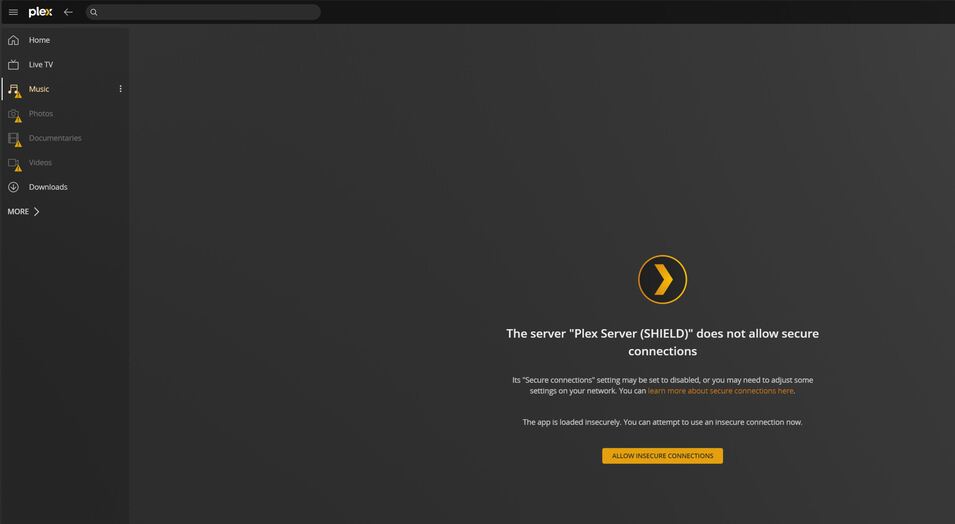
“The server “SHIELD Android TV” does not allow secure connections”. (edit: worked fine until a few hours ago)
Guess I’ve involuntarily joined the club, and would appreciate a certificate reset as well
“The server “SHIELD Android TV” does not allow secure connections”. (edit: worked fine until a few hours ago)
Question: Confirming – Nvidia Shield TV app ?
I ask because I have one, all updates installed, NO issues.
I only use it for Plex.
Not that I advocate this but it has helped.
Another consideration – Out of memory (too many concurrent running apps) does cause problems… even though it shouldn’t)
I’ve moved us here. We’re venturing out of the strictly “SSL Certificate” scope of the thread.
As for the DNS rebinding rule to write, you want to allow plex.direct domain.
Some want it as *.plex.direct.
Some will also accept ‘private domain’. (my pfsense does)
Here you see the DNS rule (the pfsense is the DNS server for the entire LAN domain)
Thanks for your help and your patience!
Firstly, regarding your reply from the other thread regarding Shield as a Plex server: I should have phrased that better. I use the Shield as the “official” server, but the data is stored on a NAS. I just use the Shield to transcode etc. That of course still leaves its fair share of issues, but I’m not worried about my data in the slightest, and there’s more than enough storage space (except for metadata, since I have no idea how to change the directory for that - but there’s nothing else on the Shield, so whatever).
My router actually straight-up lets you enter exceptions for the DNS rebind protection. I have followed your advice and added “*.plex.direct”, but to no avail. Guess I could wipe the server yet again and see if that helps.
This is still what the message looks like (and reconnect doesn’t work, either):
Again, thanks for your help!
I understood you are using the Shield as the official server with data stored externally.
This is what I am suggesting you reconsider NOT doing.
Your Shield was designed as a player.
Yes, it’s less convenient to have two devices but, in the long run, better off.
The Shield Pro can DirectPlay everything so even the most basic NAS running the Plex app will work for playing on the shield.
Regarding DNS rebinding, I am seeing this article.
Is it applicable ?
Oh, my bad - and yeah, the Shield can playback quite a few things, which is why I wanted to use it as a server for transcoding purposes - my NAS has an AMD APU. Guess I shouldn’t have believed the advertising regarding that Shield 
That being said, I just threw a Plex server on my NAS (Truenas Scale) and got the same issue:
In light of that, I’d still love a certificate reset.
Thanks for the thing about the router. I’d honestly never come across that, so it’s good to know. Just added the Shield’s actual address. Let’s see if it helps.
NAS-Plex and Shield Server both reset.
Please restart both
If you just installed on your TrueNAS Scale and it blows up — Router 
Thank you so much!
I’m headed to bed while still scanning with my NAS Plex, but will restart tomorrow. Hopefully, that’ll do it.
I had indeed only installed on the TrueNAS Scale after your reply, but it’s working again after the reset. I’ve also followed your advice and made it the main server, though I’m keeping the Shield one around for the time being, just in case.
Again, thanks for your help!
Edit: is there a way to mark this solved or something? regardless, thanks!
Click the “Solution” button 
This topic was automatically closed 90 days after the last reply. New replies are no longer allowed.