Question: Is the New Player more sensitive to “bitstream timing info” errors than the Old Player?
Disclaimer: I’m not savvy about encoding, I know enough to get myself in trouble…
I ran across some threads that had similar problems as I am having and a couple people said they ran their file through MKVtoolnix and used the option to “fix bitstream timing info” using the option seen here:
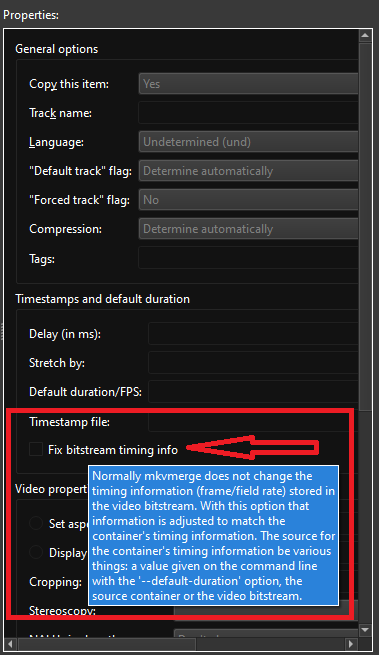
I figured I could give that a try so I loaded my file into MKVtoolnix, selected this option (no other variables) and hit go. The option was only available on the video stream in MKVtoolnix, if that matters.
I took the “fixed” file and loaded it into my plex library in the same folder as my old file.
The file with the “fixed timing” was slightly smaller in size for some reason:

I played the movie (using the “play version” option to choose the “fixed” file) and it did not stutter, freeze or crash. (Edit: failed on second try, see below) However, the movie did not stop playing at the end; it displayed a black screen and the timer kept on going until I hit the back button on my remote. Perhaps there is something I needed to do other than check the “fix bitstream timing info” box.
The point is, the “fixed” movie played smoothly. (Edit: failed on second try, see below) So, this leads me to believe that some of my files have this timing error.
Back to my question. I have not encountered this problem until using the New Player which suggests that the Old Player is able to deal with these “bitstream timing info errors” and the New Player cannot. Is that the case, and if so, is there any hope that the New Player will become as robust as the Old Player?
If not, does that mean I have to figure out how to remove these errors from my files that have worked fine using the Old Player? I’m not even sure which of my files might have these errors until they exhibit problems in the New Player.
For info: my files originate on blu-rays or dvds and get run through MakeMKV and then through Handbrake. I don’t think I’m doing anything too fancy to these files. Seemed like a pretty common workflow. Like I said, they have been playing fine up until now.
I don’t think I consider this a solution yet as I haven’t figured out how to make the movie stop playing, nor do I want to go through this process on thousands of files that worked fine before.
Anyway, maybe this info will be helpful in some way to someone.
Edit: I should also mention that I only played the “fixed” file once, so I don’t yet know how repeatable smooth play is. More testing to follow.
Edit 2: Another thing is I can’t get the original file to crash in the same place. If I skip 40 minutes into the video, I don’t get the stutters or crashes. Seems like it is a random cumulative error that ends up failing in the same ballpark area of the video. Same with TV shows. Sometimes I can watch a show with no problems but then the problem shows up in the next episode. Or the third.
Edit 3: 08 May @11:49
The the new file with the “fixed timing” crashed the second time I played it so I guess it was a fluke the first time. I posted my logs below.
