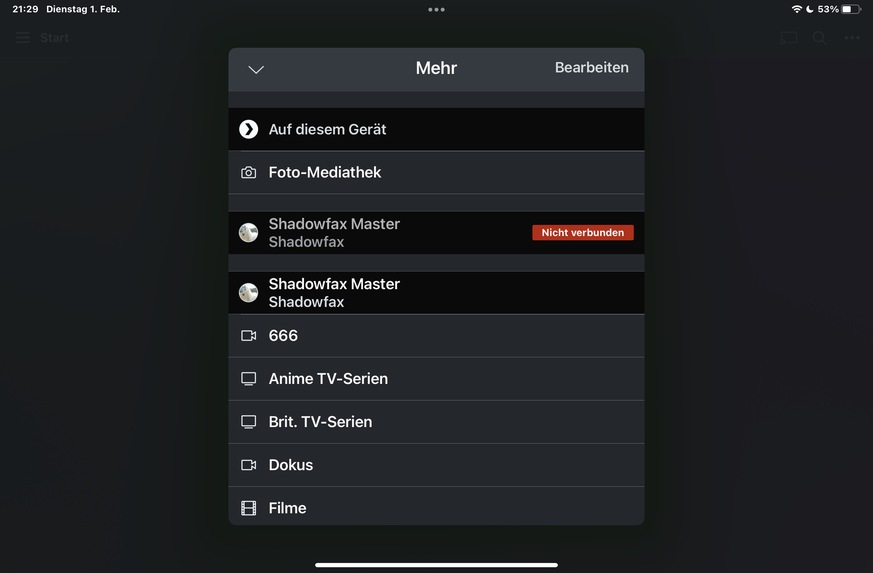
I’ve setup a new plex server with same name as the old one. Altough I removed the old server from my list of allowed devices, the old server still appears in all of my apps and I can’t delete it there. It seems to cause trouble because sometimes the app won’t connect to my new server because it seem to look for the old server with same name that is not active anymore. How can I resolve this?
Thanks, already did that, Old Server still apperas in apps (see attached screenshots above)… Oh and yes, I already signed out and back in again in my apps, no change…
Have you tried uninstall and reinstall of the app? Sometimes the app can cache stuff locally so doing this will force clean all local app cache and data.
@dane22 Thanks, the problem seems to get worse! Somewhere my old Server seems to be “cached” or something, since this morning I can’t connect anymore via remote access also. Already tried the according article regarding remote access, it is not working anymore. And when I finally got a connection, i still see two servers, the new and the old one…
PS: I seem to loose Remote Access every 2-3 days (router settings unchanged), I then have to quit the server and start it up again. I then have to reconfigure remote Access to get it to work for another 2 days… What could that be? Shall I open a new thread regarding this or could you look into this anyway?
PPS: As @anon5074910 mentioned a re-install of plex app did solve the problem of double servers…