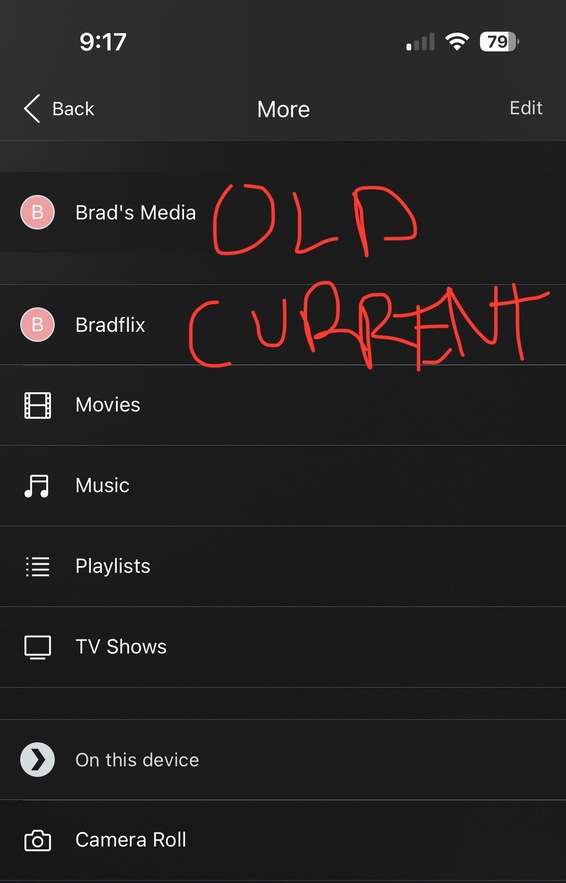
Hi all,
I’ve read reports and articles and yet my old Windows Server is still showing up in my list on my Plex app. I’ve made sure to sign out of every server session. My newer server (2 years now) is a docker container running on Linux. I’ve deleted the iOS Plex app, cleared cache and it always comes back. I’ve read that the devs sometimes have to intervene on the backend but there’s no way to email technical support. Any other advice? Could there be files in the server from the transition that still show the old server somehow?
Thanks!
That server is not connected to your plex.tv account. And as far as I can see, it hasn’t been for months at least.
This only leaves two explanations:
- There is a Plex server by that name still running in your local network. Perhaps either un-“claimed”, or connected to a different Plex user account. Look out for forgotten containers or daemons. Is the Plex icon still shown in the task tray of your Windows computer, perhaps?
- the same as 1) but perhaps in a different WiFi network that you are also frequently using with your phone.
I have purged unused containers. Unsure what I could look for in the file system to narrow it down. Definitely don’t have that windows machine up and running. That has been reformatted to a new OS. I can’t imagine it being #2. My network has been stable for a long time.
Any clue what to look for? Or what I could attach to be parsed?
When you uninstalled the app from the phone, did you install it afterwards directly from the app store? Or did you restore a device backup?