Whenever I sign into my account on android it asks which server I’d like to use. The first server I made is no longer on or running. I went into devices on the web interface and deleted it, signed out and back in, cleared my cache and yet it still shows up every time I log into an android device (have not tested other platforms). What am I missing to make this thing go away? Any help or pointers would be greatly appreciated.
Try to perform the ‘Reset customization’ procedure on all plex clients:
Thank you very much for the suggestion. Unfortunately after I did that it brought me right to the screen asking which server I wanted to use .
That was the intention.
Are you explicitly signing out of your plex account before closing the app?
Don’t do this.
It will reset all your personal preferences within the app and cause it to ask indeed every time you sign in again.
I am having an issue with the notifications on the app so I have been signing out and/or reinstalling which is how I found the issue. It’s really not the end of the world, I just wasn’t sure if there was a way to clean it up
It is not an issue. It is how it’s supposed to work.
It’s supposed to remember the servers you removed? It doesn’t show up anywhere on any other device I use.
Ahh, I think now I understand you!
You are referring to the list of servers which is presented when you are supposed to select your default server, right?
Yes! Sorry I should of done a better job describing where the issue was.
I think the list will at least be purged if you uninstall the app and re-install it afterwards.
That’s what I thought but it didn’t work. Leads me to think it has something to do with my account instead of the app but it doesn’t show up anywhere on my account page. I checked devices - servers and it only shows the one.
And it is completely out of the question that these old servers are actually still running in your local network? i.e. they are not signed into your account anymore, but still present in the local network
I won’t say that it is completely out of the question, as computers are tricky things sometimes. I completely uninstalled the app from the computer and haven’t found any remains of it. I will try to put the app on another phone that has never had it installed and see if it pulls the same thing.
Try to start the newly installed app while the phone is not connected to your home WiFi. This should prevent it from seeing unclaimed servers.
Unfortunately the phone I used doesn’t have a data plan. Sure enough it did popup. I will uninstall it from my phone and turn off wifi then try it again.
Without an internet connection, you won’t be able to sign into your account.
You nailed it! Off the WiFi it did not prompt for the other server. Looks like I’m going to have to factory restore the computer it used to be on. Appreciate the help narrowing this down!!
Will probably not be necessary.
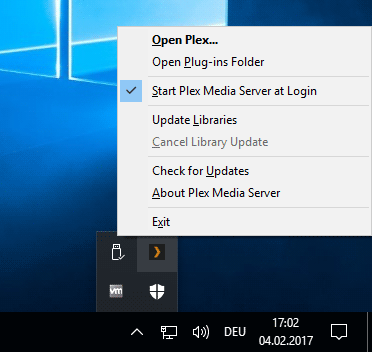
Just take the time to log into each and every Windows user account on that computer and look for the Plex task tray icon. If you find it, right-click on it and disable the auto start of Plex. Then Exit.
Rinse and repeat with the other user account(s).
I don’t use windows I am a linux guy. I found that I had installed it using the command line as well as the software manager, so I had two installation directories. I uninstalled the second location which will hopefully fix up this issue.
LOL.
Mentioning factory restore somehow brought me to the idea. 
