Server Version#: 1.18.2.2041-3d469cb32
Player Version#: 1.3.1.916-1cb2c34d
I am new to PLEX. I first input all of my music to my QNAP NAS (Plex Media / Music) and had no issues. I next ripped all 170 CDs from my “Mozart Complete Edition” to (Plex Media/Mozart Complete Edition). I had many tagging issues which I corrected by Editing in PLEX. However, PLEX insists on creating two separate Albums name Mozart Complete Edition.
How do I combine these two Album Artist into one?
I am trying to upload 2 .png screen shots.
Thanks,
Tom
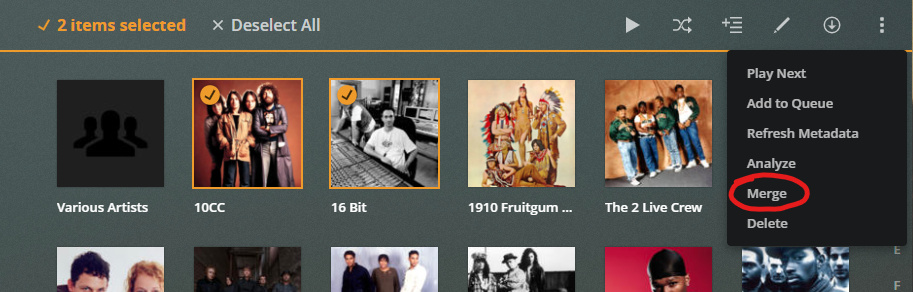
Go back one level ‘up’, so you see both artists side-by-side. (click on the circled link)
Make sure, you are on the ‘LIBRARY’ tab.

Then ‘select’ both artists and pick ‘Merge’ from the vertical ellipsis menu up, right.
Many thanks Otto. That was really simple. I now have ONE album. I have two additional issues related to this project.
-
When I ripped the CDs I named as depicted in the first .png above, i.e. CD 001 - Album Name (As depicted on the CD jacket.) MOST of the Albums now appear in the order of ’ CD 001 - File Name, CD 002- File Name, etc. However, as seen in the above .png that is NOT always the case. I have not found a way execute a sort / resort of the Library Albums by Name.
Is there a way to do the sort?
-
My ‘Mozart Complete Edition’ Library now contains 147 Albums, there should be 170. When previously reviewing my Libraries I noticed that PLEX combined several of my CDs. After discovering that error I deleted the CDs in PLEX that were in error. Is there a way to have PLEX Media Sever rescan my original NAS Folder (Plex Media/Mozart Complete Edition) to add them to my Mozart Library? I am able to identify which CDs are missing. i.e. CD 009, 028, etc.
I hope I was able to clearly explain my issues in #2.
Thank you for the quick reply. I am slowly learning my way around PLEX!
Tom