Hi. On every client in my house, the only option under quality is 720p. I’m on the local network, I csnt seem to find the setting anywhere to allow anything higher. I always direct play anyhow but I was wanting to test my servers transcoding capability when I noticed only 720p was available.
Check the Dashboard Details and you may find you’re in Relay Mode (when your clients can’t make a direct connection to the server - for various reasons):
What you do next is a mystery to me, but the answer is at your house - somewhere.
What is the resolution and video codec of the video file, which is being used for the test?
Dashboard says local. Dosent matter what resolution video I have on the go. The only option is 720p. I’ve tried 1080p and 4k stuff
Do you let your server create optimized versions of your videos, or do you have several different versions of your videos?
If you do, the client might have automatically picked one of these for playback, based on the bandwidth preference in each client’s settings.
Hi. I’m not sure. I havent changed any setting for that. Just to clarify my server says nearby, is that right?
Does the video have a small number in the top-left corner of its poster?
How many file names are listed when you look at the Plex media info of this item?
It is expected and desirable if the server and the client are inside the same local network.
Just the 1 file for each movie. I have noticed if I go on the laptop and load up plex it says remote. But the server itself says nearby
The server cannot say that.
Where do you see it?
(screenshot, if possible)
Monitor the Dashboard in a second web browser window during playback.
When I click on my servers name on plex on the server pc it says nearby. If I go to the plex website and log in or log in via my phone and launch, under my servers name it says remote even though I’m on the same network.
If I play a video on the laptops Web app it os saying its playing locally in dashboard
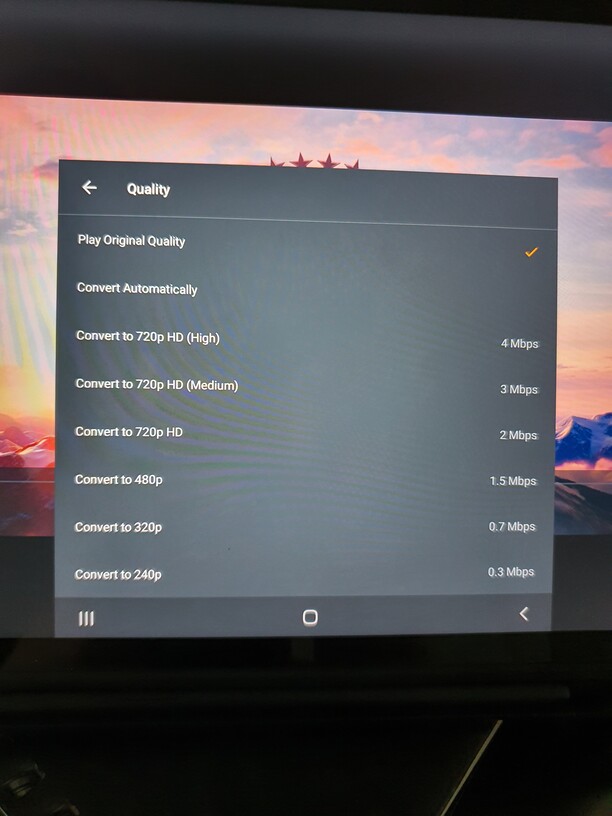
So this is a 4k movie on my tablet playing locally, these are the only transcode options available. Dosnent matter if I play it on my shield tv pro, firestick etc. Theres never a 1080p option
I may have picked up on something on another thread. The files I’m playing are h265. If I select a h264 file in 4k the 1080p option is there.
Maybe its to prevent users from transcoding a file into a file that becomes larger than the original?
I hope thats the case. If it is, its a good feature imo
Definitely not.
It doesn’t make sense when going from H.265 to H.264 – in the local network.
Well Idk it it makes much sense to convert a 3 mbps hevc into a 20 mbps avc either. Which Im allowed to from my own server.
I would imagine most of the people using transcoding does so due to low bandwith, not compatibility.
It absolutely does. Since HEVC is much more bandwidth-efficient, it can transport much more detail in a lower bitrate.
If you restrict the resulting AVC file to the HEVC file’s original bitrate, you will lose a lot of detail.
Add the necessity to transcode on-the-fly, which restricts the achievable quality further.
So it makes absolutely sense to raise the bandwith when transcoding from a more efficient codec to a less efficient codec.
Otherwise you will end up with “potato video” quality.
It seems to be file dependant, many of my rips are now h265, the h264 stuff is seemingly allowing me to choose 1080p from a 4k source or a lower bit rate 1080p if the source is 1080p. My main reason was to try out the hdr mapping as I bought a plex pass yesterday. I dont really understand how it works. My 4k hdr files will direct play on my firesticks connected to 1080p non hdr tvs. I’m assuming I have to force transcode to make the hdr mapping work? However it seems my pc isn’t good enough to do this as it lags out
Which exact type of CPU and GPU are in your server?
Did you stop and restart your Plex server since you bought the Play Pass?
You reduce quality in any event when transcoding. But I do understand how this works, regarding the codecs.
I would argue that in most cases, when playing from a local server, it doesnt make sense to transcode at all.
What I find horrible with the current implementation, is that users on mobile who does enable the transcoder to save data may end up using more.
