For some time I have been thinking about adding some ninja level info to my TV shows to let people know the current status. Top of my mind were these 1 season shows or shows that take a long break (think Game of Thrones missing one year so they could film in the winter or The Equalizer which is in a mid season break at the time of writing). I never had time to get into it so didn’t bother.
But over the holidays I got inundated by questions and requests from my family, “Get season 2 of The Firm”; “Is there a second season to Flashforward?”; and so on. I began thinking of adding some kind of overlay on the poster to show if the show ended like Lost, or was cancelled like Stargate Universe or any other status that might seem relevant such as “On a break”. New episodes can be seen in the recently added and On Deck so it’s not that important to add but at the moment.
I told a few friends who also have Plex servers of their own how they manage that but was told they didn’t know until one of them sent me a screenshot he had seen of the exact thing. He didn’t say where it was from because someone else sent it to him so we can’t ask how to get that information but I was wondering if there’s a plug in somewhere (or a way to write a script) to do this.
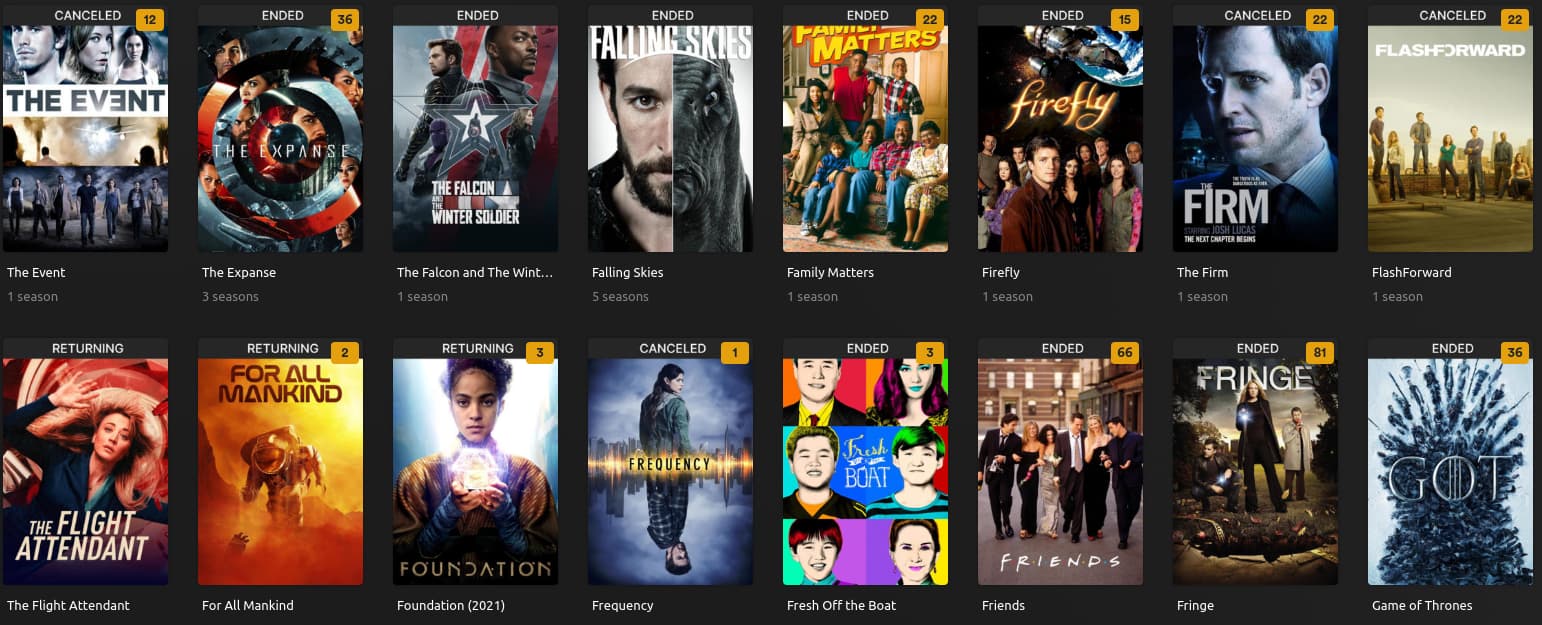
Screenshot showing status: Airing, Cancelled, Ended on TV show posters
I’ve included a screenshot showing what I’m referring to. I don’t have the patience, time, and skills to do this manually for a few hundred shows. I looked around under tags, TV show advanced settings (at show level and for the whole library) but there’s nothing I found that I can use in Plex’s available info to do that so I was thinking a script to look for the show status on TheTVDB or IMDB and integrate that info.
I copied over a few files to create a throwaway TV show and movies library pair and it went and created a ton of collections I didn’t need. Eventually figured out how to grab only what I wanted and which lines to remove for the unwanted stuff to go away then I pointed it at my TV Shows library and Movies. Based on what it can do I wasn’t interested in the bulk of it. For movies I didn’t mind the resolution overlay and thought the ability to show an overlay if there are mid or post credit scenes would be lovely… but without context the icon used doesn’t convey that message to me so I left it out for now. What I now have is resolutions for movies and status for TV shows. And the need to sleep at 7:36AM.
So @dbirch I want to say something about you throwing food on the ground when someone close by is hungry… In a nice way. You drop manna in the way of the hungry. Thanks for this suggestion. I didn’t want to look at or touch a yaml file during the last days of my PTO but going down that road has answered so many questions that I would otherwise be asked.
You are welcome. Due my job I can easily revert to talking to non-IT users like they are 5 year olds (often what is needed to translate the issue) However with more experienced users it can be considered patronizing, many people on this forum tend to be a bit more skilled than the average user. So I threw it out, and was prepared for follow up if needed.
Glad to see it worked. Care to share your rules?
Sure. I have just the bare minimum. None of the default collections that PMM makes. I kept all the default comments in the file as well. I didn’t even check to see what the ribbon metadata does, I just commented it out. See below.
libraries:                       # This is called out once within the config.yml file
  Movies-Foo:                        # These are names of libraries in your Plex
    metadata_path:
    #- pmm: basic                 # This is a file within PMM's defaults folder
    #- pmm: imdb                  # This is a file within PMM's defaults folder
      # see the wiki for how to use local files, folders, URLs, or files from git
    overlay_path:
    - remove_overlays: false     # Set this to true to remove all overlays
    - pmm: resolution
      # see the wiki for how to use local files, folders, URLs, or files from git
  TV Shows-Bar:
    metadata_path:
    #- pmm: basic                 # This is a file within PMM's defaults folder
    #- pmm: imdb                  # This is a file within PMM's defaults folder
      # see the wiki for how to use local files, folders, URLs, or files from git
    overlay_path:
    - remove_overlays: false     # Set this to true to remove all overlays
    - pmm: status
    #- pmm: ribbon                # This is a file within PMM's defaults folder
      template_variables:
        font_size: 75
        back_color: "#262626" # darker
        back_width: 1920
        back_height: 125
        horizontal_align: center
        vertial_align: top
        vertical_offset: 0
      # see the wiki for how to use local files, folders, URLs, or files from git
I added Foo and Bar to the library names to avoid ruining anyone’s library if they copy this to config.yml file and run. If it so happens Foo and Bar are in their library names, I have questions. Not enough questions. But I have questions.