Server Version#: 1.67.2.3705-db506a00
Just as title states. The upper left of the plex app is blacked out where the pinned links are. If I hover over them sometimes it’ll show the name, they’re still clickable.
Everything else seems to work fine.
Server Version#: 1.67.2.3705-db506a00
Just as title states. The upper left of the plex app is blacked out where the pinned links are. If I hover over them sometimes it’ll show the name, they’re still clickable.
Everything else seems to work fine.
Screenshots please?
1.67 is the Plex desktop app? (It’s not a server version)
If something is truly “Blacked out,” it’s a problem, but I wonder if the sidebar is simply collapsed?
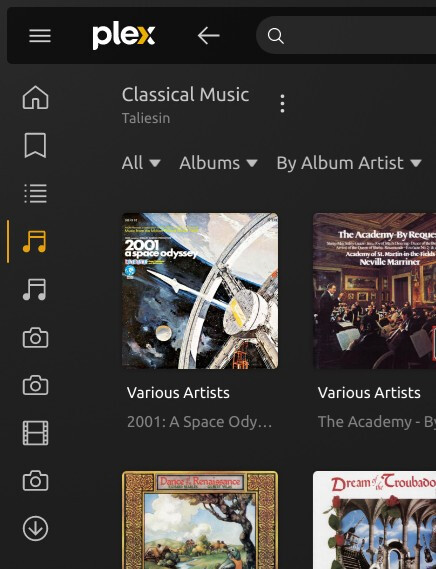
In this state, the sidebar should appear when you hover on any of the sidebar icons.
If you want the sidebar to stay open, just click the ‘hamburger’ icon above the sidebar:

I assumed 1.67 was the server version. I’d provide the correct one if I knew where to find it.
Here’s a screenshot. It’s not collapsed like @beckfield suggests.
There’s a popup / javascript blocker getting in the way.
That panel is an overlay in the window and it’s written in JS.
I don’t doubt you but I’ve installed and reinstalled both MATE and Cinnamon a few times, added/changed nothing and still get this result. Do you know what I need to do to fix this?
If this were the Web version, I’d suggest restarting the browser with all extensions disabled to see if it fixed the problem – then we could narrow down which extension was creating the conflict – but I don’t know what would be affecting the desktop app that way, as @ChuckPa suggests.
FYI:


