Server Version#: 1.30.1.6562
Player Version#:
A couple days ago, my main PC died. I have a spare laptop that I wasn’t using so I installed Plex media server on it. After the libraries finished synching up everything was fine for a few minutes. after watching a show, I went back to home and my continue watching is missing. I tried multiple movies and tv shows on 2 different laptops and on my Xbox series X and the continue watching is gone from all 3.
I’ve been going through the settings and trying to find any info online as to how to fix this with no luck. can anybody help me out here please?
Is the continue watching missing but other auto collections there like recently added?
Do you have your movie and TV libraries pinned?
Continue watching is dependent on what you have pinned. And also on the selected option for Visibility in the library settings as follows:

The option I have here allows the TV library to show up on my home screen and items in it to show up when I search. One other option is to show it in the home screen but not include it in global search. The third option is to not have it on the home screen and not have it searchable too.
the only thing missing is continue watching. the movies and tv shows are the only libraries pinned. scanner, agent and visibility settings are exactly the same as your screen shot.
If you navigate away from the home screen and go to “More” then click on your server name, do you see “Continue Watching” and “On Deck” there? Likewise, if you click on the movie and tv libraries, is “Continue Watching” there?
I’m trying to establish if you lost it on your home screen only or the feature is completely gone in your players? I too use an Xbox Series X. It’s in the middle of the night where I am so I’m not going to turn it on to see but when I was last on it about 6 hours ago I had continue watching there.
continue watching came back up out of the blue. i finished watching a tv episode and when i went back to the home screen, continue watching was gone again.
to answer your question, if i click more and click on the server name, continue watching is not thee, not on the movies or tv libraries list either.
the only thing i can think could be causing the issue is that my pc, that died a couple days ago was the original server before i had to change it to a new computer and now plex is trying to search for the original server.
does that sound plausible to you or just crazy?
This sounds plausible. Some time ago I had to reinstall PMS and didn’t reclaim the server. The clients that were connected to the previous one still saw the old one and couldn’t find it. I had to delete the old server and sign out of the clients and sign back in selecting the available server to pin. There’s probably a better way for the latter but I did it by signing out. I happened to see someone I share my server with setting up a new TV a couple of weeks ago and they could see my old server listed under sources (but as unavailable) and I had to walk them through removing the unavailable one.
how do i remove the unavailable server when i can’t run the pc the server was originally installed on? more accurately, the cpu overheated and now it wont run for more than a minute or two before shutting down. maybe i could try to see if i can get it running long enough to uninstall the server if that is my only option?
worst case scenario would be to delete my account and start from scratch.
Delete the server from your list of Authorized Devices: https://app.plex.tv/desktop/#!/settings/devices/pms
If you delete your account, you cannot sign up again with the same e-mail address for 30 days.
No need to delete your account. In my account it eventually stopped showing the old server (I think it was 3 or 4 days for me). On the Xbox player signing out and back in allowed me to connect to the one that was working. Even though I had the same name on both it showed as Unavailable and Nearby. After a few days the old one stopped showing when I went to more as well.
In someone else’s account I went to see the libraries they had and clicked on my name to see what I’m sharing with them and clicked “Leave Server”
To remove the server from your account go to settings and click on “Authorized Devices”. Once there, click the drop down labelled “All” and select “Server”. Remove the one you don’t need from there. Hopefully they are named differently or there’s something else you can use to differentiate them.

Select Server. You should get at least 2, the current one and the one that died. Any old server could still be there.

Here I used the same server name. The one from 3 months ago is from an old PC I decommissioned and temporarily moved it to a Linux box that had the capacity. Differentiating is easy for me because I can tell which OS the server was running on. I never needed this step though as I said for some reason in my clients the old one stopped showing up in a few days. The people I share with still see the old one but it’s always “Offline” or unavailable and they’ve pinned the new one.
only one server shows up on the list. continue watching came up again on the xbox a few minutes ago so i’m watching a tv episode now. just out of curiosity, i opened up plex on my laptop while watching on the xbox and continue watching is missing on the laptop again.
this is getting really frustrating, i never had any problems with plex before.
Can you share a screenshot of the left hand side of your Plex player on the desktop when you click more? This is something I’ve not encountered before.
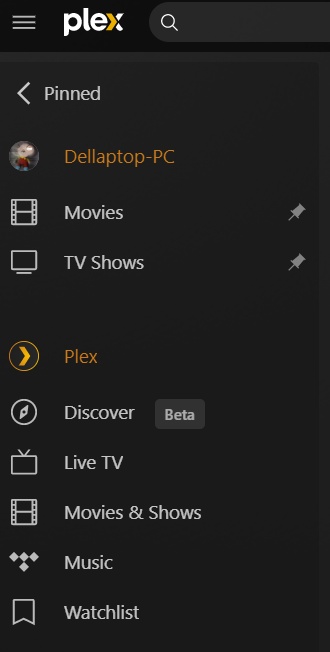
here you go
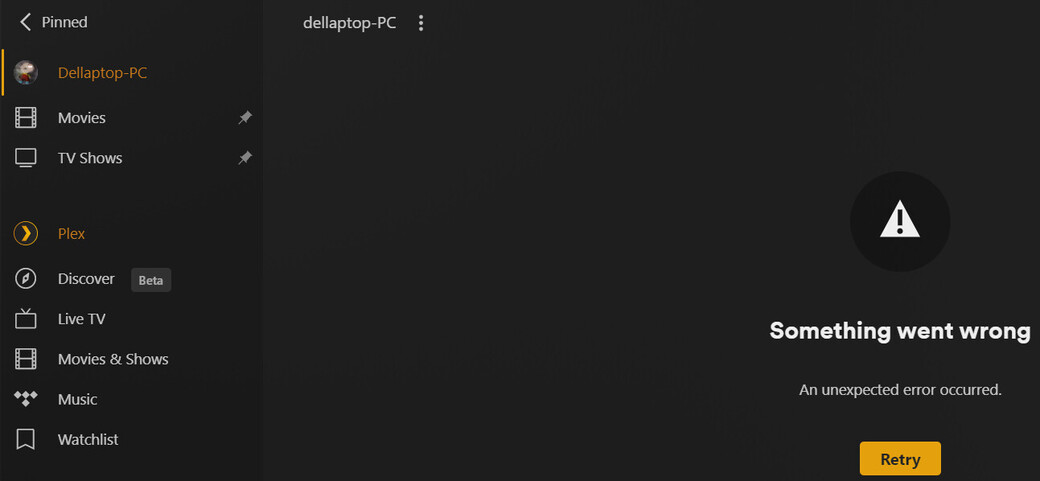
after a little trial and error, if i stop watching a show on the xbox, the continue watching comes back up on the laptop. when i turn plex back on the xbox, continue watching shows up on both the xbox and the laptop. as soon as i start watching something, continue watching goes missing again.
here is a screenshot of what i get when i click on my server on the laptop while watching a show on the xbox:
Your old server was indeed removed by you, meaning it get’s soft deleted
I just removed it completely from your account
i just got home from work and tested it and so far it all seems back to normal. thank you everyone for your help. if, it does happen again, i will post again.
