Hello!
Media organizing question here…
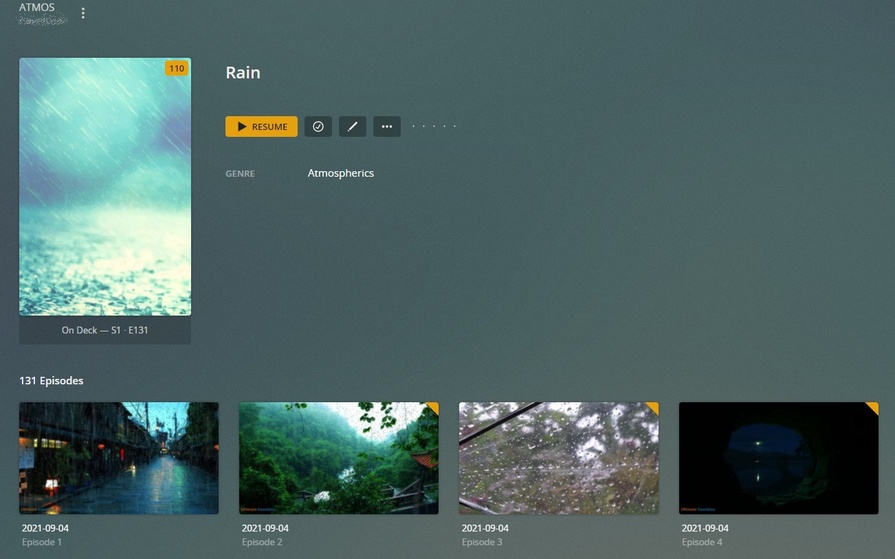
I have a ton of nature videos I’ve sorted into Shows and Seasons for PLEX to process. For example I have 100 rain videos, I named them all, then added s01e### to each name, and added them to plex as a series. Then a “show” for say forest videos, or snow videos named the same way. So library called “atmospherics” and then “shows” inside of it which are 100 rain videos, 50 snow videos, etc etc.
Is there a way I can import the filename into the title field for PLEX like it does for personal media videos? Is there a tool where I can take the filename and import it into the Title Metadata field for the file so PLEX can import that? By default when using the series model the files are just named “episode 1” “episode 2” and so on.
I’d use the personal video scanner but it makes all the videos just one lump in the library. Unless you set the view to folder, and every single client does as well, it just looks like a mess in the library. However the naming works great, it just grabs the filename and that’s what the user sees. If I could get the personal media scanner to see the folder structure similar to shows, so the library defaulted to showing folders, that would be ideal as well.
Thanks! Hopefully someone has an idea here on how to process.