Server Version#:
Player Version#: 2025.18.0
Just updated my iPad to 2025.18.0, and the PIP button doesn’t do anything - can press it all day long and it never does a thing.
NOTE - this is on iPad. On iPhone (with the same version), the button DOES work as expected. So not sure what the difference is there?
NOTE2 - think I found the issue. On my iPad I have the audio output to HomePods (which causes it to transcode, which is a different issue). I switched to direct audio to the iPad instead, and the PIP button does work. I then did some additional testing - forced it to transcode with audio coming from the iPad only, and PIP works as well.
Then went back to original quality w/audio going to HomePods again, and PIP works now.
However, I exited out of the app and went back in again and now PIP doesn’t work again (and I can’t seem to get it work again lol). So definitely something going on there with PIP not responding at times.
Hang on, you can get airplay to work on an iPad…that is surprising, as I can’t. No matter what order of operations in establishing playback.
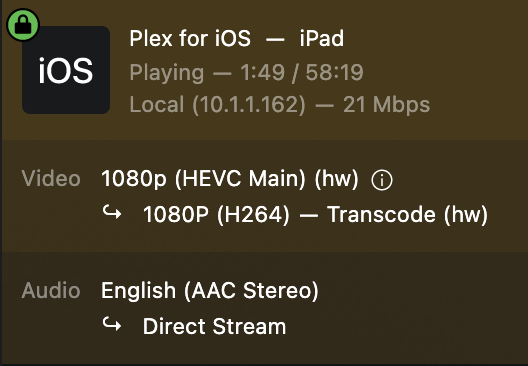
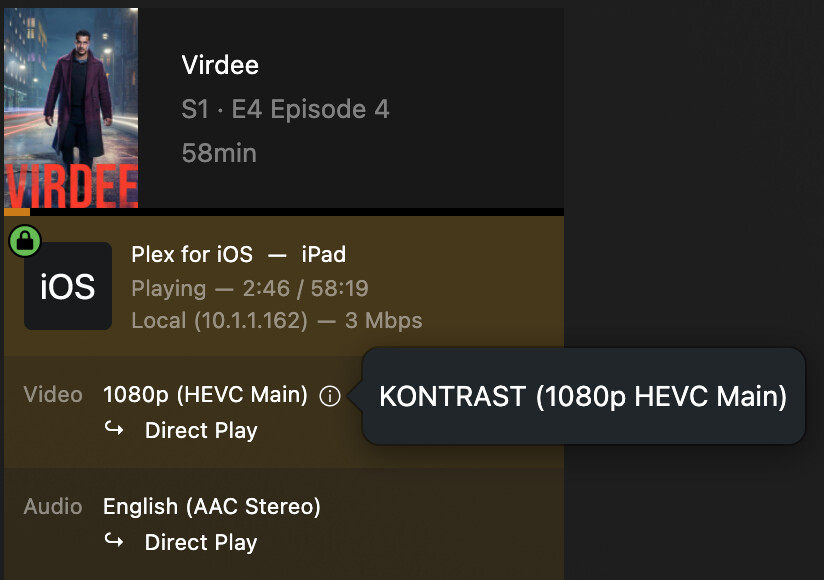
I also see the transcode, that shouldn’t be happening as when not connected to HomePod, direct plays just fine. Further the transcode is increasing the stream size from 3Mbps to 21Mbps.
Connected to HomePod via airplay, no audio & transcode (note 21 Mbps stream)
Playback on iPad speakers, audio works & no transcode. Note 3 Mbps stream
Logs Microsoft OneDrive
(available until end of month, password to access is the email address registered to this forum, DM me if you can’t find it)
I haven’t tried using AirPlay to send video to a TV. Just using the audio portion of AirPlay to send sound to HomePods (minis in my case).
So looks like I’m in the same boat as you.
Edit: Just tried using AirPlay from my iPhone to our Apple TV and it worked fine. Didn’t check to see if it was transcoding though.