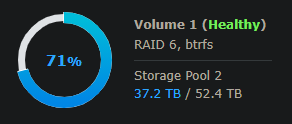
Starting a few days ago I have been unable to play any media from outside my local network. Within the LAN I can play on any device/player without any issues. However from outside my network, I am getting an Error code 4294967279. I have tried connecting via the windows media player, via the web using app.plex.tv as well as directly to the external IP address - in every instance nothing will play. I can browse just fine, but when I go to play it spins for a minute or so and then gives the following error: “An unknown error occurred (4294967279)”
I have tried uninstalling and reinstalling Plex on my Synology as well and that made no difference.
Attached are the logs - any assistance would be greatly appreciated.
There are 957 “no space left on device” messages in the log files.
May 14, 2021 15:54:36.660 [0x7f7c9c671700] ERROR - [Notify] Failed to add watch for "/volume1/Videos/TV Shows/Bar Rescue/Season 02" (28: No space left on device)
The transcoder is also logging errors that it cannot access the tmp_transcoding directory. This can happen when a volume is full.
Make sure you have adequate space left on your NAS.
May 14, 2021 12:53:31.005 [0x7f5b7bd11700] ERROR - [Transcoder] Error while decoding stream #0:1: Input/output error
May 14, 2021 12:53:33.000 [0x7f5bdd99a700] ERROR - [Transcoder] [eac3_eae @ 0xb26a80] EAE timeout! EAE not running, or wrong folder? Could not read '/volume1/Plex/tmp_transcoding/pms-c2379aeb-ebee-4ffd-8c61-db91f7bc47e9/EasyAudioEncoder/Convert to WAV (to 8ch or less)/a18a6a69-b689-4caf-aaed-fde556058788_23833-0-1228.wav'
May 14, 2021 12:53:33.002 [0x7f5b71c26700] ERROR - [Transcoder] [eac3_eae @ 0xb26a80] error reading output
May 14, 2021 12:53:33.002 [0x7f5b79fc5700] ERROR - [Transcoder] Error while decoding stream #0:1: Input/output error
@trumpy81, one quick question. I found the steps to change the folder locations, but just wanted to double check that the scanning of the library won’t try and redownload all the metadata, posters, etc.
Disable auto-empty trash
Stop PMS
Move or copy the files
Start PMS
Add new path(s) to library in addition to the old path(s)