Playback Error - Playback has stopped due to multiple playback errors - EAC3 5.1

I’m getting a playback error on my Roku Ultra “Playback has stopped due to multiple playback errors. Please check your connection and try again.” I get this error on what appears to be random files. For troubleshooting purposes if I try and play the same video through the web app the playback error changes to “Conversion failed. A required codec could not be found or failed to install.”

This leads me to believe it’s a EAC3 issue… I tried to find the codecs in the file structure but didn’t see any to delete per other forums at this location:: appdata\binhex-plexpass\Plex Media Server\Codecs

Server Version#: Version 1.16.2.1297 --> Up to date
Player Version#: Roku Ultra and version: Plex Media Server Logs_2019-07-11_13-58-59.zip (1.4 MB) 6.3.11.5782-c36cd4b12-Plex

PMS is running on an Unraid server version 6.6.7 and latest docker from “binhex-plexplass”

Attached are the logs which I restarted PMS and then encountered the playback errors at 1:59pm. Per the description above I encountered the Roku playback error first then immediately tried the web app which is hopefully captured in the logs.

Thanks for all the help!
Josh

Any updates on this issue?

Same here. Tried uninstall reinstall. Using a Samsung KS8000. Works directly through the Samsung app (quality not as good).

Doesn’t work after a couple minutes through the Roku (4k ultra).

Any ideas anyone?

I still don’t have it working. I wish someone from Plex would review the logs and provide support.

Also having this issue. Running 6.7.2 UNRAID with latest Binhex Plex Server Docker. Plex client is Roku Ultra client.

I’ve tried to remove the codec folder and the preferences file and that doesn’t help. I really wish this issue could be resolved. Maybe having another paying member will help us get support.

The error that is being logged is

Jul 11, 2019 13:58:10.106 [0x14fbcf1f8700] ERROR - Unzip: could not set executable bit on output file
Jul 11, 2019 13:58:10.106 [0x14fbcf1f8700] ERROR - CodecManager: failed to extract zip
Jul 11, 2019 13:58:10.106 [0x14fbcf1f8700] ERROR - Error configuring transcoder: Decoder install failed: eac3_eae

This would arise if the destination folder is on a mounted volume and the /etc/fstab does not have “exec” set or “noexec” not absent

Previous report of this SOLUTION: Conversion failed. The transcoder exited due to an error

Please see dialogue there

The unzipping is probably to a temp directory and it is failing to set the execute bit on the file

The target directory after unzipping would be /config/Plex Media Server/Codecs/EasyAudioEncoder-xxxxxxxx/EasyAudioEncoder

Thanks for the extra bit of information @sa2000 as I didn’t find this thread earlier.

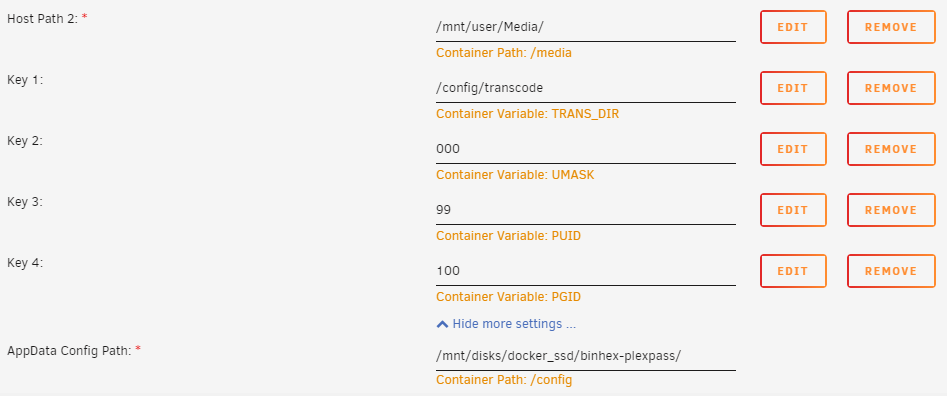
I’m using unassigned devices and mount a SSD which holds the docker files, tmp, and transcode directories. This should confirm it’s not on a share.

I have modified the permissions on the codec, tmp, and transcode and have set to chmod -R 777. I’ve deleted all codec folders and when I try to play a file in question it adds a codec to the codec folder but still doesn’t play. Here’s a screenshot of what was added.

I’m unsure about the “exec” set or “noexec” not absent piece. Do you know how to check for this? Here are the permissions for the Codecs folder:
image

I tried another docker tonight and had the same issue. I tried playing the file in question on a friends Windows based PMS and worked just fine so I know Plex can handle the file.

Thanks again for your insight into this!

These are options in /etc/fstab for a mount
The mounted volume needs to have “exec” and must not have “noexec”

found some reference relating to docker here Some docker containers don't like it when fstab is noexec - Plugins - openmediavault

Is the codec file now unzipping ok ? would need fresh logs to see if same or new error

I ran nano /etc/fstab in the command line and here is everything there. I’m a little confused by what I’m looking at so hopefully you can help decipher it. :slight_smile:

Here are the new logs. I tried playing the video about 11:01am from the plex web app. I did delete the codecs and restarted PMS too.
Plex Media Server Logs_2019-08-16_11-01-55.zip (2.2 MB)
Thanks!

This topic was automatically closed 90 days after the last reply. New replies are no longer allowed.

