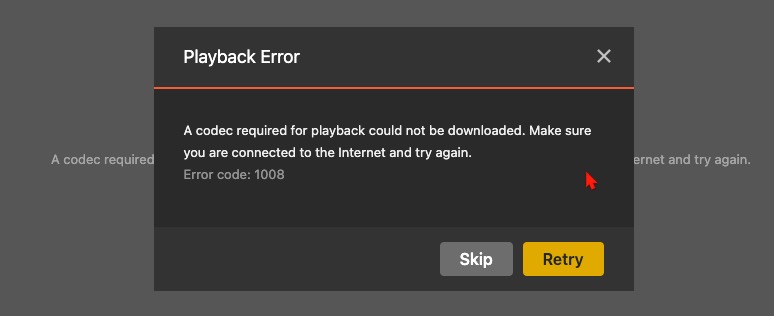
I have never gotten this before and now I cannot play back ANY of my videos. Now, you might say that his is because I am running an old version of the Mac Plex Player, but that in itself is a problem which I have put on this community and it has never been fixed either. The new versions will put up “Something Went Wrong” message when I try to display ANYTHING. But, let’s deal with this first.
Additional information. I just tried to run 3-4 of my rip movies and they are now getting the same error. So, whatever has happened is effecting ALL and ANY video.
This continues to plague me. I have tried to put this on a Plex Player Mac chat, but could not find one. I cannot run this on my Mac Studio with most current OS Sequoia 15.3.2. Any idea when this will be resolved?
@LeviDavis What is the issue that you’re seeing? Is this the same Photo viewing issue that you reported here? If not, you’ll need to provide some more details and include your PMS logs.
The issue is what this chat is all about. I am receiving this error every time I try to run a video on my Plex Player (on my Mac Studio). This issue keeps getting moved around to hit the “appropiate” section of this community, but is NEVER been answered.
Sorry I must have missed this thread before. Can you confirm the player version where you’re seeing this error? Is it the older version you have in the initial post in this thread? If so, can you update to the latest Plex for Mac player, reproduce the error, and capture both the PMS logs and the Plex for Mac player logs?
I cannot update to the latest Plex player as I get another error 'Something went wrong!" ALL of the time, just trying to run it. And that has NOT been fixed either. And every time I ask for help on either of these, we are just put off. I am not the only one with these issues. And, I can just go round and round on asking for help, but nothing happens. This is killing me. Plex.log (1.3 MB)
above is player log. Plex Media Server Logs_2025-04-01_11-14-07.zip (3.7 MB)
This is server log
I’m trying to but we cannot investigate or fix something that is in such an old build. You’ll need to update to the latest version and provide logs then.
My understanding is you’re having two issues.
Viewing nested photos will result in a error
We have an internal issue tracking this
Playing videos reporting a issue
Let’s focus on the video playback issue. Can you please update the Plex for Mac to the latest and attempt video playback. If/when it fails please grab your client and server logs and share them with me, please.
Something else you can try is to Quit the app and move/remove the contents of ~/Library/Application Support/Plex/ and then restart the app.
This will reset the Plex for Mac app and remove any downloaded content. You’ll need to sign back in also.
I have done what you asked. I quit the app, removed all the contents of that folder and restarted the app this time the most current of Plex Player for the Mac 1.108.1.307. I can’t get to ANY video to try replaying it because I get the ‘Something went wrong’ error. And I am using the most current Plex Media Server version 1.41.5.9522. Plex.log (226.8 KB)
Here is the log for the player
I wouldn’t want to hijack this post, but I had the same problem with v1.103 client. I upgraded it to v1.108 and it’s resolved. Though the problem popup was entirely misleading.
In my case only “Plex.app” on Mac mini had this problem. Android client, HTPC app, Windows clients and web client worked without problem.
I had a similar problem in the past but in that case my server couldn’t reach internet so it couldn’t download the codecs required to play files. This time it wasn’t like that, but it may be a similar problem.
Is there a way to download required codecs manually?
I mean if plex server is running on a linux x64 machine, is there a way to determine the link we need to download and extract into Codecs folder? Considering if plex server itself cannot download the link.