Server Version#: 1.41.9.9961 (Docker)
Player Version#: 8.45 (9684)
AppleTV OS: 18.6 (22M84)
AppleTV 4K - ETH connected
<If providing server logs please do NOT turn on verbose logging, only debug logging should be enabled>
Server and Apple TV are in the same local network. (Gigabit)
I’m experiencing playback issues on some videos when using Plex on Apple TV. The message “Your connection to the server is not fast enough…” appears shortly after starting playback. After a short wait, the video does start playing, but only for a few seconds before pausing again. This cycle repeats three or four times before the stream eventually stops completely.
The same issue occurs on iPhone and iPad, except that the error message does not appear—playback just keeps pausing and eventually stops.
All devices are using Direct Play (no transcoding involved).
Interestingly, on Apple TV the issue can be resolved by enabling the “Use old video player” option under Settings > Advanced in the Plex app. However, this option does not exist in the iOS versions of the app (iPhone and iPad), so the problem remains there.
Because of the fact that it works when changing the advanced setting „Use old Player“ to „ON“ I suggest that the new player is broken somehow.
Also when I look into other posts, the issue it mentioned here multiple times, but without any solution. But also nobody wrote about this advanced setting. Maybe nobody tried it before with this problem?
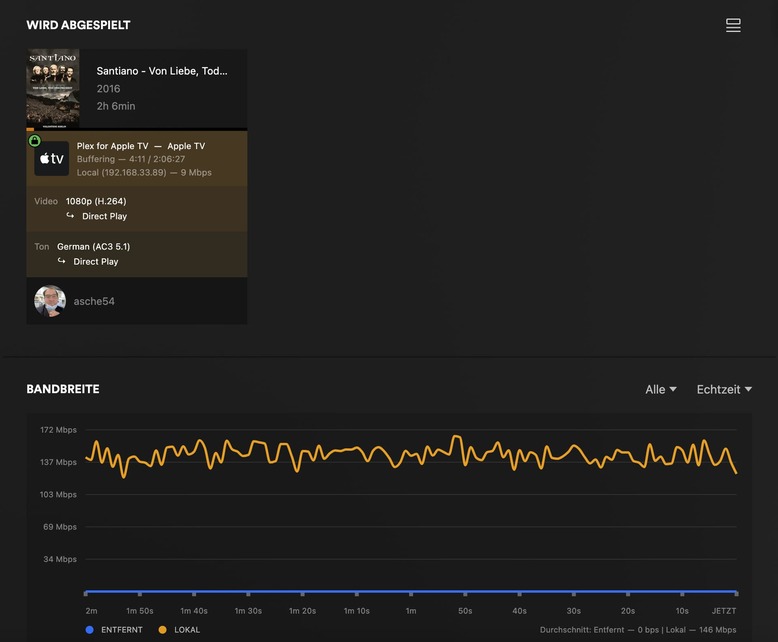
A 9 Mbps video using a steady 135 Mbps of bandwidth.
That can happen when the video and audio are poorly interleaved.
Remux the file (copy the contents into a new mkv/mp4 container).
MKVToolNix (Win/Mac/Linux) can read MKV or MP4. The output is a MKV.
Subler (Mac only) can read MKV & MP4 and output MP4 files. Choose the Optimize function as well (FAQ).
XMedia Recode (Windows only) can read/write both MP4 & MKV. Choose to copy, not encode, the tracks. Choose “Streaming - Fast Start” if the output is a MP4 container.
If the output is a mp4, movflags & faststart will rearrange some bits to make streaming start faster (same as Subler’s Optimize and XMedia Recode’s “Streaming - Fast Start”).
The above works for SDR video. If remuxing HDR, some extra flags may be required (translation: I haven’t tried it).
I am having the same issue/error code, even after switching to old player. However, my bandwidth graph is spiking wildly but at a much lower maximum. It’s a problem on both my Apple TVs. Web player on my laptop seems to work fine which also points to it being an Apple TV issue. Hoping this will be sorted out…
The bandwidth graph is normal. Media does not stream at a steady state. Plex sends as much data as fast as possible to fill the buffer on the client. When the buffer empties to a “low water mark,” Plex repeats the process to refill it.
Notice that Plex is transcoding the video from HEVC Main 10 to H.264. The decode process is occurring in software, not using hardware acceleration (there is no (hw) next to (HEVC Main 10)).
If the CPU in your server cannot decode the video in real time, then you’ll get the “CPU not strong enough” or “connection to the server is too slow” message.
Interestingly, another episode did direct play - same player, same format - but still showing the same error. Any ideas?
edit: I tried changing from the homepod stereo pair to the TV speakers and that seems to have fixed the problem, which leads me to suspect there is something broken maybe between TVOS 26 and Plex.