Hello,
I run my Plex server on a Synology DS214play. I use various Plex clients.
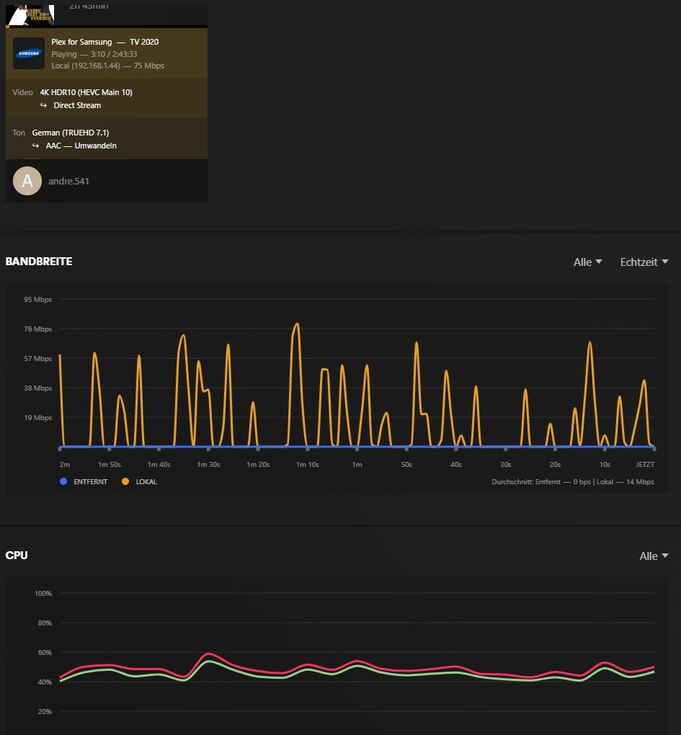
When playing some films on my Samsung QLED 4K Q95T (GQ75Q95TDTXZG), connected with a LAN cable, the film stalls every 30 seconds. The orange loading squiggle can be seen.
Playback on an Amazon Fire TV Stick (WLAN) works without any problems.
The Synology cannot be the reason for the problem, otherwise the Fire TV Stick would also stall.
Do you have an idea what it could be?
Thanks for the information.
When you play the film, the dashboard says “convert”. Video and sound.
The question I’m asking myself is, why doesn’t the DS have to convert the movie when I play it on a FireTV Stick?
The TV is not old. I was hoping it wouldn’t cause any problems.
Would the problem go away if I used a DS723+?
I have to test other films that also have DTS audio.
By deactivating the subtitles, the film runs without any problems.
Thank you.
The Fire TV Stick either doesn’t seem to have subtitles set or it’s better than my €2,000 TV.
What transcoding performance does the DS723+ have?
Is it worth switching?
The DS214play is a bit older.
If yes, then Plex is burning the subtitles into the video stream. This uses the CPU and the DS214play is not strong enough.
A DS723+ will not help.
Subtitle support is inconsistent across Plex clients. What works on one client does not work on another.
Samsung does not support DTS audio, so the server has to transcode it. On some Samsung models, transcoded audio + subtitles results in a video transcode. Plex must also add the subtitle to the video instead of sending it as a separate stream. This is referred to as “burning.” Burning uses the CPU. It the CPU cannot perform the task in real time, the video will buffer.
The Plex Android TV client (Fire TV, Nvidia Shield, etc) has much better audio and subtitle support. Even if the audio is transcoding, it will direct stream subtitles - no transcoding, no burning. That is why the $35USD FireStick works better than the Samsung Plex client.
Options:
Nvidia Shield: Best option if you need to pass lossless audio (DTS-HD, TrueHD) to your sound system.
Other Android TV device (FireStick, Chromecast w/ GoogleTV, etc): They do not passthrough lossless audio. However, if audio is transcoding, subtitles do not force a video transcode.
More Powerful Plex server: Run PMS on a more powerful server, such as an Intel i3/i5/etc. They can burn subtitles into a 1080p or lower video stream.
Not an option: Any Synology NAS with a Celeron or AMD CPU. They are low power CPUs and not strong enough to burn subtitles. Also, the AMD CPUs do not have an embedded GPU, so they cannot be used for hardware accelerated transcoding.
I tried another film.
A 4K movie with TrueHD7.1.
The same problem. If I leave the subtitles on, the film stalls. If I turn off the subtitles, it works.
Unfortunately, you can’t do without subtitles for this film.
Thanks for the feedback. I think it’s a shame that a €2000 TV isn’t able to handle this. But the cheap Fire TV Stick does.
None of this seems to be possible without fiddling.
Unfortunately, a DS723+ is not powerful enough for what I want to do.
Then it must be a different DS. I’m afraid a DS423 will also have problems with transcoding.
What subtitles format do you use? SRT for example should be supported by Samsung TV without burning them. However I too have issues when audio is transcoding and selected subtitles are SRT - video stall for good until I turn off subtitles, it’s not always happening and it doesn’t matter if video is 1080p or 4K (server runs on Intel i5 and CPU usage is very low). Interestingly Jellyfin client on Samsung TV plays the same video and subtitles without any issues.
Have a new Samsung S90C and was looking forward to running Plex off the TV rather than chromecast - BUT media runs so sloooowly it’s unusable. Have tried turning off subtitles and yes much better - BUT I need subtitles.
Is there anything - anything - on the Plex client horizon for Tizen based TVs to get a decent viewing result with subtitles on ??
It seems as if the Plex server is too slow to convert the films into a format that the television understands.
I have just moved from my NAS to a small mini PC with the Plex server. An Intel I5 6400 and 16 GB of RAM are installed there.
However, I haven’t been able to test much yet. The first attempts look good.
The films that caused problems as described above work well on the new server.