Not sure. I have given up for the time being and infuse.
Will check over the holidays.
Not sure. I have given up for the time being and infuse.
Will check over the holidays.
I also have this issue, it seems to be on HEVC MKV’s, if I switch back to the “old player” it direct streams instead of direct plays and the stutter is gone. Is anyone else seeing the “fix” being not to use the “enhanced player” which IMO has a lot of issues.
CC’ing a couple people to get some Plex eyes/opinions: @DaveBinM, @sergiou87 - I personally think this is a enhanced player issue. Any word of this happening to some content?
I have not replied to this thread for a few months now as I have been trying out a few different things with my setup at home in an attempt to see where the problem lies. From my testing I can only conclude that there is an issue with the new player in the Apple TV Plex app. I will explain my reasoning below.
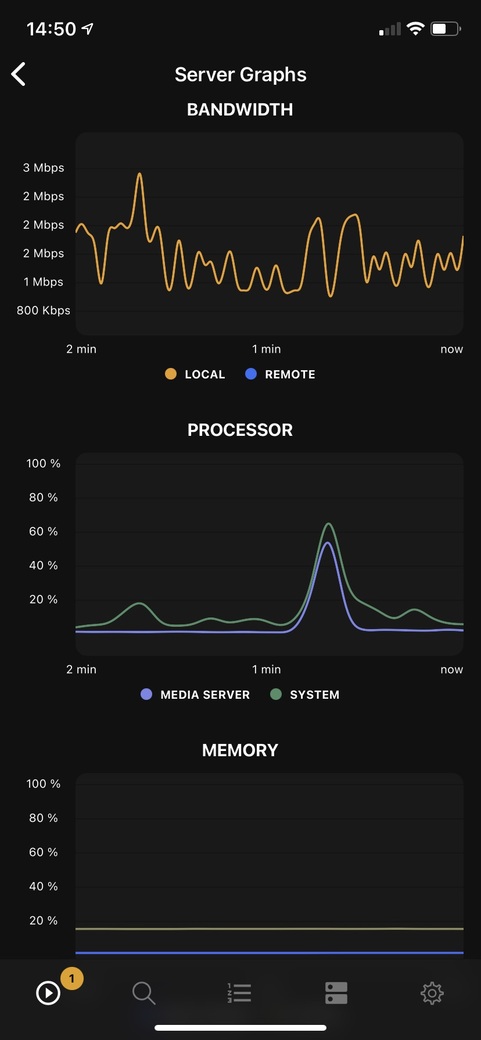
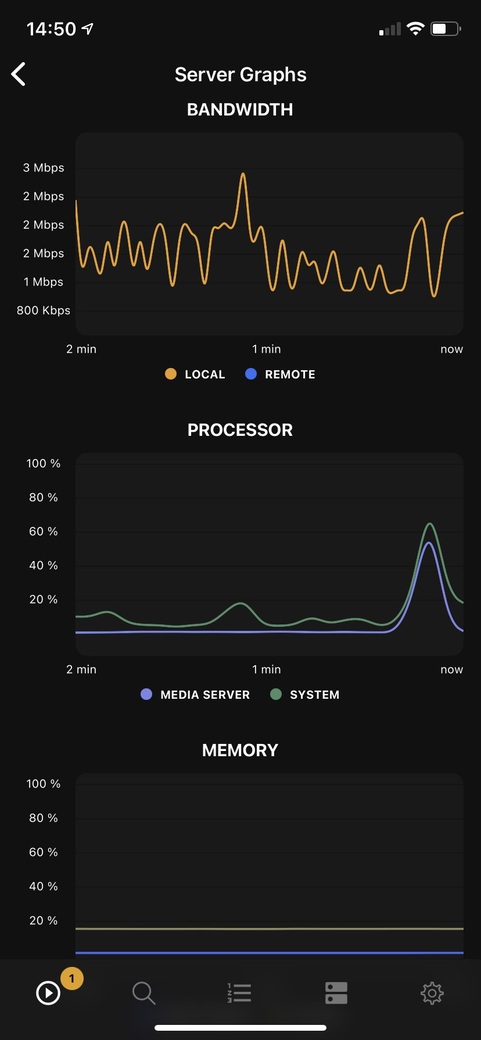
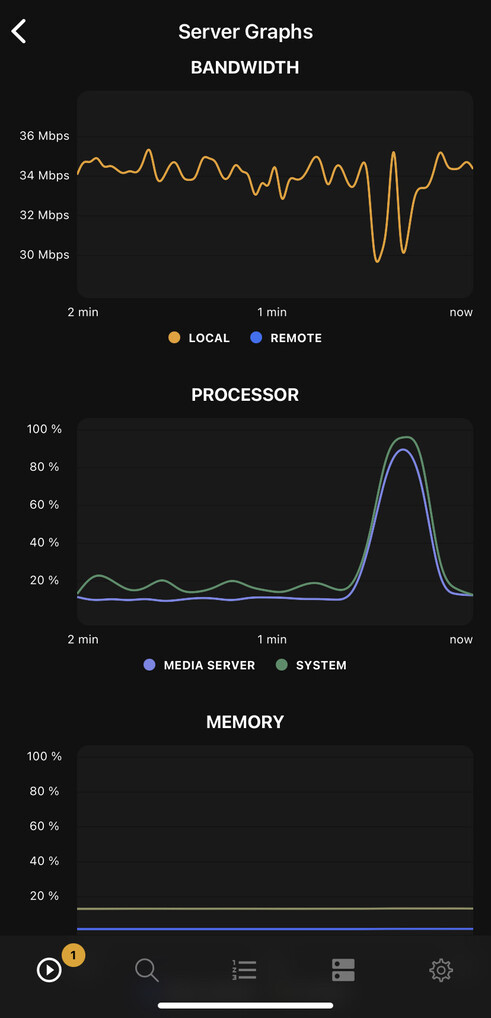
I normally run my Plex server on a Raspberry Pi, as all of my media is encoded in a format which I believe the Apple TV has CODECs support (H.264 video and AC3 audio). All of my media is played via direct play, both video and audio. To see if the low powered Pi server was the problem I setup a test server on a Ryzen powered PC using UnRAID. In both cases (playing the same video files on in the Apple TV from both systems) I see constant stuttering every few minutes in the playback on the Apple TV. Using the Plex Dash app I can see the spike on the server. As you can see from the screenshots below, the spike affects the whole system as usage jumps in the Plex server application. The Apple TV is connected to my network via ethernet.
These are the spokes caused by the latest version of the Plex app running on the Apple TV. The spikes are not as pronounced as previous builds but still cause noticeable stuttering in playback.
This is from a previous build of the Plex Apple TV app (early Feb 2021) which shows a far bigger spike. The stutter in playback was much more noticeable when this happened.
These screenshots are from my main Raspberry Pi Plex server, although the same results happened on the Ryzen UnRAID system as well. Both systems were using the latest version of Plex server, installed through Docker using the Linuxserver containers.
To try and narrow down where the issue lay I have purchased a Fire TV (a 2020 HD streaming stick) to do some additional testing, along with an ethernet adaptor to remove any WiFi issues. I have used the same files on the Fire TV stick which I used on the Apple TV, playing these files from both the Raspberry Pi and UnRAID servers. Having used this device since the middle of January I have not had a single issue with stuttering. The Fire TV was using direct play to play these files. I have not taken any screenshots of the Plex Dash app while playing back files on the Fire TV stick as there have been no spikes on the server.
From the testing I have done I only get the stuttering problem on the Plex app on the Apple TV. It does not matter if I stream it from a low powered Raspberry Pi or a much more powerful Ryzen 2700X machine running the latest Plex server. The video stutter is present when using either server and playing back on the Apple TV. As you can see from the screenshot above the spike in server usage has dropped when using a more recent build of the Plex app on the Apple TV, but it is still causing playback issues. Playing the same media on the Fire TV stick (from the same two servers) does not see the same spikes or stuttering on playback.
Sums it up well with the issues I have also had. Doesn’t happen with other Plex players on other devices with the same files.
Totally agree with everything above from @darranwest - I have the exact same situation. I have no issues on any other devices, the stutter and consequent CPU spike on my Synology DS216+II are exactly as you describe. The only thing that seems to help is bombing out of Plex, force quitting it, then going into apple settings and enabling/disabling match frame rate. Then when you go back into Plex it behaves - for a period. Usually, next day I have to do the same again.
The same effect can be got by going into settings in ATV Plex app, changing to old player, and then changing back to new player. This also makes it behave itself for at least a few hours… Can someone from Plex PLEASE look into this - its hugely annoying and as it is just the Apple TVOS affected, I would imagine many people are also being annoyed by this.
Hi everyone.
I am investigating the same problem.
My issue is exactly as described and viewed on stridemat’s video.
However I am seeing the same behaviour on Win 10 Desktop and Firesticks I have given to my family.
I would have hoped PLEX Moderators would have picked up your thread by now.
This is my first search for a cause and fix.
If I find any positive info, I’ll be back.  (with Good news)
Good luck all.
I have had also posted the issue in my own thread without any moderator response.
my report
I would like this to be picked up as a bug request for AppleTV App. No other playback method is experiencing this. I have a FireTV stick which is fine. Both AppleTVs stutter after a while. The more often you launch a new stream inside the app, the worse it gets.
You can easily circumvent the stuttering by “killing” the process on the AppleTV and have a fresh start of the App. This usually results in a shutterless playback. If you stop and launch a new stream it will start to occur after a while.
I too have started to having stuttering in the plex apple TV app. This is occurring on all of our apple TVs locally (we have 3x here, all apple tv 4k gen1 or higher).
(this only started in the past few months, prior there was no stuttering and i use appleTV + plex every night, so i would have noticed it). Im not sure about transcoded content, but it is defenatly occurring with direct-stream/direct-play content.
I have also heard from friends that this is occuring when using their apple TVs + plex, remotely.
I have tried updating my PMS (win2012r2 dedicated plex-only server) from the PMS Latest release, to the PMS Plex-Pass Latest release- however the issue still persists.
according to this link (the only changelog i can find for the plex appleTV app), the ATV app was last updated Mar 21 2021 , and does appear to be updated every month or better, which is great!)
(btw, i do really like the new backgrounds feature that was recently added to the ATV plex app, it really is a beautiful effect/look!) Additionally, i would like to see plex/plex devs stop adding new features to PMS/plex Apps and focus more of their efforts on addressing bugs + existing features. (ie browse through these forums and focus on reports here, more so than adding the “Plex Games” or plex TV+ streaming features) thanks
EDIT: btw- im seeing this occur on h.264 (non HEVC) content as well as hevc content.
For me it got better while ago, but it’s come back with a vengeance over the last couple of days.
I still see no input from Plex themselves 
I am getting this dropped frame effect too. No other apps on my Apple TV do this, and playing the exact same file back on a web player on my PC is fine. I thought it was a 4K HDR issue, but it happens even in 1080 files and 720 files.
I did not have this issue a few weeks ago.
I tried every different configuration for weeks to cure this exact problem, and it looks like I have it fixed. In the Plex app settings on my Apple TV, I changed the setting for “Play Smaller Videos at Original Quality” to “on.” For some reason this setting was affecting even videos that weren’t “smaller.” Anyway, if you haven’t fixed the problem yet, you might want to give it a shot if that is turned off. All the other settings can be on without a problem now. fingers crossed
My app already had this setting set to “on”.
I noticed that this issue went away some time ago in Dec but has slowly started returning recently, but not as severe.
Here the setting is also already set to “on” and the stuttering still occurs.
I was losing basically one frame about every minute – which made the audio glitch too. It started happening when I upgraded to the Apple tv 4K, but it seems to be good now. Could be a combination of the ATV and my projector/tv since it doesn’t happen on the 1080p ATV or on any devices. Is the issue you’re getting a longer stutter? I’m not liking the idea/possibility of it getting worse again.
I’ve always had that setting on as well, and like the other poster I’ve had this issue in the past. This kind of regression - bugfix - regression pattern is very frustrating.
@Dave-Kotlan I wish the video @stridemat shared earlier was still accessible, it’s exactly what mine does.
It’s like a stutter for a few seconds every 5-10 minutes. I get it regardless of what I’m watching, whether is 720, 1080, 4k, live TV.
I’ve been having the same issue with Plex on both my Apple TV’s, 1080 and 4K models. Seems to have started over the past month. Direct Play worked without a hitch prior to that. Maybe there is an issue caching enough of the file to play it back smoothly? Wired or wireless makes no difference. I use a Shield TV with Plex and do not have this issue. For example, an 80GB 4K file plays without a hitch. I’m suspecting the Plex client for tvOS is the culprit. Frustrating for sure.
Curious to see if anybody with the Gen 2 4K AppleTV is having this issue. I’ve had mine for a few days now and haven’t noticed it… yet.
Over the last few months this has improved for me. I am not sure if it has been an update to the server or tvOS app, but I’ve experienced no stuttering in the video for serval weeks. This was on an Apple TV HD, the one first released in Sept 2015 as the 4th generation Apple TV.
Last weekend I upgraded to the latest 4K version and that has also been working without issue. As the stuttering had stopped on my previous model I’m guessing it was a software tweak, and not the updated hardware, that has fixed the stuttering I was seeing before.