My network setup is fairly simple. There is a dedicated server at Hetzner with its own public IPv4 address. Then Plex is installed within a rootless podman container (I am using the linuxserver.io Plex container unmodified) so it has a local NAT:
root@plex:/# ip a
1: lo: <LOOPBACK,UP,LOWER_UP> mtu 65536 qdisc noqueue state UNKNOWN group default qlen 1000
    link/loopback 00:00:00:00:00:00 brd 00:00:00:00:00:00
    inet 127.0.0.1/8 scope host lo
       valid_lft forever preferred_lft forever
    inet6 ::1/128 scope host
       valid_lft forever preferred_lft forever
2: tap0: <BROADCAST,UP,LOWER_UP> mtu 65520 qdisc fq_codel state UNKNOWN group default qlen 1000
    link/ether be:9a:09:07:90:26 brd ff:ff:ff:ff:ff:ff
    inet 10.0.2.100/24 brd 10.0.2.255 scope global tap0
       valid_lft forever preferred_lft forever
    inet6 fe80::<redacted>/64 scope link
       valid_lft forever preferred_lft forever
Of course within the container Plex runs under port 32400, but outside of it I expose it to the world wide web as another non standard one. It indeed works, I can then access my plex server using the external-ip:myport format, can see my libraries and start the playback as well. Then I could add it to remote access and its also accessible from app.plex.tv.
But the problem is that whenever I start a playback from anywhere, it shows up as a local one:

The 10.0.2.100 is seemingly the container IP.
The remote access tab looks like this (except the 123.123.123.123 shows up as my actual public IP from hetzner):
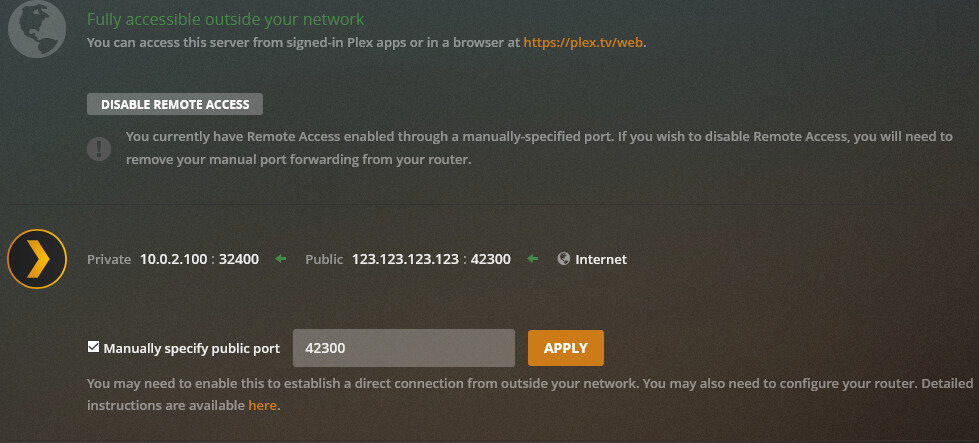
Upon reading further regarding the issue I came accross this setting as a potential way to solve my issue:

But even after defining this, the connections are still showing up as local ones.
I have checked the IP addresses of the server at https://plex.tv/pms/resources.xml and I figured it looks like this:
<Connection protocol="http" address="10.0.2.100" port="32400" uri="http://10.0.2.100:32400" local="1"/>
<Connection protocol="http" address="123.123.123.123" port="42300" uri="http://123.123.123.123:42300" local="0"/>
So I assume this looks good.
Though I have to admit I am not entirely sure how plex could possibly operate with resolving the actual external IP behind NAT. I assume many got a similar setup, all who run their plex servers at home and use a NAT within 192.168.1.0/24 or so. In that case, how does plex know the actual source IP? Or the home routers replace the source IP there?
I was thinking Plex could pick up the real IP of the clients using an API call to their servers from the client. Obviously that wouldn’t work for picking up local IPs, but it would be a decent way to determine the ext IP of the clients.
What can I do to have Plex show the real IP of these playbacks if I want to keep my container rootless and don’t want to do things like host networking?
Server Version#:1.23.1.4528-c0513eb4c
Player Version#:4.55.1

