I’ve read multiple threads about people having problems with the naming of this TV series ripped from DVD, but honestly they’re all going waaaaay over my head. I’ve been a “casual” user of plex for a few years. I’m not a power user. Most everything is a defaults. I rip a disc and let plex do its thing. The naming of the episodes on my hard drive are correct for this series, but in the plex app, they’re all messed up. Some don’t even show up, although they’re there.
My naming is as such…
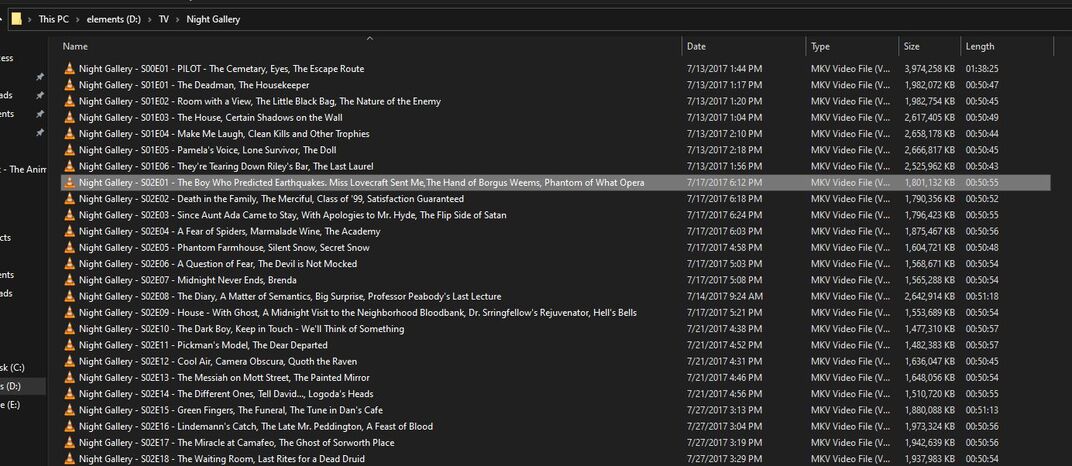
for the pilot “season”… Night Gallery - S00E01 - PILOT - The Cemetery, Eyes, The Escape Route
And season 1… “Night Gallery - S01E01 - The Deadman, The Housekeeper”
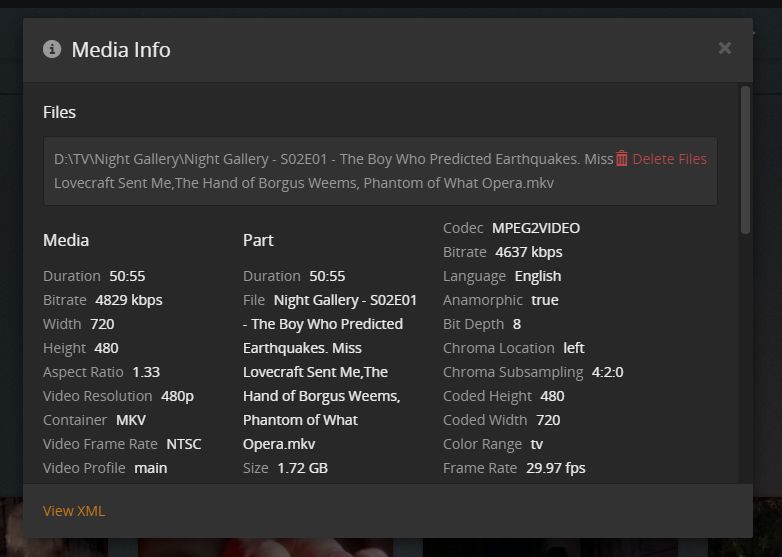
And season 2… Night Gallery - S02E01 - The Boy Who Predicted Earthquakes. Miss Lovecraft Sent Me,The Hand of Borgus Weems, Phantom of What Opera
Etc.
I tried toggling the DVD numbering, Absolute numbering, etc. in the Advanced tab and that doesn’t fix it.
I would be willing it get rid of the “seasons” etc and just have a long list of titles to play if that’s what it takes.
Check the Plex naming in the DOCs that’s a start…
DVD Order Shown:
A Drive:
......A TV Show Library Folder/
...........Night Gallery/
...............Season 01/
..................Night Gallery - S01E01-E02 - The Deadman, The Housekeeper.mp4
https://thetvdb.com/series/night-gallery
Name your files according to ‘one of’ the listings (Aired/DVD) - then do this:
Then this if necessary:
The Rules (for now):
https://support.plex.tv/articles/naming-and-organizing-your-tv-show-files/
https://support.plex.tv/articles/naming-and-organizing-your-movie-media-files/
The Magic:
DOC? Whats that?
Ok. What’s LMA?
Not sure if Night Gallery is unique, but several people have had problems with it.
My post requires reading it.
All you seek is contained therein.
Aren’t the names I listed correct? All my other shows are listed that way with no issues
Ok. My names look correct to me.
So I made sure local media assets was checked in all the tabs. Then you say to do the next step if necessary. What do I do to determine is the first step worked? Refresh something? Thanks!

Read the links I posted.
Good Luck
I have. I’ve clicked the local media assets boxes. Is my naming correct? Did you happen to read any of the other threads about this TV show that several people have had issues with? There’s a lot of language and steps in there that I simply can’t follow. I realize much if this is second nature for the “pros” here.

Ok. I posted a pic of my the way I’ve written out the name of the Night Gallery series, which is the same as all my other TV shows. All my other shows are fine except Night Gallery. Something odd is going on with it. When I name my shows, I do it on the hard drive they are stored on. Do you see something I need to correct? Thanks!
Season folders, I’m guessing they are just not on that list…
That’s all I noticed
If I read that directory listing correctly there is a problem with how you have you “Night Gallery” folders set up. In particular I do not see a “Season” folder.
It should mostly look like this:
TV Shows <- The TV library points here
_______ShowName (year)
____________Season 01
__________________ShowName (year) - s01e01 - Optional Name.ext
__________________ShowName (year) - s01e02 - Optional Name.ext
__________________and so on for the shows in season 01
____________Season 02 <- just like Season 01
____________Season 03 <- and so on for each season
____________Season 00 <- or “Specials”
__________________ShowName (year) - s00e01 - Optional name
__________________ShowName (year) - s00e02 - Optional name
__________________and so on for each special
Note 1: the eXX part of the specials must match EXACTLY what is found in TheTVDB
Note 2: The (year) may be omitted for shows that do not have more than one occurrence throughout the years.
There are many other structures and naming systems that work but this is the one I use and it just works.
For a mass rename I use FileBot with this format string {n.replaceTrailingBrackets()} - {s00e00.lower()} - {t}
While I do not know if changing the structure will fix your issue it can’t hurt.
BTW: If you change things you need to do “The Plex Dance” after the change so Plex will detect the changes and reset itself.
Wow. Ok. I’ve never used season folders. I have about 15 TV shows (and all there seasons) in my plex and they all have worked fine up until this Night Gallery issue.
Ok. Thanks. I’ll break them up and put them into separate folders by season and cross my fingers! Lol.
If your non-compliant structure did work in the past is no guarantee that it will work now or in the future. Plex tries VERY hard to match everything but there is at least an even chance that structures and naming that do not conform to what Plex expects will fail to match for some shows and even for everything.
It is best to not fight the great Plex-i-Sauras or your data could end up looking like Tokyo after a visit from a well known large lizard in a bad mood.
Plex can be very forgiving in the naming of movies BUT TV shows are a whole different kettle of fish. (That also attracts said lizard) It takes time, sometimes more sometimes less, to comply with what Plex expects but if you conform to the Plex structure and naming and make sure that “Local Media Assets” is either turned off (That is what I do) or moved to a very low priority Plex will then match with over a 98% accuracy rate. (I get more like 99.97%)
One more thing: Spelling is of varying importance. I once misspelled “Season” (I spelled it as “Saeson”) and Plex failed to match an entire show. It took me several hours to find and fix the problem.
