I’ll keep this brief, downloaded Plex to my desktop when i purchased a WD Ultra NAS…it came with a PLEX Pass for 3 months free…(haven’t got that far lol)
When i open my installed PLEX page, left side pinned bar, click “your media” it tells me to install PLEX media player again!! Please help!!
Thanks in advance, Mike
First of all, you need to make sure that both your NAS and your workstation is on the same IP Net, and it starts with:
- 10.x.x.x
- 172.16.x.x → 172.31.x.x
- 192.168.x.x
Also, verify, that you do not have any popup block addon’s installed on your browser
If/when so, browse to http://IP_OF_WD-NAS:32400/web
Thanks for replying Dane, Iremoved the popup block in Chrome settings.
I had this exact problem before I installed the NAS so that isnt part of it.

The Plex homepage shows “my Media” but when i click on it it tells me to download Plex media server…an operation i just finished doing!
I am willing to pay whatever the monthly fee is if it comes with setup support.
Thanks Dane, Mike
Interesting update, after watching a “PLEX for dummies” video it seems i’ve never been able to access a ‘server setup’ page within PLEX. attempts to uninstall PLEX and start over dont work either. Should i redirect the install process to my NAS instead of the default “C” drive?
Not sure if dane is busy, but until he gets back, when you the page open that’s in your picture above on the Home without your media, have you tried to click the Wrench icon in the upper right and go into Settings → General and claim the server?
screenshot what you see in the Settings. You might want to click Show Advanced if you see that.
But when you want to start over with a clean install that doesn’t delete you films ofc, then you can use the plex article about uninstalling PMS.
Good luck!
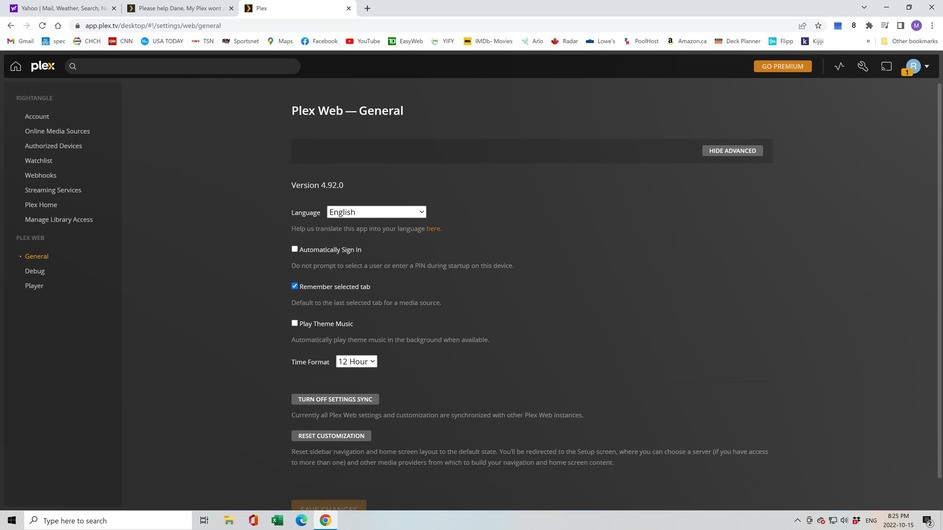
In the most recent picture you used the hosted web app to do things, but you can’t claim a server using that. You have to use the local, bundled version.
To claim the server visit the IP address of the WD server you said you have.
If my WD server was on 192.168.1.40 then I would visit
You may have had problems because you used 127.0.0.1 originally rather than the IP of the WD PMS device.
It’s weekend, so not @ work 
Thanks for your help Nibbles/Dane. Here’s the painful part…When i originally installed PLEX it wouldn’t recognize my library (see above pic), a PLEX sponsored utube video explained the advantages of NAS so i spent 500 bucks and got the same result!!
I dont know how to find the IP address of my new WD ultra, if PLEX is only for ‘teckies’ please tell me now, I thought it was plug and play.
2 thoughts, it might be a setting i have that won’t allow PLEX media server to initialize/launch…or do i need to install PLEX media server directly onto my NAS
PMS is not simple, and you’ll know after adding a few movies and TV shows whether this sort of thing is enjoyable. For many of us server owners, it’s a hobby and a passion because it represents what we really love to preserve.
To find the WD Ultra IP address, see p 14 of your user manual
Getting Started Using Online Setup Software
which implies that the IP address is displayed in their MyCoud app, once your NAS is found. If you don’t see it right away, on the Dashboard is a Settings that has a Network section.
