Libraries no longer found, server installed on same NAS as Library

Server Version#: 1.18.5.2309-f5213a238

I have had Plex Media Server installed on my SN DS415+ for multiple years. Recently the home page just does not find my libraries at all. In the past I’ve had issues with connections, but never that they are just gone.

I thought it maybe was related to having disabled the Admin account on my NAS, but I tried re-enabling it and rebooted and it made no difference. Likewise I thought it might be due to a dns security feature of my new router, but that wasn’t it either. I can log in fine on the local network IP address, it’s just not seing it.

Adding logs (redacted library paths)
Plex Media Server_fixed.log (163.2 KB)
Plex Tuner Service.log (1.2 KB)

From a system on the same network as the NAS, using a incognito/private browser window, sign in directly to Plex Media Server: http://192.168.2.26:32400/web.

Can you reach the server settings (wrench icon)?

On DSM 6 systems, Plex Media Server runs using the plex userid. It does not matter if the Admin account is enabled or disabled.

Nov 21, 2022 14:42:46.127 [0x7fa7616fb700] ERROR - Error issuing curl_easy_perform(handle): 7
Nov 21, 2022 14:42:46.127 [0x7fa7616fb700] WARN - HTTP error requesting POST https://plex.tv/servers.xml?auth_token=xxxxxxxxxxxxxxxxxxxx&async=1&asyncIdentifier=ee387a6a-b9b0-4aa7-910e-75dd696e06e0 (0, No error) (Failed to connect to plex.tv port 443: Connection timed out)

Plex Media Server cannot talk to plex.tv (the above error repeats multiple times).

  1. Make sure the NAS has a solid Internet connection - wired, gigabit Ethernet.
  2. Configure the Synology NAS to use a public DNS such as 1.1.1.1 (Cloudflare), 8.8.8.8 (Google), 9.9.9.9 (Quad9), etc.
  3. Whitelist the plex.direct domain in your router DNS security, if possible.

See the DNS Rebinding section of How to Use Secure Server Connections for additional information.


On a separate note…

Nov 21, 2022 14:41:01.038 [0x7fa79a738700] INFO - Plex Media Server v1.18.5.2309-f5213a238 - Synology DS415+ x86_64 - build: linux-x86_64 synology - GMT 01:00

You are running a dated version of Plex Media Server. 1.18.5.2309 was released in January 2020.

Not the cause of your current problems, but at some point, consider updating to a current release. You’ll gain added functionality and better compatibility with current Plex clients.

You can download the current version of Plex Media Server from plex.tv and perform a manual installation using Synology Package Center.

Okay so I was restricting WAN access for my NAS. After enabling that I no longer got the errors you highlighted from my log. But it wasn’t enough and I went ahead and updated the version of PSM to v1.29.2.6364-6d72b0cf6.

In my new log I see that there are references to an old email address that is no longer associated with the account, used as userId allot. I used to log-in with a username but it wouldn’t let me in so I tried my main email and got it. (Logging in with the old email referenced in the logs does not work). I don’t know if that might be causing problems?

Plex Media Server_fixed.log (619.2 KB)

Edit: I beleive my NAS may still be having issues with reaching the internet after all. I can’t reach it with my synology.me link. And in the package center I get a “Connection failed. Please check your network and time settings” message. So I need to figure this out.

Thanks for the update.

Nov 21, 2022 18:38:10.289 [0x7f6ab758cb38] ERROR - [Notify] Failed to add watch for [REDACTED] (13: Permission denied)

Plex cannot access some of your media files.

Please follow the steps in FAQ 19: Setting permissions to allow Plex access to media files to verify the userid plex has at least read only access.

Perform the procedure even if the permissions already looks OK. Synology sometimes loses track of permissions (rare, but not unheard of).

Important: Be sure to check the box for Apply to this folder, sub-folders, and files.

Then stop/start Plex Media Server, wait two minutes for Plex to fully start, and check the Plex Media Server.log file for the error message.

The login in the log file is opteron, not erik_spe7.

You need to login with the account that has claimed (owns) the Plex Media Server.

Once you have done so, you will be able to reach the server settings.

In Settings → Server_Name → General, it will show “Server signed in as emailaddress”, which is the e-mail address of the account that owns the server. The server will also be displayed in the list of Authorized Devices.

You should then be able to see the libraries configured on your server (listed in Settings → Server_Name → Libraries).

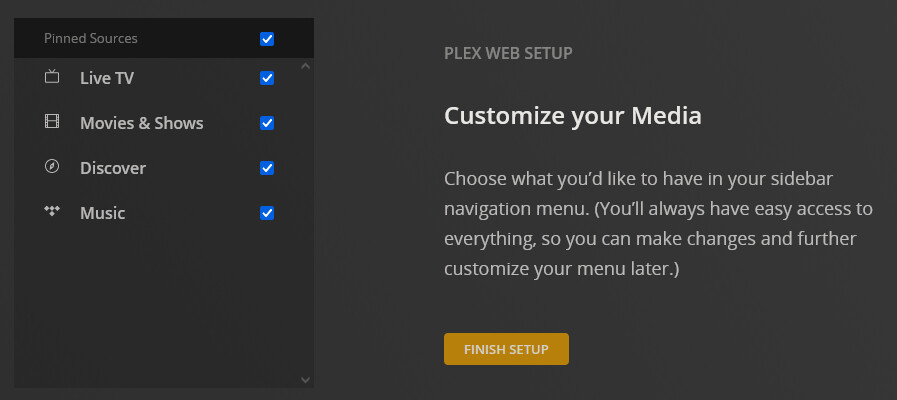
If the libraries are not shown on your Plex home page, choose MORE > and pin the desired libraries to your home page. Alternately, choose Reset Customization to reset Plex Web to default settings, which will lead you through the process of pinning libraries to your home page.

I redid the permissions and even when into the TV and Movie folders in File Station and added Write access to the Plex account on both, for subfolders also. In there it was only on Read. And I think the wrong user was that I had created the second user a long time ago, but I switched back to Optagon which is the main one.

This is what my MORE > menu looks like
image
There is nothing here except streaming stuff, which has always loaded and worked.

Resetting customization only gives me these options, and also gives me nothing except streaming.

I tried running the EZ Internet package and it has an issue with my Router, which is not on the list on the next page because it is a custom Raspberry Pi 4 router running supernetworks. I’m troubleshooting with the creator of that to see if we can get it online.

One more thing to try - reset the server credentials. This will unclaim and reclaim the server. Use the plex.tv account that you want to own the server.

If you are comfortable with Linux SSH/CLI:

  1. As a test, go to Claim | Plex and make sure you can generate a claim token.
    Close the browser window. You will generate another token later.
  2. Stop Plex Media Server in Synology Package Manager
  3. Look in your list of Authorized Devices.
    If the server is listed, delete it.
  4. Download and run the User Credential Reset and Server Reclaim Utility.
    Click on Latest on the right to to to the download page.
  5. Run the utility
  6. Start Plex Media Server in Synology Package Manager
  7. Login to Plex Media Server using http://192.168.2.26:32400/web.

If you are not comfortable with Linux SSH/CLI:

  1. Stop Plex Media Server in Synology Package Manager.
  2. Look in your list of Authorized Devices.
    If the server is listed, delete it.
  3. Using Synology File Station, navigate to the Plex Data Folder.
  4. Using the Synology Text Editor, open preferences.xml (right click, open with text editor).
  5. Remove the four PlexOnline... entries listed in Why am I locked out of Server Settings and how do I get in? and save the file.
  6. Start Plex Media Server in Synology Package Manager.
  7. Login to Plex Media Server using http://192.168.2.26:32400/web (*).
    You should be able to claim the server and access server settings.

(*) Use the NAS IP address when claiming the server. After it is claimed you can use app.plex.tv, a hostname, etc.

1 Like

Sorry for the long delay. I renamed the Preferences.xml and when I started the PMS service back up I was greeted with the setup wizard. It found the two folders I had added previously, TV and Movies, but it’s struggling to claim the server. When I press Claim Server it thinks for about 20 seconds then the Claim Server button comes back

I am using the local adress to my nas, not plex.tv

Edit:
I tried this trick of setting my DNS manually, which did not work.

For some reason my previous post triggers spam detection. I hope it comes through

so did your new one, I approved it. It sees two accounts from same IP which triggers spam. Lots of spammers talk to them selves with different accounts to seem real.

Oh, I see! Thanks. I didn’t notice that the forum had logged me into my main plex account this time. I made this thread using a different one that shouldn’t have been used in the first place.

This means Plex Media Server cannot communicate with hosts at plex.tv.

It indicates there is a networking issue between the NAS and plex.tv.

What DNS server is configured on the Synology?

  1. Login to the NAS
  2. Control Panel → Network → General
  3. Preferred and Alternate DNS servers?

Make sure the default gateway is correct.

  1. Control Panel → Network → Network Interface
  2. Edit the interface, choose IPv4

Make sure the NAS has the correct time.

  1. Control Panel → Regional Options → Time.
  2. Make sure the time zone is correct.
  3. Choose to Synchronize with NTP Server.
  4. Pick a desired server: pool.ntp.org, time.nist.gov, time.google.com.
  5. Click Update Now.
  6. It should synchronize with the time server and return status = Normal.

Note: The above is from my DS918+ running DSM 7. The paths/settings/choices should be similar for DSM 6.

1 Like

Thank you very much, this finally solved it! My NAS was using a manual network configuration for some reason when setting up my new home network, and changing it back to be automatic (Use DHCP) let me claim the server. Sorry for the late reply.

Case closed :slight_smile:

This topic was automatically closed 90 days after the last reply. New replies are no longer allowed.