I have issues with my setup and I keep needing to ‘optimize’ files as it keeps trying to transcode 4k films I’m trying to watch on my 4k Sony tv (via apple tv 2021)
So I’m thinking of just finding a good converter and batch convert my entire library at the same time as I have all sorts of 4k format media
I mainly struggle with: 4K (HEVC Main 10 HDR) files, it doesn’t directly play them it transcodes and keeps stuttering so unwatchable until I Optimize it and watch the optimized version instead which plays fine
Has anyone used “HD Video Converter Pro” ?
I need something with easy GUI as don’t like textbase stuff
My Spec:
HPE Gen10 Plus
Intel 9900
4x 8TB HDDs
Apple TV 2021
Sony 4k HDR TV (supports Dolby Vision)
Check out Handbrake.
You should check what’s actually causing the transcoding. The Apple TV on its own should be able to play 4K HEVC – I suppose your struggle comes from the combination of video/audio/subtitle. You can find technical details about the transcoding decision in your server logs (MDE)
Edit:
With 4K source material you’ll probably get the best results using H265 as transcoding target. Keep in mind this might not be the most compatible approach.
This very much depends on what platforms you’re transcoding for / you want to be compatible with. Generally I would try to transcode 4K HEVC media in h265/HEVC – otherwise your file sizes will likely explode. Take care what format you use as target for the audio streams.
If your environment has devices with very limited playback capabilities, you could aim at transcoding your files to h264 in 1080p w/ AC3 audio.
I’ve been away from Microsoft for too long. Not sure which .net redistributable package you need to install. I just remember there were certain differences and you have to have the right version.
The Handbrake troubleshooting is listing a link to a .net Core 5.x download
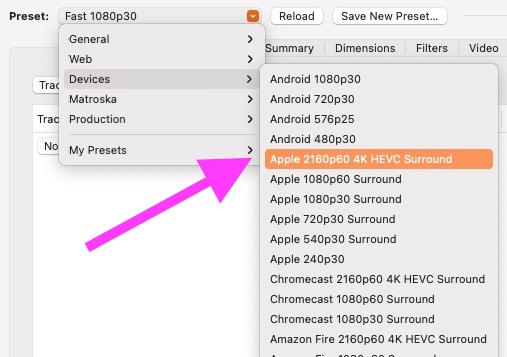
I agree on the recommendation for Handbrake. Alas, I’m not on Windows user either. I’ve used Handbrake to encode 4K video with these settings from Handbrake. This works from my PMS to my Apple TV to my Sony Bravia TV over wifi without transcoding.
Duration 2:01:42
File movie-name-here-(apple-2160p60).m4v
Size 3.51 GB
Container MP4
Web Optimized No
Video Profile main
Codec HEVC
Bitrate 3322 kbps
Bit Depth 8
Chroma Subsampling 4:2:0
Codec ID hvc1
Coded Height 1608
Coded Width 3840
Color Primaries bt2020
Color Range tv
Color Space bt2020nc
Color Trc smpte2084
Frame Rate 23.976 fps
Height 1604
Level 5.0
Profile main
Ref Frames 1
Stream Identifier 1
Display Title English (AAC Stereo)
Extended Display Title English (AAC Stereo)
Codec AC3
Channels 6
Bitrate 640 kbps
Language English
Language Tag en
Audio Channel Layout 5.1(side)
Sampling Rate 48000 Hz
Stream Identifier 3
Display Title English (AC3 5.1)
Extended Display Title English (AC3 5.1)
I’m sure I have a lot to learn about bitrate because when these 4K movies stream, PMS will use a lot of bandwidth. Take a look at this spike when the movie starts:
While Handbrake has tons of options, it’s mostly just…
drag the source file in
select a preset (if you make that your default, this obsoletes #2 for future transcodes)
click Start
You can configure your language preferences, in which case Handbrake will automatically pick the applicable tracks. I suppose it’s good practice to take a little detour between steps 2 & 3 to review the track selection.
While the app is running (which can take some time depending on the selected quality etc) you can feed its queue so it’ll stay busy without the need for you to sitting at your computer all the time.