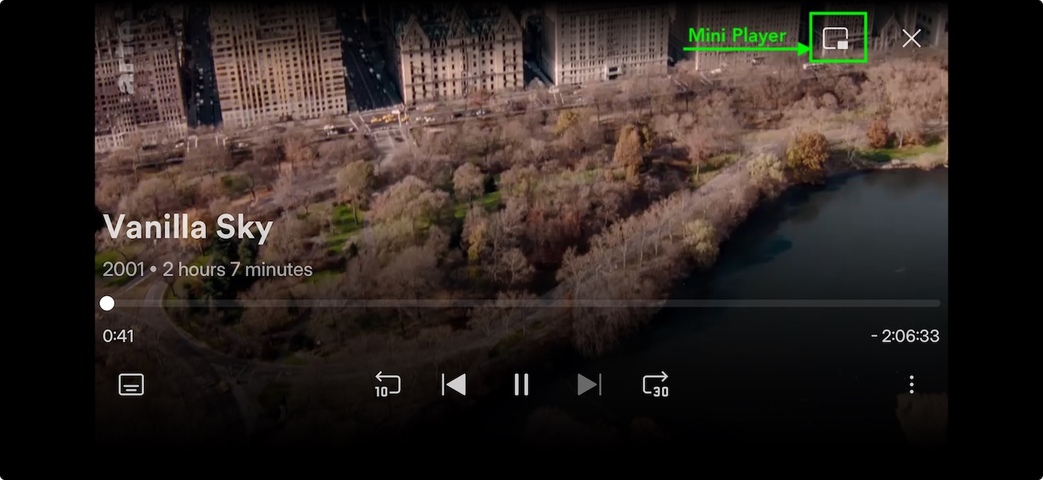
One of my most-used features on the iOS app was the ability to minimize the video into a ‘mini-player’ using the icon in the corner, and then use the “Go to Movie” function to navigate back to the movie’s detail page while the video continued playing.
This was an incredibly useful feature that allowed me to read about what I was watching or browse my libraries while continuing playback, and I used it every time I watched something.
Since the recent update, this functionality seems to be missing. Is anyone able to confirm if this feature will be reinstated soon in an upcoming update?
Just to clarify… your suggestion is to have the mini player while also browsing the Plex app?
Currently it seems you can use the mini player – but that applies to the entire Plex app; if you open it again, the mini-player expands to the fullscreen again.
Apologies for the confusion - what I am referring to is this small but critical feature —> the down arrow that used to be in the top left corner of a movie or tv show I was playing:
https://support.plex.tv/articles/205671108-media-playback/?utm_source=chatgpt.com
Currently using an iPhone 15 Pro Max on iOS version 18.4.1.
The mini player as such is still available.
Clicking the button will play the video in a tiny floating window on top of other apps you might open.
But… you won’t be able to browse the Plex app.
That’s PiP, not the mini player as such…
2 Likes
Yes I am aware I can do that and browse other apps that might be open, but unfortunately that’s not what I am referring to.
Before the update, I was able to press the down arrow in the top left corner of a currently playing movie or tv show and it would minimize the video into a smaller one (same as PiP - but like I mentioned above not what I am referring too) so I could browse the plex app, read what about what I was watching, view information about the cast and the movie or show I was watching, etc.
I’m not referring to the PiP.
With PiP you can browse other apps/etc. but PiP doesn’t allow me to browse plex while currently watching something on plex so I can figure out what I want to watch next, view details of what I was currently watching, check out the cast or synopsis of what I was currently watching.
I know, I was referring to the post right above mine. 
1 Like
10-4!
Any ideas if this feature is currently available in the new update somewhere but is hidden or called something different and I just cannot seem to locate it?
Alternatively, can you shed any light on if this feature coming back in a future update? As small and minuscule as it seems to most, it was a hugely beneficial feature on the app for how I used it.
So Plex is just ignoring this critical issue? Have they even confessed to removing the mini-player and explained why? Like many other people, I use this feature ALL the time. Often for checking which actors are in the show/movie I’m currently watching, or choosing what I want to watch next, or adding something to the Watchlist because what I’m watching right now prompts me to do so.
I do NOT want to be kicked out of my viewing to see these things.
1 Like
Hello -
I just wanted to add my voice to this. It’s particularly annoying if you are watching something that is in a playlist or collection.
If you want to look at the item currently playing, e.g. to look at something, or perhaps rate it, it’s impossible, except by stopping play completely, and then manually searching/navigating back to the item in some other way.
But then once you’ve done that, you’ve crashed out of the playlist, you can’t go back to “where you were” and so you have to start that again from scratch.