yes. but also if are in that state and you go to your playback settings you see no options.
Updating to that posted APK made no difference for me, I even cleared the app data.
You click a video, WiFi or mobile, downloaded or remote and it gets stuck on the spinner. The playback settings menu has no options other than ‘Lock to Landscape’
S21 Ultra, 5G, Android 12
plex-log-.zip (209.8 KB)
Erm that’s very odd, can you take a screenshot for me of the player settings?
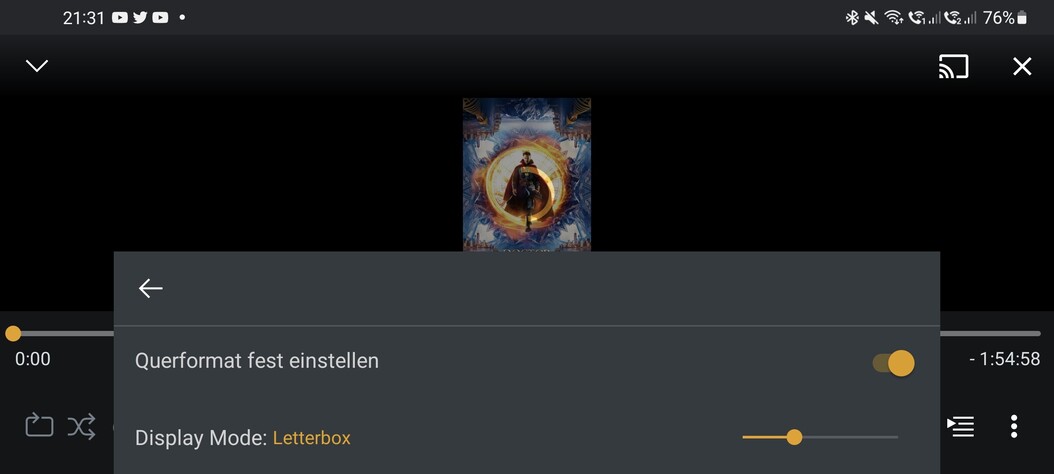
Was this an issue in the previous version of Plex you had installed?
Could you also take a screenshot of your Samsung OS version information, this is in your Settings app, then About phone (right at the bottom), then Software Information. Will look like this;

Another build to try; https://artifacts.plex.tv/android-experimental/8.27.0.29455-32795143/PlexForAndroid-8.27.0.29455-32795143-Arm64v8aGooglePlayStdExo.apk
This has an updated ExoPlayer version, with some other playback improvements.

Thanks, so looks like we have the same versions of firmware / Android installed on our devices.
One last APK to try if you don’t mind; https://artifacts.plex.tv/android-experimental/8.27.0.29467-95458b78/PlexForAndroid-8.27.0.29467-95458b78-Arm64v8aGooglePlayStdExo.apk
This doesn’t work for me. Same issue
same result nothing changed and the issue with the player settings only appeared with the loading issue
Would you be able to share the client logs from the latest version I linked above? They will include a few more log entries for me that might show the issue.
sure here
logging.txt (470.1 KB)
I’ve attached my logs as well.
The newer build has changed slightly for me. I get the first frame or so of the item being played back, and I am able to scrub through.
However if I try to change any settings like playback quality the menus are blank.
I also took a screen recording. Interestingly I did get one video to play, but then navigating another just hung the app again.
https://drive.google.com/file/d/1rySUJnK1OnzogRVsuEOb8jVHrR4ysyZY/view?usp=drivesdk
logging (2).txt (4.1 MB)
I have S21ultra with latest A12 and i had same issue and i was not able to play video. So i did fresh install and still same. Than i changed App permission and allowed access to media and remove ability to revoke that and now its working.

Tried that, revoked permission, still the same issue.
Did you also allowed access to media ?
It’s odd the permissions have made a difference for you, for streaming playback from a server we won’t touch the disk so don’t need any permissions.
Mine (on the S21 Ultra), are like this;

I’ve been searching around for possible explanations and it seems to be a common problem with the Android 12 release on Samsung devices (at least on the Samsung forums).
I’m still attempting to replicate though, if I can do that then I might be able to figure out if it’s a device codec issue or not. To help narrow some things down, would it be possible for someone with the issue to try playing a few different videos (with quality set to original) that use different video and audio codecs? For instance, an MPEG4 video, H264 and HEVC with different audio codecs AAC, DTS, AC3, EAC3.
Would also be good to know if you have your Samsung device set to 60Hz or 120Hz refresh rate on the screen and whether you use a battery profile setting (that limits the CPU), and resolution used on the device.
It is definetly an issue with the player. I was able to get some things to play with vlc by changing the settings in the app to allow external that would not then play on the plex player when I switched back and tried to play the same movie.
Music is not playing for me as well on S21 with android 12. I am using my own server while on the wifi. Vlc is working to play videos.
