When I use vlc as an external player, it work plays fine.
VLC is working fine over DLNA for any media type in my Plex Library (MPEG4, H264, HEVC all with different audio codecs DTS, AC3)
IMHO, not related to Samsung codec, as VLC is able to play any file. This seems to be specific to the way Plex plays files and could be an exoplayer problem.
Is there anyway of choosing another media player in Plex to test this theory out?
1 Like
Same issue here. Samsung S21 5G. Android 12.
Server version: 1.24.5.173
Player version: 8.25.1.28703
Just to add to the pile: same issue for me on S21.
I’ve found that restarting the phone allows me to use Plex for a while without issue. When it stops working again, I restart my phone; repeat.
Not working here either, S21 Ultra, Android 12.
I recently migrated from an old coputer to a new Synology. I thought that broke everything and spent a lot of time trying to troubleshoot. Glad I found this thread and know its actually just an Android/OneUI problem.
Same issue here on a Galaxy s21 ultra with Android 12.
Same issue here. S21.
I was able to replicate using an S21 ultra Android 12. I could replicate the issue with the live TV provided by Plex as well as files on my server. I couldn’t find any type of file that would play.
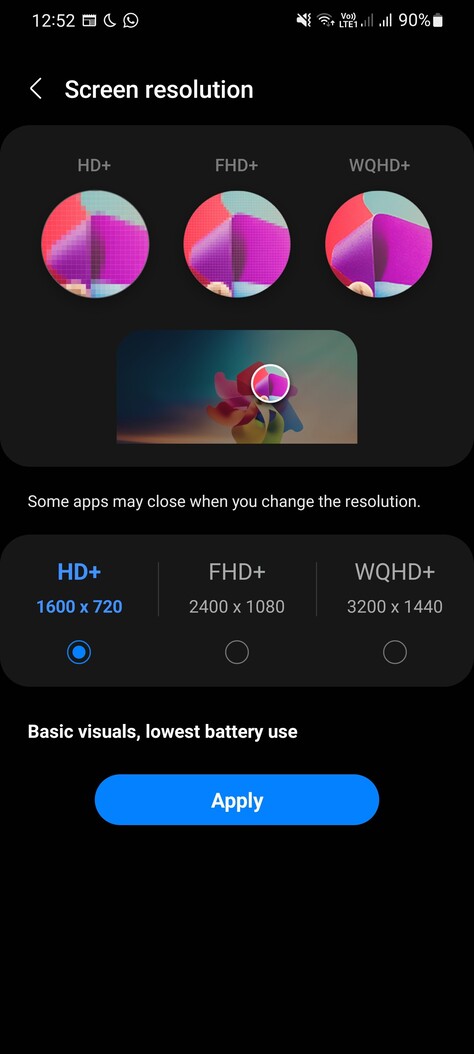
I was able to resolve this by changing my screen resolution to HD+ from WQHD+ and force closing the app. Once I did that, playback starts working normally. Weirdly, it continues to work after switching it back to wqhd.
I tired changing the refresh rate before the resolution and it made no difference.
Edit: settings > display > screen resolution is the option and I set it like so:
1 Like
Can confirm. Lowering the phone resolution works for me.
Wow, I can also confirm dropping the resolution has worked for me too.
Unable to drop the resolution on the S21. Either that option was removed in Android 12, or it never existed.
Try settings, display, screen zoom and set to the middle of the 5 dots. Worked for me but not really sure what resolution that is.
1 Like
Can confirm the zoom trick works on my S21

So i just went into the display properties and slid the slider back and forth, seems to have done the trick. I’m now watching movies as before. So far so good
2 Likes
UPDATE:
it’s back to not being able to play all movies, movies on my home screen work, but not in my collections etc.
Hi,
I´m new to the Plex Pass and was having the same issues on my S21 for the last couple of days. Today I got it working for a while, but after closing and reopening the app, the same problem appears. Now I´m not 100% sure if it is the same problem across the board, because my loggings throw an error from time to time (instead of “[MediaDecisionEngine] Server was happy with client’s original decision”, I get “[MediaDecisionEngine] Server failed to provide decision” and that is when it doesn´t work)
Now as a total nooby to the Plex App, I´m not sure if it configured something wrong. The app is the only thing that doesn´t work so far (I can even use the web app on my S21 and it works totally fine).
So if someone might be nice to look over the loggings of today, I would really appriciate that
PlexAndroidlog.txt (4.5 MB)
My fix through changing the screen resolution has persisted for 12 hours and through 2 restarts for me.
@neilparmar does it persist if you try changing the resolution instead of zoom? Or do you definitely not have the option to change the resolution (in display settings, for me it is the option below “screen zoom”)?
Interestingly enough this trick works for me as well.
