Also have the same issue. After Android Update, Nothing Plays. Nothing that anyone has recommend so far has worked except for restarting the phone every time it starts happening. Galaxy S21+.
I just got the latest BUKF android update pushed to my phone from Verizon, and Plex seems to be working again :). We shall see how long it lasts.
I have BUKG update and Plex won’t play anything on my S21 Ultra
This is the same setting I was playing with that got plex going temporarily on my phone.
Here in the US have not received any new samsung updates on my unlocked s21+.
The new plex beta playstore update 8.27.0.29651 seems to help a bit? It will playback every few attempts, and once it starts playing you can scroll through the media without issue. I can quit playback if its just spinning and click play again and it’ll start playing, other times I have to repeat a few times before it’ll play.
I don’t think it had an effect but figured I’d mention it. I disabled/enabled private compute services to see what it would do. So far the app hasn’t started back up so Idk
Looks like I was wrong, the issue is back again even on the BUKF update
Dear Folks,
Same issue here…
Looks like changing screen settings (zoom and rez) solves the problem temporarily (only for the video you’re watching + any one following if in a playlist).
But if you close the app and get back… issue is back again…
I confirm issue is gone, I tried this morning again with various content. Android web view has been updated from playstore. My server Metadata have been migrated to new version as mentionned in previous post.
No reboot since yesterday. To be precise, before yesterday I couldn’t even play one single file even after the weekly phone reboot.
So either is the server sending incompatible Metadata before or something google play store updates but I’m still on the same android 12 version. I’ll keep trying with app not killed.
My issue is gone also. I didn’t update anything though so it must have been a server side change
How did you update your metadata out of curiosity?
I use a Mac, not sure if it’s the same set up as Windows
Ah, figured out how to refresh metadata and updated Android WebView. Still broken.
I had a pop-up on my webserver webpage asking me if I want to upgrade to the newer version.
I just said yes.
For what I know metadata format has been upgraded and I was on the previous format.
Tried updating my Plex server to the latest versions and uninstalling the updates and updating again through the play store for Android WebView and sadly I still have the issue.
Same issue still here (S21 Oneui 4.0) tried everything suggested here and nothing seems to work. Sometimes for brief moments it works but most of the time it’s stuck on loading the song/movie that’s selected.
Latest stable server release and beta version of the app.
The new samsung update just hit my phone. After installation everything appears to be working normal. Will update if anything changes
1 Like
Downloading the update now. It did stop working around the time that OneUI 4.0 was released.
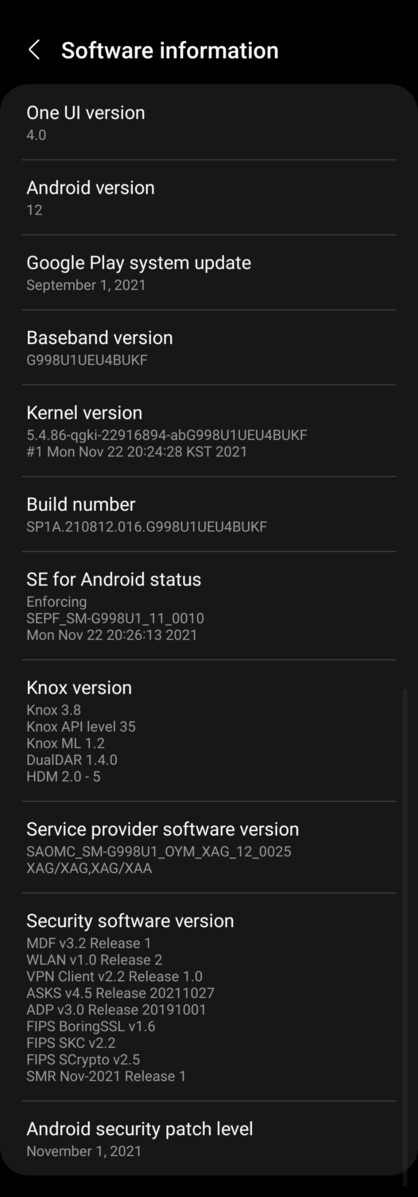
I stand corrected. It was only working BECAUSE I had recently rebooted my Phone to update. still not working.
1 Like
Yep that was my experience. I thought BUKF fixed things, but it was just temporary from a reboot
I also took the Samsung update a couple of days ago, still issues with playback. I can start a video, stop it, resume payback, someone it works, sometimes it doesn’t. Rebooting the phone head no effect. This really needs to be addressed more aggressively. I’ve been a Plex user for many years, and it has been rock solid so those years. But this is beyond frustrating.
