Server running on Synology NAS DS1517+
Server Version#:1.41.6.9685-70009685 - DSM 7.1.1-42962 Update 8
Player Version#:4.145.1
The Plex App and server have been working perfectly fine across all my devices as of today 30/04/2025.
From the new updated plex app on an android phone I received the message Server unavailable. I checked the server on the NAS and it was running fine with no apparent errrors. I stopped the service and restarted it … still didnt work. I rebooted the NAS - that didnt work.
I uninstalled the app on the phone and reinstalled - that didnt work.
From the Synology NAS server itself I clicked the link http:192.168.**:322400/web Plex opened but stated cannot connect to server.
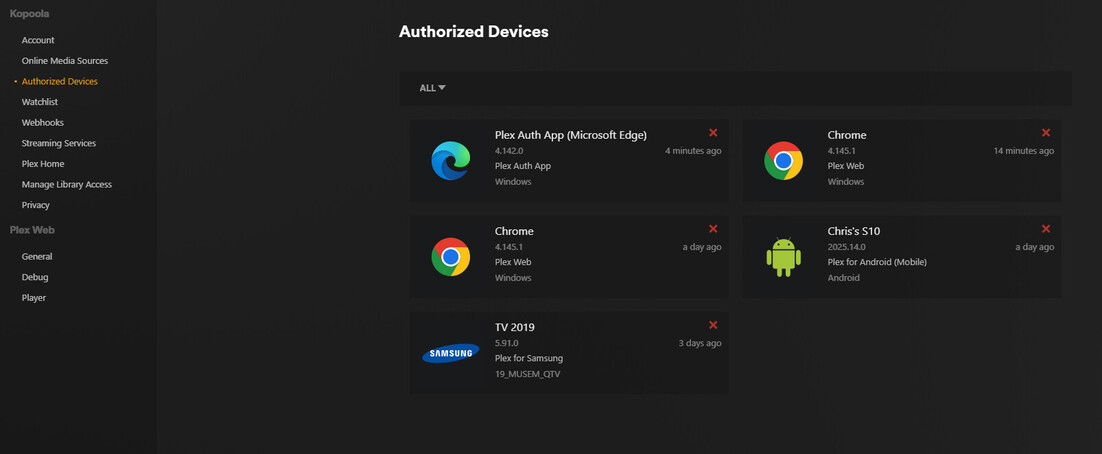
I went on the Plex site and it suggested checking the Authorised device - the server was showing in there.
I tried removing the server registration - it removed as per instructions - now I cannot get it back, no matter how many time I have logged out of apps servers rebooted etc (ive tried every combination).
I do not know what else to try can some one please help, Ive check similar topics on the forum without any luck - I have a plex lifetime pass
The most likely cause is a DNS cache issue, but other possibilities also exist.
I recommend that you reboot your modem/router and then everything connected to it, including any wireless devices.
Once that is done, then confirm that all of your devices are on the same subnet.
That is, if you access your router settings using E.G. 192.168.0.1, then all devices must have an IP address of 192.168.0.x, where x is a different number for each device.
Never try to open Plex using a Quick Connect or DDNS address, unless you are remote from your NAS, in other words, in another location outside of your home.
Always use http://NAS-IP-Address:32400 to open Plex from the NAS locally.
Let me know if this solves your issue or not, thanks.
Hi, thanks for your reply, its greatly appreciated
I’ve tried rebooting my router, network switch and NAS, logged in and out of the plex app both locally and remotely. the issue I have now is that the wizard that adds the server back in doesnt start. I need to get the synology media server back in the authorized devices.
…sorry the reboot didnt work
Your server will not be added back into Authorised Devices until after you sign in to your Plex account.
Click on the avatar (top right corner of screen) and if needed, sign out then sign back in.
Make sure the server is claimed in Plex Settings > Server > General.
Unconfirmed 773228.zip (2.1 MB)
Hi ChuckPA, please find attached Log as requested
Thanks
C
Hi Trumpy81, As mentioned in my first post I tried this many times and even though I log in and out of the Plex App in either a windows laptop OR my mobile phone (Android) the server is never claimed.
I noticed that you added an entry to allowedNetworks that is invalid, this is likely to be the cause of your issue.
From your logs:
May 01, 2025 19:23:24.681 [139809583434552] ERROR - Error parsing allowedNetworks entry ' 192.168.1.129': Invalid argument [system:22]
Stop Plex from running on the NAS.
Open FileStation and go to /PlexMediaServer/AppData/Plex Media Server and edit Preferences.xml and search for allowedNetworks=“192.168.x.x” and remove the entry you made so that it reads allowedNetworks=“”.
Save Preferences.xml and then restart Plex.
Hi Trumpy81 - BINGO!
This option worked, the TV is works again along with the App on the windows Laptop.
I have an issue with the android phone app with the new app version saying that the Plex server is out of date … which it isn’t as there are no other updates available for it.
I’m going to reinstall the app on the mobile and see what happens
Thanks very much for your support it was greatly appreciated
You should be running the beta version, v.1.41.7.9749-ce0b45d6e. Download it here: https://www.plex.tv/en-au/media-server-downloads/?langr=1&cat=nas&plat=synology-dsm7
You may need to turn on Include Beta releases (Plex Pass required) (top left of page).
You already have the public version installed and that should be up to date also, so not sure what is going on there.
Try updating the Android app, you should be on version 2025.15.0 (966828394).
To see the version you are currently using in Android, in the Plex app, click on the Avatar (top right) > Settings > About.
Hi, Yes, I went on to the Plex site and downloaded V 1.41.6 (I didn’t do the Beta as wasn’t sure if it was buggy or not…and face it I was having enough dramas as it was without compounding the matter).
The Windows Plex app usually notifies when there is an update, but this time it didn’t…anyway the one I downloaded and manually installed did the trick the Android App now works.
Once again thanks for all your invaluable help…have a great weekend.