I’m having the exactly same issue.
Reinstall or restoring app didn’t help.
Hope that Plex team or Xiaomi will fix it soon.
Hi.
Only works with the old video, the new video does not work.
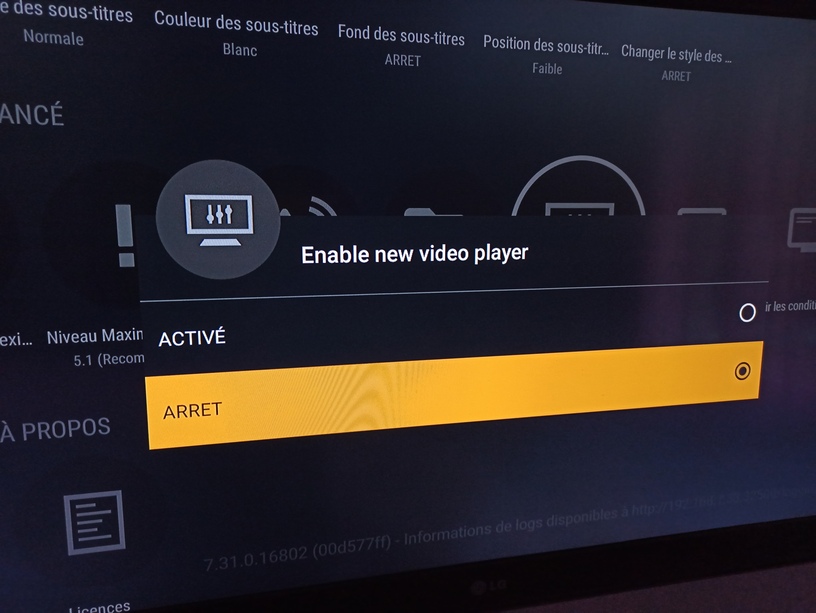
Must turf off the new video in settings.
Advanced/ Enable new video player : off
2 Likes
Thanks, it appears to work.
Apparently issue occurs with the new exoPlayer. Hope that this will be fixed soon as new player works just better.
Thanks.
Had same problem and disabling the new video finally it works.
Inadvertently updated Mi Box S to 2604 today. Since updating I have hardly been able to get anything to playback on new or old player.
On rare occasion with new player enabled, I can select play then immediately switch to play original quality and it works.
If I switch to old player most of the time it just hangs ob the loading spinner. If playback foes work, it freezes after 5-10 minutes with the generic network too slow error.
The official Kodi Add-on seems to be working without any major issues.
Note that I also have the latest client on my Sony Bravia (Android 9) and have no playback issues at all.
the only solution that work for now
1 Like
Great!!! That’s been the solution for me!!! Thanks thanks thanks!!!
1 Like
Same here. I disabled new video player on PLEX and it worked
I can confirm that I have managed to fix this error turning off new player.
I have the same problem.
While I`m launching Plex from mobile vía ChromeCast to my Xiami mi box S.
This is a temp solution to watch your plex colection until they fix the problem
1 Like
J’ai eu le même problème j’ai tout résolu en allant dans paramètres et en désactivant new video player.
Same issue here! No solution until now! I’m a Dad who wants to live couple years more, so I tried everything! The solution is trivial and I think it could help you all: Cast stuff from your phone with plex app! Two sweet hours of silence in the house! I hope you will be okay guys! Stay home!
Good afternoon,
I’ve done it and nothing.
When the new Player is enabled, the videos do not play, and when I disable it, it plays, however it is as if frames are missing as if it were a stop motion animation.
Another thing that happens, the films that are owned by Plex, are working normally, only those in my library that are not. Do I need to make any adjustments to my server? The problem I have other boxes including from Apple and are working normally, and my cousin and my sister who access the network from outside because they live in another house are using the same box without problems.
I have already restored the factory, I have already disabled his new Player and nothing solves the problem. My God.
I have the same issue; all Plex clients (WebApp, MacOS, AppleTV, iOS…) do work on both Plex owned videos as well as my own videos on my Plex servers (and have been working like a charms for years), but on the Android Plex client on my Xiaomi box S running Android v9 (just acquired… had no chance to test it on the older v8… creepy…)
Even before launching a movie, it’s quite obvious that the simple load of libraries, as well as the details of a movie if I click onto it, are excessively slow… hence all that mess really seems to me, like related to pure network issues… as if the Plex client would not properly communicate with the network sublayers on the Xiaomi box S Android 9 (I have a fast fiber connection, and latest Wifi6 router - even tested on an older Apple Time Capsule with WIfi5, same issue)
Apart from Plex, all other remote clients (TV, Arte, and so - included Kodi and its Plex add-on) work perfectly
Good afternoon,
The strange thing is that I see people saying that disabling the new Player will work again, only that I have two Box Xiaomi S here at home and in neither of them it worked. I disabled the new Player and even then I have problems, after that it actually loads the video but it seems that the film is missing frames or as if it were stop motion, and I don’t know what else to do. Help…
Desinstalei o Plex da MiBox e reinstalei a versão mais antiga encontrada no AptoidTv. Deixei desabilitado o novo player e parece que tudo esta funcionando bem, sem trancos ou perdas de quadros, inclusive com som digital pelo HDMI
This worked great! Thanks!
1 Like
Actually, Aptoid kind of “crashes” many apps on my Xiaomi
I’d recommend instead that your reinit our box, install everything from the Google Play store (Plex included) and then, disable the new player
Then everything should be fine
1 Like
Maybe try this and report in the other thread
This topic was automatically closed 90 days after the last reply. New replies are no longer allowed.
