So I think I finally figured out what’s going on. This bug happens as soon as a Plex client is started on the network, even if no playback or any activity is happening on the client (client completely idle).
On my more recent setup (with 1.19.3.2764), there is a raspberrypi plex that’s always on on that network, and that’s why the writes never ever stop. I was able to reproduce the same behavior with 1.18.2.2058 eventually, I just had to start a client and bingo: constant writes.
Can something be done about this? When the server is running from ssd this is really trashing the drive for no reason and generating needless disk activity in any case.
Same issue here with a Plex Docker image running on unRAID and it’s constantly writing to:
com.plexapp.plugins.library.db-shm
com.plexapp.plugins.library.db-wal
This is about 5MB/s consistently, all the time even at idle. I have nothing else running that touches this SSD. These are tiny files - 32KB and 3340KB respectively - and I can only assume it is constantly wiping and recreating them?
I’ve noticed that as long as ANY clients are connected to the Plex server, even just sitting in a Library view, some statistics tables in the database are updated at least every 60s.
Local web clients appear to check in every ~10s. I think that causes a little bit of bandwidth consumption and triggers the database statistics update.
Things like Sonos integration appear to trigger occasional tickles and stats updates too.
With no clients connected, I get at least a few (10+) minutes between Log writes or Database updates.
SSDP (Sonos, Xbox) discovery messages do write to the log file, but don’t seem to trigger statistics updates in the database.
I notice that some devices generate SSDP log messages even when they’re “off”. Turning off DEBUG logging stop these from generating logging.
I’ve checked which files are accessed with lsof /dev/sdd1 and identify the PMS Files
com.plexapp.plugins.library.db, com.plexapp.plugins.library.db-wal, com.plexapp.plugins.library.blobs.db-wal and com.plexapp.plugins.library.blobs.db-shm.
after that I checked the timestamps with find -printf “%TY-%Tm-%Td %TT %p\n” | sort -n | tail
the result @ 10:30 is
2020-08-21 10:06:50.9698309490 ./com.plexapp.plugins.library.blobs.db-wal
2020-08-21 10:06:51.0428319400 ./com.plexapp.plugins.library.blobs.db-shm 2020-08-21 10:30:21.1409466250 ./com.plexapp.plugins.library.db-wal 2020-08-21 10:30:22.1789607000 ./com.plexapp.plugins.library.db-shm
the result @ 10:32 is
2020-08-21 10:06:50.9698309490 ./com.plexapp.plugins.library.blobs.db-wal
2020-08-21 10:06:51.0428319400 ./com.plexapp.plugins.library.blobs.db-shm 2020-08-21 10:32:21.9865853420 ./com.plexapp.plugins.library.db-shm 2020-08-21 10:32:51.1509808350 ./com.plexapp.plugins.library.db-wal
and so on
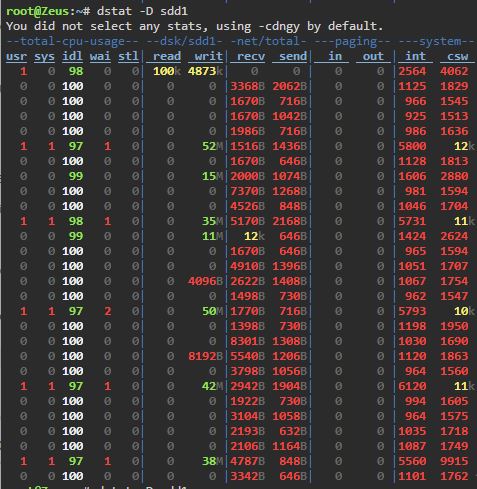
Finally, I checked with dstat how much data is written to the hard disk when PMS is running.
About 50MB are written every 5 seconds, in the Unraid web interface an average of 8 to 10 MB is displayed, which corresponds to dstat.
I have the same issue on an Ubuntu 20.04.1 server with a clean install of plexmediaserver_1.20.1.3252-a78fef9a9_amd64.deb
It is constantly writing to:
com.plexapp.plugins.library.db-shm
com.plexapp.plugins.library.db-wal
A fix for this would be great because this blocks my 6 HDDs from napping.
My current workaround is to turn of the plex service and just starting it manually when I want to watch something
Having the same issue here.
I’m currently using version 1.20.2.3402 installed on xigmanas. For some reason PMS preiodicly ( every 5-15 seconds) modifies those two files (their size stays the same). Constant disk chumming while the system is idle is driving me nuts. I hope this issue would be fixed someday…