Hi
For the past few days when watching something from my laptop on my TV over wireless, the show stops with an error message saying check the drive is mounted.
It seems that Plex is causing my laptop to lose the internet connection (wireless). The laptop won’t reconnect to anything (even hotspotting to my phone fails) until I reboot or reinstall the network card driver.
It would be best to attach your server to the network via an Ethernet cable, not via WiFi if possible. Wired Gigabit Ethernet provides a more stable connection than WiFi.
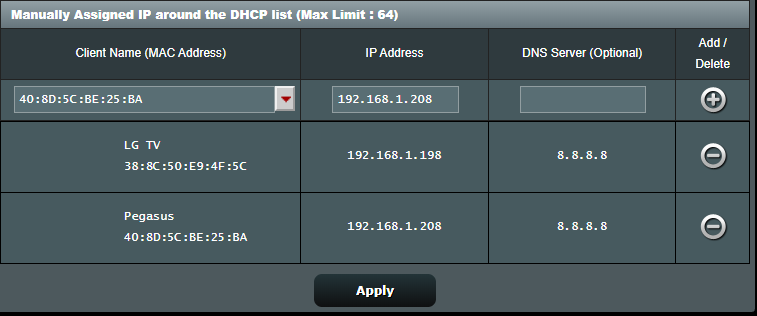
If possible, login to your router and look for the section that assigns IP addresses. It is usually referred to as the DHCP Server or something very similar.
See if it has the capability to assign a specific IP address to a specific device every time it appears on the network (i.e. a “reserved” address). If so, assign one to your PC running Plex Media Server. This ensures your laptop receives the same IP address every time it connects to your home WiFi network. This is desirable as it makes it easier for clients to find the server whenever they come on the network (as the server’s address is always the same).
Here’s an example from my Asus router. The two devices will always have the same IP address whenever they connect to my home network.
Thanks for the detailed response. I don’t seem to have that option in my router (Tenda Nova mesh).
The thing is, I’ve made no changes to anything and Plex has always worked flawlessly up until recently.