Server: Version 1.30.2.6563
Player: Safari web, PS5, iOS, Roku, Apple TV
This is a very strange issue, but as per the Unraid forums it seems I’m not alone in seeing this behavior over the past few days.
https://forums.unraid.net/topic/40463-support-linuxserverio-plex-media-server/page/222/#comment-1222644
Around 9pm last night, my Plex server seemed to crash about 2 minutes into an episode of a tv show I was watching. When I took a look at the logs, the only error I found was related to a bad local network IP address, so I rebooted the docker and fixed that. Again, 2 minutes into the show it crashed, so I rebooted the docker again and attempted to stream something via the browser. Same show crashed the docker a third time, so this time after the docker reboot I tried a different show. Same result. After about 20 minutes, the problem seemed to go away, and I was able to watch the show. I thought this was a minor blip, but today around 1pm the exact same thing has happened, yet services have not yet been restored.
In the above link, it seems several users have experienced the same behavior that I have. I’ve included a screenshot of what the local link to Plex in my browser looked like right at the docker restart, which I’ve never seen before.
Has something been broken by the latest build?
Hoping this gets a little attention as there are many Unraid users esperiencing similar issues.
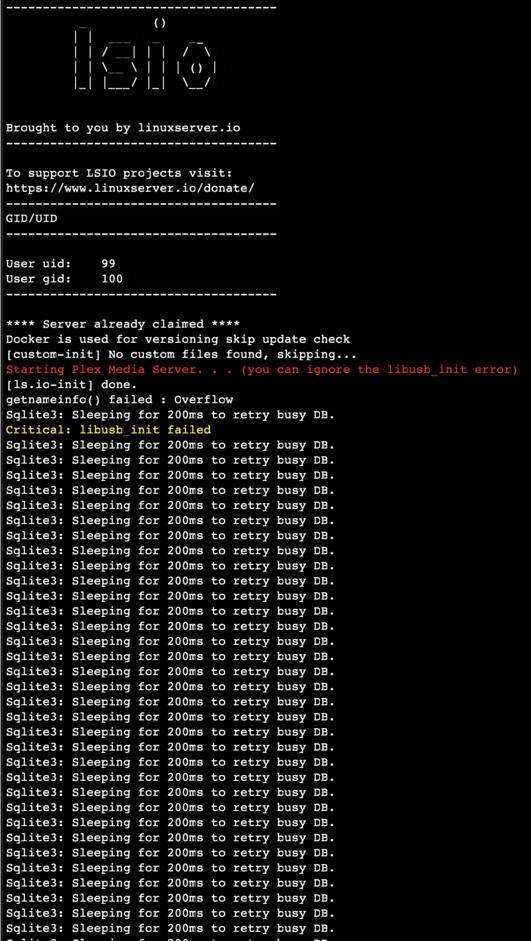
This morning, Plex is completely down no matter what I attempt at a reboot, but I’m seeing something different in the logs now
Another oddity, here’s what I see when loading Plex:
Now starting to see this in the logs:
Feb 03, 2023 11:43:26.121 [0x14d00b2d8b38] DEBUG - [HttpClient/HCl#1ae] HTTP/2.0 (0.1s) 200 response from GET https://plex.tv/media/providers?X-Plex-Token=xxxxxxxxxxxxxxxxxxxx (reused)

Feb 03, 2023 11:43:26.121 [0x14d004936b38] DEBUG - [MediaProviderManager] discovered cloud provider (Metadata)

Feb 03, 2023 11:43:26.121 [0x14d004936b38] DEBUG - [MediaProviderManager] loading cloud provider details (Metadata) (alive: 1)

Feb 03, 2023 11:43:26.121 [0x14d004936b38] DEBUG - [MediaProviderManager] we had 1 cloud providers online, we now have 1

Feb 03, 2023 11:43:26.121 [0x14d004936b38] DEBUG - [MediaProviderManager] cloud provider (Metadata) is online and available

Feb 03, 2023 11:43:26.132 [0x14d00b2d8b38] DEBUG - [HttpClient/HCl#1af] HTTP/2.0 (0.1s) 200 response from GET https://plex.tv/api/v2/server/users/subscriptions?auth_token=xxxxxxxxxxxxxxxxxxxx (reused)

Feb 03, 2023 11:43:26.133 [0x14d00a8c0b38] DEBUG - MyPlex: using cached data for request for https://plex.tv/api/v2/server/users/services?auth_token=xxxxxxxxxxxxxxxxxxxx

Feb 03, 2023 11:43:26.137 [0x14d00d1f3b38] DEBUG - Auth: authenticating user as guest

Feb 03, 2023 11:43:26.137 [0x14d00d1f3b38] DEBUG - Request: [100.40.14.207:58998 (WAN)] GET /media/providers (10 live) #1523 TLS GZIP Signed-in Token ()

Feb 03, 2023 11:43:26.138 [0x14d00d1f3b38] DEBUG - Completed: [100.40.14.207:58998] 401 GET /media/providers (10 live) TLS GZIP 0ms 485 bytes

Feb 03, 2023 11:43:55.900 [0x14d00948ab38] DEBUG - NetworkServiceBrowser: Parsing SSDP schema for http://192.168.1.100:54818/rootDesc.xml

Feb 03, 2023 11:43:55.900 [0x14d00948ab38] DEBUG - [HCl#1b0] HTTP requesting GET http://192.168.1.100:54818/rootDesc.xml

Feb 03, 2023 11:43:58.979 [0x14d00b2d8b38] WARN - [HttpClient/HCl#1b0] HTTP error requesting GET http://192.168.1.100:54818/rootDesc.xml (7, Couldn't connect to server) (Failed to connect to 192.168.1.100 port 54818: Host is unreachable)

Feb 03, 2023 11:43:58.979 [0x14d00948ab38] ERROR - SSDP: Error parsing device schema for http://192.168.1.100:54818/rootDesc.xml