Plex DVR Recordings "Agenda" view is showing wrong dates

I have noticed that Agenda view for my DVR recordings is showing an incorrect date. It would appear that it is using the US date format.

The date is almost correct (UK), when I select “Calendar” view. Although it is seems to be prefixed by the month number, e.g. “Sat 2/9” for Saturday 9th February.

The incorrectly formatted date does not affect the actual recording.

Web client Version 3.85.2, on Windows 10 64 bit
PMS Version 1.14.1.5488, on Ubuntu 18.04

1 Like

Check it out in the latest version, only available at
https://app.plex.tv/desktop
This will eventually replace the local stored version when it gets an update

I reported this a while back and as far as i can tell, using the above link all dates look ok now

@paulsalter thanks, but I am using the latest version via https://app.plex.tv/desktop

Just doubled checked mine and its the same version

Under Settings and the General option under Web Client, is it set for English UK or just English

Bug confirmed and filed.

Out of interest, can i ask what causes the bug to show?

I am in the UK and the hosted web app was fixed about a month ago to show correct regional dates

A wrong string/date formatting operation.

This part of the interface didn’t support localized date formats before. That was only added in the current release.
But apparently not correctly.

1 Like

Good to hear it will be fixed. Many thanks.

Thanks for the information

I have seen this for the last few days in web app as well (US date format). Glad to see that I was not just going crazy. Looks fine in Roku. Glad to see this will be addressed as a bug.

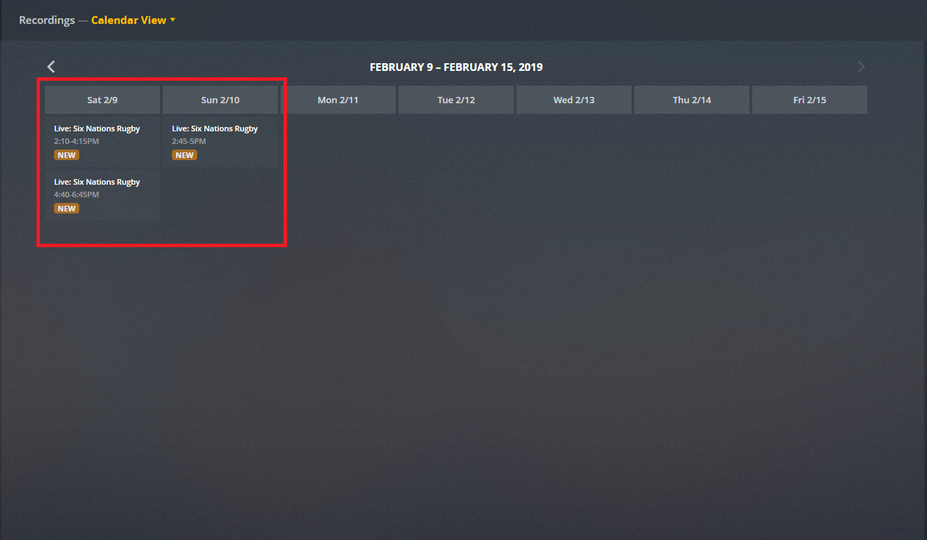
Any update? Still seems to be broken for me.

Should be fixed now in the hosted web app.

Apologies, missed this. The issue is now corrected.

This topic was automatically closed 90 days after the last reply. New replies are no longer allowed.
