Server Version#: 1.28.2.6151-7000
Hey there. I‘m having a little Problem with media recognition lately.
For clarification:
Download file via SABnzbd
Radarr/Sonarr grabs the file from SABnzbd and renames it as follows:
Plex scans library and can’t find the file (sees the folder though)
Put file into mkvtoolnix, don’t change any settings (same file name), hit “start multiplexing”
Plex scans library and finds the file just fine
My setup is as follows:
Synology NAS DS918+ with DSM 7.1-42661 Update 4
PMS official synology package 1.28.2.6151-7000
Downloading from Usenet with SABnzbd 3.6.1 (Docker container)
Using Radarr/Sonarr (Docker containers. Radarr 4.1.0.6175 / Sonarr 3.0.9.1549)
Any help is very appreciated
If the file is named exactly the same I’m guessing mkvtoolnix is wiping out some embedded metadata that’s causing Plex to incorrectly identify the name of the file
Library settings → edit → advanced → uncheck “prefer local metadata” and it will ignore those tags in the properties
Your naming appears to be ok. The only thing I would suggest is having things like “-RLSGRP” in the file should either be erased or contained in the square brackets so Plex ignores it
If this doesn’t fix the problem you can post a specific file you’re having trouble with
Thanks for the reply!
“prefer local metadata” is already unchecked in the library settings.
I tried to put the RLSGRP inside the square bracket, and it didn’t help.
How can i post a file?
You can just post a screen shot of the file you’re having trouble with or copy and paste the exact file name.
If this is a movie there’s also a chance it’s matching something else in your library as a duplicate. That would cause it not to show up
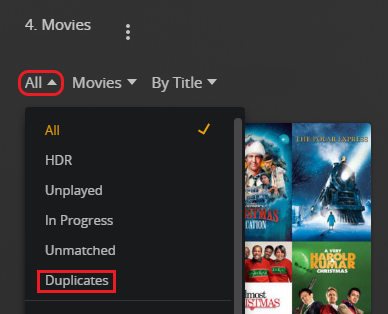
Filter your library to show duplicates and see if the effected file is there. Click the 3 dots and chose “get info” of any movies that show up
This doesn’t explain why running it through mkvtoolnix seems to make a difference but it’s the only thing coming to mind at the moment
You can also supply an imdb or tmdb id tag in the file name in curly brackets
/Movies
   /Batman Begins (2005) {imdb-tt0372784}
I tried your suggestions.
There are no duplicates in the library.
This is what the file was renamed to in Radarr, after downloading it:
Then I tried these variations:
none of these made a difference.
Maybe it could be the release, but it’s happening a lot lately and older releases have the same problem, so maybe not.
I’m not familiar with your downloading and naming procedures but all of your examples should work the way they are named.
I’m starting to think there’s some kind of copyright protection in the file and running it through mkvtoolnix is removing it
that would be strange, since the file is playing flawlessly in any media player i tried.
Maybe I should try to create a new plex server in a docker container and point it to the movies location, so I can rule out false settings on my server.
ChuckPa
September 10, 2022, 7:41pm
8
DEBUG logs zip please which capture the playback attempt ?
Without logs, it’s all guesswork
How do i do that?
dbirch
September 10, 2022, 8:09pm
10
My first bet is file permissions since the naming looks OK. Perform a file scan and post your logs
ChuckPa
September 10, 2022, 8:15pm
11
Let me recap what I’m focusing on:
Remuxing a file implies bad header – which PMS will see when scanning but ultimately ignore as “not a media file”.
This entire sequence of events.
deltadog:
Download file via SABnzbd
Radarr/Sonarr grabs the file from SABnzbd and renames it as follows:
Plex scans library and can’t find the file (sees the folder though)
Put file into mkvtoolnix, don’t change any settings (same file name), hit “start multiplexing”
Plex scans library and finds the file just fine
This screams of permissions especially when a Synology is involved.
PMS follows DSM rules for ACL-based permissions
The third party download tools use chmod (Linux mode) permissions which break / erase the ACLs .
These ‘violators’ (
Ok, thanks for the explanation.
Here is the log file I downloaded after performing a file scan. Hope it helps.
Plex Media Server Logs_2022-09-10_22-14-01.zip (5.3 MB)
ChuckPa
September 10, 2022, 8:40pm
13
Let the “Permission Denied” errors begin
Sep 10, 2022 22:13:45.529 [0x7f41c16d3b00] ERROR - Error opening file '"/volume2/media/tv shows/Ancient Aliens (2010)/Season 18/Ancient Aliens (2010) - S18E11 - Ancient Aliens On Location - Incredible Structures [WEBDL-1080p.h264.AAC]-KOGi.mkv"' - Permission denied (13)
Sep 10, 2022 22:13:45.529 [0x7f41c16d3b00] ERROR - Error opening file '"/volume2/media/tv shows/Ancient Aliens (2010)/Season 18/Ancient Aliens (2010) - S18E12 - Ancient Aliens On Location - Extraordinary Encounters [WEBRip-1080p.x265.EAC3]-Sonarr.mkv"' - Permission denied (13)
Sep 10, 2022 22:13:45.530 [0x7f41c16d3b00] ERROR - Error opening file '"/volume2/media/tv shows/Ancient Aliens (2010)/Season 18/Ancient Aliens (2010) - S18E15 - Ancient Aliens On Location - Mysterious Artifacts [WEBDL-1080p.h264.AAC]-KOGi.mkv"' - Permission denied (13)
.
.
Sep 10, 2022 22:13:47.854 [0x7f41c16d3b00] ERROR - Error opening file '"/volume2/media/tv shows/Archer (2009)/Season 13/Archer (2009) - S13E01 - The Big Con [WEBDL-1080p Proper.h264.EAC3]-GOSSIP.mkv"' - Permission denied (13)
Sep 10, 2022 22:13:47.854 [0x7f41c16d3b00] ERROR - Error opening file '"/volume2/media/tv shows/Archer (2009)/Season 13/Archer (2009) - S13E02 - Operation - Fang [WEBDL-1080p.h264.EAC3]-FLUX.mkv"' - Permission denied (13)
Sep 10, 2022 22:13:47.855 [0x7f41c16d3b00] ERROR - Error opening file '"/volume2/media/tv shows/Archer (2009)/Season 13/Archer (2009) - S13E03 - Saturday [WEBRip-1080p.x265.EAC3]-Sonarr.mkv"' - Permission denied (13)
.
.
Sep 10, 2022 19:47:46.137 [0x7f41c1032b00] ERROR - Error opening file '"/volume2/media/movies/Blade (1998)/Blade (1998).mkv"' - Permission denied (13)
.
.
.
Sep 10, 2022 20:00:00.986 [0x7f41c1032b00] ERROR - Error opening file '"/volume2/media/tv shows/Eden - Untamed Planet (2021)/Season 01/Eden - Untamed Planet (2021) - S01E06 - Alaska - Last American Frontier [WEBDL-2160p.HEVC.HLG.AAC]-NTb-1.mkv"' - Permission denied (13)
Sep 10, 2022 20:00:00.991 [0x7f41c1032b00] DEBUG - File '/volume2/media/tv shows/Eden - Untamed Planet (2021)/Season 01/Eden - Untamed Planet (2021) - S01E06 - Alaska - Last American Frontier [WEBDL-2160p.HEVC.HLG.AAC]-NTb.mkv' didn't exist, can't skip.
Sep 10, 2022 20:00:00.991 [0x7f41c1032b00] ERROR - Error opening file '"/volume2/media/tv shows/Eden - Untamed Planet (2021)/Season 01/Eden - Untamed Planet (2021) - S01E06 - Alaska - Last American Frontier [WEBDL-2160p.HEVC.HLG.AAC]-NTb-1.mkv"' - Permission denied (13)
.
.
.
Sep 10, 2022 22:12:04.800 [0x7f41c16d3b00] ERROR - Error opening file '"/volume1/music/Kreator/2022 - Hate über alles/Kreator [Hate über alles] 01 - Sergio Corbucci Is Dead [FLAC-16bit-44.1kHz-855 kbps].flac"' - Permission denied (13)
Sep 10, 2022 22:12:04.800 [0x7f41c16d3b00] ERROR - Error opening file '"/volume1/music/Kreator/2022 - Hate über alles/Kreator [Hate über alles] 02 - Hate Über Alles [FLAC-16bit-44.1kHz-1060 kbps].flac"' - Permission denied (13)
Sep 10, 2022 22:12:04.800 [0x7f41c16d3b00] ERROR - Error opening file '"/volume1/music/Kreator/2022 - Hate über alles/Kreator [Hate über alles] 03 - Killer of Jesus [FLAC-16bit-44.1kHz-1052 kbps].flac"' - Permission denied (13)
Sep 10, 2022 22:12:04.800 [0x7f41c16d3b00] ERROR - Error opening file '"/volume1/music/Kreator/2022 - Hate über alles/Kreator [Hate über alles] 04 - Crush the Tyrants [FLAC-16bit-44.1kHz-1017 kbps].flac"' - Permission denied (13)
Sep 10, 2022 22:12:04.800 [0x7f41c16d3b00] ERROR - Error opening file '"/volume1/music/Kreator/2022 - Hate über alles/Kreator [Hate über alles] 05 - Strongest of the Strong [FLAC-16bit-44.1kHz-1072 kbps].flac"' - Permission denied (13)
Sep 10, 2022 22:12:04.800 [0x7f41c16d3b00] ERROR - Error opening file '"/volume1/music/Kreator/2022 - Hate über alles/Kreator [Hate über alles] 06 - Become Immortal [FLAC-16bit-44.1kHz-1017 kbps].flac"' - Permission denied (13)
Sep 10, 2022 22:12:04.801 [0x7f41c16d3b00] ERROR - Error opening file '"/volume1/music/Kreator/2022 - Hate über alles/Kreator [Hate über alles] 07 - Conquer and Destroy [FLAC-16bit-44.1kHz-1012 kbps].flac"' - Permission denied (13)
Sep 10, 2022 22:12:04.801 [0x7f41c16d3b00] ERROR - Error opening file '"/volume1/music/Kreator/2022 - Hate über alles/Kreator [Hate über alles] 08 - Midnight Sun [FLAC-16bit-44.1kHz-1054 kbps].flac"' - Permission denied (13)
Sep 10, 2022 22:12:04.801 [0x7f41c16d3b00] ERROR - Error opening file '"/volume1/music/Kreator/2022 - Hate über alles/Kreator [Hate über alles] 09 - Demonic Future [FLAC-16bit-44.1kHz-1042 kbps].flac"' - Permission denied (13)
Sep 10, 2022 22:12:04.801 [0x7f41c16d3b00] ERROR - Error opening file '"/volume1/music/Kreator/2022 - Hate über alles/Kreator [Hate über alles] 10 - Pride Comes Before the Fall [FLAC-16bit-44.1kHz-990 kbps].flac"' - Permission denied (13)
Sep 10, 2022 22:12:04.801 [0x7f41c16d3b00] ERROR - Error opening file '"/volume1/music/Kreator/2022 - Hate über alles/Kreator [Hate über alles] 11 - Dying Planet [FLAC-16bit-44.1kHz-990 kbps].flac"' - Permission denied (13)
.
.
.
Sep 10, 2022 22:12:13.782 [0x7f41c16d3b00] ERROR - Error opening file '"/volume1/music/Heilung/2022 - Drif/Heilung [Drif] 01 - Asja [FLAC-16bit-44.1kHz-757 kbps].flac"' - Permission denied (13)
Sep 10, 2022 22:12:13.782 [0x7f41c16d3b00] ERROR - Error opening file '"/volume1/music/Heilung/2022 - Drif/Heilung [Drif] 02 - Anoana [FLAC-16bit-44.1kHz-771 kbps].flac"' - Permission denied (13)
Sep 10, 2022 22:12:13.782 [0x7f41c16d3b00] ERROR - Error opening file '"/volume1/music/Heilung/2022 - Drif/Heilung [Drif] 03 - Tenet [FLAC-16bit-44.1kHz-766 kbps].flac"' - Permission denied (13)
Sep 10, 2022 22:12:13.782 [0x7f41c16d3b00] ERROR - Error opening file '"/volume1/music/Heilung/2022 - Drif/Heilung [Drif] 04 - Urbani [FLAC-16bit-44.1kHz-700 kbps].flac"' - Permission denied (13)
Sep 10, 2022 22:12:13.782 [0x7f41c16d3b00] ERROR - Error opening file '"/volume1/music/Heilung/2022 - Drif/Heilung [Drif] 05 - Keltentrauer [FLAC-16bit-44.1kHz-739 kbps].flac"' - Permission denied (13)
Sep 10, 2022 22:12:13.782 [0x7f41c16d3b00] ERROR - Error opening file '"/volume1/music/Heilung/2022 - Drif/Heilung [Drif] 06 - Nesso [FLAC-16bit-44.1kHz-694 kbps].flac"' - Permission denied (13)
Sep 10, 2022 22:12:13.782 [0x7f41c16d3b00] ERROR - Error opening file '"/volume1/music/Heilung/2022 - Drif/Heilung [Drif] 07 - Buslas Bann [FLAC-16bit-44.1kHz-695 kbps].flac"' - Permission denied (13)
Sep 10, 2022 22:12:13.782 [0x7f41c16d3b00] ERROR - Error opening file '"/volume1/music/Heilung/2022 - Drif/Heilung [Drif] 08 - Nikkal [FLAC-16bit-44.1kHz-705 kbps].flac"' - Permission denied (13)
Sep 10, 2022 22:12:13.782 [0x7f41c16d3b00] ERROR - Error opening file '"/volume1/music/Heilung/2022 - Drif/Heilung [Drif] 09 - Marduk [FLAC-16bit-44.1kHz-667 kbps].flac"' - Permission denied (13)
.
.
.
u.s.w.
Multiple methods are available.
Go to the media shared folder and apply the ACL again.Apply to this folder, sub-folders and files ”
To loosen the apps which break the ACL:
This is how to prevent Sonarr (running on DSM 7) from preventing access to new media and blocking existing media.
(chown Group = PlexMediaServer is not required)
Wow! This is amazing.
I did exactly as you described, did a library scan and BOOOM… lots of stuff gets detected, that I didn’t even know was missing.
Strange thing is, that some episodes would show up, while others wouldn’t, although they were in the same folder.
Anyways, thank you so much, my friend! ::
I am having a similar problem. Some of my personal/home movies show up in my plex media server and some do not. I don’t think it’s the file format, because both mp4 and .mov show up. I cannot find “prefer local metadata” . it is not in advanced settings. some of my movie files are from p2p, some can be seen and other cannot. Should I change the video conversion process? or something else? i don’t know where the permissions stuff is if that’s the problem.
ChuckPa
September 14, 2022, 9:20pm
17
@erikastreams
If some do and some don’t, and all are of type “Home Videos” / “Other Videos”
then it is a permission problem were the files don’t allow “PlexMediaServer” to read them. (Linux, which is what DSM is based on, is very strict about permissions).
Please read here. It applies to the entire shared folder but also will fix any individual ones inside the shared folder much easier than ferreting it out.

 ) can be setup to not break things too badly.


