Plex fails to open ports when manually restarted

Hi all, I hope one of you can help me solve this, but I do have to preface in saying it’s less a Plex issue and more of a Synology but I’m hoping someone has had experience in dealing with this.

Anyway, the issue I’m specifically having is that if I manually stop & start PMS (because it’s misbehaving or whatever) or if I have to update the PMS app, then all of sudden, PMS can no longer be reached by the internet (no remote access).

Now, it appears this is because PMS can’t port forward from my Synology to the router. But this is only limited to when I manually start the PMS process. If I restart my NAS, and PMS gets started by the system, then all of a sudden it can port forward and works without issue. Does anyone know why this is happening?

Enable debug log and save it. Stop and start Plex and then post the logs here

As requested: Plex Media Server Logs_2021-05-14_09-53-01.zip (3.0 MB)

In the failed case, Plex Media Server is unable to automatically configure a port forwarding rule on your router via NAT-PMP; it doesn’t appear as though the router is responding to the SSDP requests from Plex (or if it did, then the replies aren’t making it to Plex).

Here’s what the successful case looks like (from your logs, Plex Media Server.3.log):

May 13, 2021 19:42:45.402 [0x7f4097a23700] DEBUG - NAT: UPnP, found device <http://192.168.1.1:49152/IGDdevicedesc1.xml> with private address <192.168.1.11>
May 13, 2021 19:42:45.410 [0x7f4097a23700] DEBUG - NAT: UPnP, usable device <http://192.168.1.1:49152/IGDdevicedesc1.xml> with private address <192.168.1.11>.
May 13, 2021 19:42:45.413 [0x7f4097a23700] DEBUG - NAT: UPnP, public address is REDACTED
May 13, 2021 19:42:45.524 [0x7f4097a23700] DEBUG - HTTP requesting PUT https://plex.tv/devices/fd58848e4da0561fd58b8fc2d7d489d7b85cfb50?Connection[][uri]=http://192.168.1.11:32400&httpsEnabled=1&httpsRequired=0&dnsRebindingProtection=0&natLoopbackSupported=0&X-Plex-Token=xxxxxxxxxxxxxxxxxxxx
May 13, 2021 19:42:45.619 [0x7f4097a23700] DEBUG - HTTP/1.1 (0.1s) 200 response from PUT https://plex.tv/devices/fd58848e4da0561fd58b8fc2d7d489d7b85cfb50?Connection[][uri]=http://192.168.1.11:32400&httpsEnabled=1&httpsRequired=0&dnsRebindingProtection=0&natLoopbackSupported=0&X-Plex-Token=xxxxxxxxxxxxxxxxxxxx (reused)
May 13, 2021 19:42:46.005 [0x7f4097d11700] DEBUG - NAT: UPnP, found device <http://192.168.1.11:5000/ssdp/desc-DSM-eth0.xml> with private address <192.168.1.11>
May 13, 2021 19:42:46.010 [0x7f4097d11700] DEBUG - NAT: UPnP, found device <http://192.168.1.1:49152/IGDdevicedesc1.xml> with private address <192.168.1.11>
May 13, 2021 19:42:46.018 [0x7f4097d11700] DEBUG - NAT: UPnP, usable device <http://192.168.1.1:49152/IGDdevicedesc1.xml> with private address <192.168.1.11>.
May 13, 2021 19:42:46.208 [0x7f4097d11700] DEBUG - NAT: UPnP, mapped port 13662 to 192.168.1.11:32400.

That sequence isn’t present in the log from the most recent start of Plex Media Server(Plex Media Server.log); it never sees a reply from your router:

May 14, 2021 09:52:19.315 [0x7fa29ba23700] DEBUG - NAT: UPnP, didn't find usable IGD.
May 14, 2021 09:52:19.393 [0x7fa29b447700] DEBUG - NAT: UPnP, getPublicIP didn't find usable IGD.
May 14, 2021 09:52:19.565 [0x7fa29ba23700] DEBUG - NAT: UPnP, didn't find usable IGD.
May 14, 2021 09:52:19.870 [0x7fa299f76700] DEBUG - NAT: UPnP, didn't find usable IGD.
May 14, 2021 09:52:19.942 [0x7fa2a88f1700] DEBUG - NAT: UPnP, getPublicIP didn't find usable IGD.
May 14, 2021 09:52:20.121 [0x7fa299f76700] DEBUG - NAT: UPnP, didn't find usable IGD.
May 14, 2021 09:52:38.638 [0x7fa2a8315700] DEBUG - NAT: UPnP, didn't find usable IGD.
May 14, 2021 09:52:38.709 [0x7fa23f159700] DEBUG - NAT: UPnP, getPublicIP didn't find usable IGD.
May 14, 2021 09:52:38.889 [0x7fa2a8315700] DEBUG - NAT: UPnP, didn't find usable IGD.

You would likely see more consistent behavior if you configure a manual port forwarding rule on your router. The rule would look something like:

  • Remote/Source IP address: May not be present, but if it is, leave blank or set to whatever value means “any” to your router.
  • External/public port: 32400 (you can specify a different value; if you do, I’d recommend something 50000 or above)
  • Internal IP address: IP address of your Plex server (192.168.1.11)
  • Internal port: Must be 32400
  • Protocol: TCP

If you do configure a manual port forwarding rule, ensure you enable “Manually specify public port” in your Plex settings, under Settings (Server Name) -> Remote Access. Specify the same public/external port you configured in the port forwarding rule your router.

2 Likes

Thanks for your detailed response. I can confirm that manually specifying a port of course works as expected and consistently and so is what I’ve done in the meantime.

However, I prefer PMS port-forwarding itself since that way it creates a random port on every start up and also, I just want to find out why it’s failing in the first place. I’m inclined to think my router is responding to the requests but that they just aren’t making it to Plex, since it only fails in a specific scenario (when PMS process is started manually).

I’m going to try the Synology forums but thanks for your help.

That’s fair.

If you have access to the tcpdump utility on your NAS, dumping its network traffic might provide some additional insight as to where the process is breaking down. Something like the following:

sudo tcpdump -i INTERFACE -vvv -A \( \( src host ROUTER_IP and dst host NAS_IP \) or \( src host NAS_IP and dst host 239.255.255.250 \) or \( src host NAS_IP and dst host ROUTER_IP \) \) and port 1900

Replace ROUTER_IP and NAS_IP with the appropriate IP addresses; replace INTERFACE with the name of the network interface which is used by Plex Media Server (“eth0” for example). If you don’t know the interface name you may be able to find it using tcpdump -D; or, you could just leave the -i and interface out entirely to capture from all interfaces.

This will dump (to the terminal) all SSDP queries sent from the server to the network, and show all of the replies. It won’t show the steps of the process where Plex actually attempts to configure the port forward as that’s done over a dynamically-selected port. You can make it show these interactions as well by removing the and port 1900 portion of the command, but it will potentially generate a great deal more unrelated output.

Here’s what an SSDP query and response look like on my server:

13:35:37.363085 IP (tos 0x0, ttl 1, id 33333, offset 0, flags [none], proto UDP (17), length 129, bad cksum 0 (->3cce)!)
    10.10.0.101.49301 > 239.255.255.250.ssdp: [bad udp cksum 0xfae7 -> 0x4999!] UDP, length 101
..^.... f.2x..E....5......

.e.......l.m..M-SEARCH * HTTP/1.1
HOST: 239.255.255.250:1900
MAN: "ssdp:discover"
ST: upnp:rootdevice
MX: 5


13:35:37.414224 IP (tos 0x0, ttl 64, id 24108, offset 0, flags [DF], proto UDP (17), length 383)
    10.10.0.1.ssdp > 10.10.0.101.49301: [udp sum ok] UDP, length 355
. f.2xx. D:...E...^,@.@...

..

.e.l...k.VHTTP/1.1 200 OK
CACHE-CONTROL: max-age=120
ST: upnp:rootdevice
USN: uuid:50f063f0-ec48-4742-9f6c-63207f63ba29::upnp:rootdevice
EXT:
SERVER: Debian/wheezy UPnP/1.1 MiniUPnPd/2.1
LOCATION: http://10.10.0.1:32788/rootDesc.xml
OPT: "http://schemas.upnp.org/upnp/1/0/"; ns=01
01-NLS: 1621097231
BOOTID.UPNP.ORG: 1621097231
CONFIGID.UPNP.ORG: 1337

If you see something similar in the failing case in your environment it would mean that the responses are making it to the NAS, but are not being being seen by Plex for some reason.

I didn’t show it in the snippets I posted from your logs, but there are some SSDP replies from devices on your network which do make it back to Plex (from a device at 192.168.1.36, if I remember correctly). So it’s not that all SSDP replies go missing.

1 Like

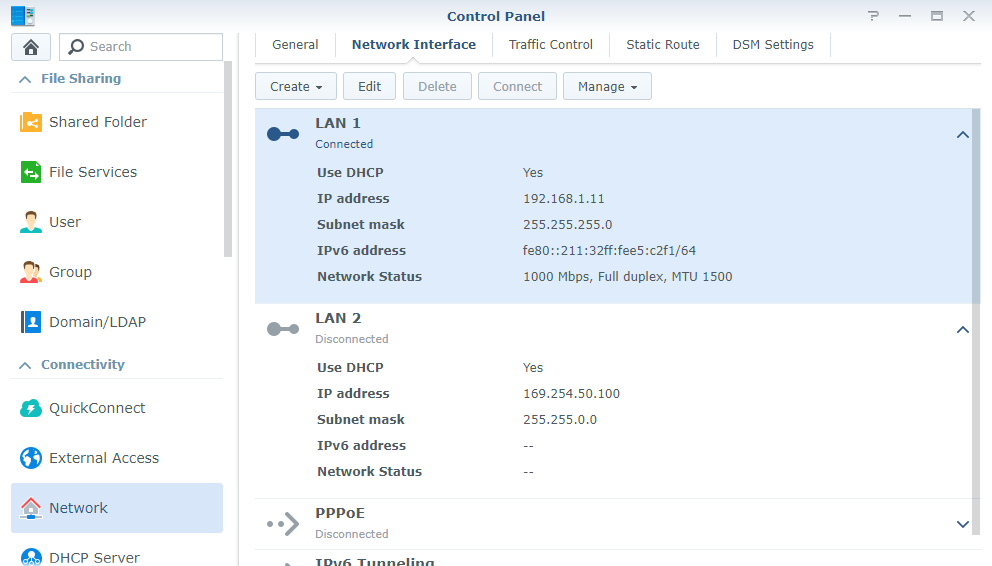
Disconnect the cable from eth1 and leave it connected only to the one with IP .11

eth1 is not connected.

It’s not getting any IP, but it’s definitely connected.

eth1 (169.254.50.100) Using APIPA

Just to make sure run sudo ip link set eth1 down, then restart Plex and check if UPnP configuration works.

Hmm, I can tell you it’s definitely not.

DSM:

And just checked PMS, it only sees eth0. Is there still a point in running the command?

Didn’t know it was a nas. I don’t think the command will work then. Just shutdown that interface because Plex is seeing that interface as active

NetworkService: Browsing on interface 169.254.50.100 on broadcast address 169.254.255.255

Ok well the command still worked, and LAN 2 has now disappeared from DSM. I assume if I ever need to enable it again it’s just sudo ip link eth1 up?

Anyways testing right now if this has worked.

Yep

Ok, waiting for your test results

Ok, so I found out I do have access to tcpdump on my NAS and here’s the results.
The first couple where it says

ST: urn:schemas-upnp-org:device:InternetGatewayDevice:1

Is from when I started PMS (it was stopped before starting tcpdump) and surprisingly it port-forwarded just fine. I even double-checked this by pressing the ‘apply’ button in PMS Settings > remote access, and yeah, it was working fine, fully accessible by the internet.

root@Mahir007-NAS:~# sudo tcpdump -i eth0 -vvv -A \( \( src host 192.168.1.1 and dst host 192.168.1.11 \) or \( src host 192.168.1.11 and dst host 239.255.255.250 \) or \( src host 192.168.1.11 and dst host 192.168.1.1 \) \) and port 1900

tcpdump: listening on eth0, link-type EN10MB (Ethernet), capture size 262144 bytes

19:17:44.797971 IP (tos 0x0, ttl 2, id 52304, offset 0, flags [DF], proto UDP (17), length 165)
    SynologyNAS.cust.communityfibre.co.uk.52240 > 239.255.255.250.ssdp: [bad udp cksum 0xb250 -> 0xe7c3!] UDP, length 137
E....P@....I...........l...PM-SEARCH * HTTP/1.1
HOST: 239.255.255.250:1900
ST: urn:schemas-upnp-org:device:InternetGatewayDevice:1
MAN: "ssdp:discover"
MX: 3


19:17:44.828582 IP (tos 0x0, ttl 2, id 52326, offset 0, flags [DF], proto UDP (17), length 165)
    SynologyNAS.cust.communityfibre.co.uk.33940 > 239.255.255.250.ssdp: [bad udp cksum 0xb250 -> 0x2f40!] UDP, length 137
E....f@....3...........l...PM-SEARCH * HTTP/1.1
HOST: 239.255.255.250:1900
ST: urn:schemas-upnp-org:device:InternetGatewayDevice:1
MAN: "ssdp:discover"
MX: 3


19:17:52.430059 IP (tos 0x0, ttl 1, id 58375, offset 0, flags [DF], proto UDP (17), length 146)
    SynologyNAS.cust.communityfibre.co.uk.45184 > 239.255.255.250.ssdp: [bad udp cksum 0xb23d -> 0xa4a6!] UDP, length 118
E.....@................l.~.=M-SEARCH * HTTP/1.1
HOST: 239.255.255.250:1900
MAN: "ssdp:discover"
MX: 2
ST: urn:ses-com:device:SatIPServer:1


19:17:52.430110 IP (tos 0x0, ttl 1, id 58376, offset 0, flags [DF], proto UDP (17), length 146)
    SynologyNAS.cust.communityfibre.co.uk.34737 > 239.255.255.250.ssdp: [bad udp cksum 0xb23d -> 0xcd75!] UDP, length 118
E.....@................l.~.=M-SEARCH * HTTP/1.1
HOST: 239.255.255.250:1900
MAN: "ssdp:discover"
MX: 2
ST: urn:ses-com:device:SatIPServer:1


19:17:54.798483 IP (tos 0x0, ttl 1, id 59645, offset 0, flags [DF], proto UDP (17), length 129)
    SynologyNAS.cust.communityfibre.co.uk.54422 > 239.255.255.250.ssdp: [bad udp cksum 0xb22c -> 0x7e53!] UDP, length 101
E.....@................l.m.,M-SEARCH * HTTP/1.1
HOST: 239.255.255.250:1900
MAN: "ssdp:discover"
ST: upnp:rootdevice
MX: 5


19:18:04.798885 IP (tos 0x0, ttl 1, id 2720, offset 0, flags [DF], proto UDP (17), length 129)
    SynologyNAS.cust.communityfibre.co.uk.54422 > 239.255.255.250.ssdp: [bad udp cksum 0xb22c -> 0x7e53!] UDP, length 101
E...
.@................l.m.,M-SEARCH * HTTP/1.1
HOST: 239.255.255.250:1900
MAN: "ssdp:discover"
ST: upnp:rootdevice
MX: 5


19:18:14.799144 IP (tos 0x0, ttl 1, id 3912, offset 0, flags [DF], proto UDP (17), length 129)
    SynologyNAS.cust.communityfibre.co.uk.54422 > 239.255.255.250.ssdp: [bad udp cksum 0xb22c -> 0x7e53!] UDP, length 101
E....H@....v...........l.m.,M-SEARCH * HTTP/1.1
HOST: 239.255.255.250:1900
MAN: "ssdp:discover"
ST: upnp:rootdevice
MX: 5


19:18:24.799618 IP (tos 0x0, ttl 1, id 4773, offset 0, flags [DF], proto UDP (17), length 129)
    SynologyNAS.cust.communityfibre.co.uk.54422 > 239.255.255.250.ssdp: [bad udp cksum 0xb22c -> 0x7e53!] UDP, length 101
E.....@................l.m.,M-SEARCH * HTTP/1.1
HOST: 239.255.255.250:1900
MAN: "ssdp:discover"
ST: upnp:rootdevice
MX: 5

But after 10 minuets, I thought I’d just try again because well, every other time I manually did the stop/start for PMS, it fails to port-forward and just as I expected, it failed and checking tcpdump, this is all that came out:

root@Mahir007-NAS:~# sudo tcpdump -i eth0 -vvv -A \( \( src host 192.168.1.1 and dst host 192.168.1.11 \) or \( src host 192.168.1.11 and dst host 239.255.255.250 \) or \( src host 192.168.1.11 and dst host 192.168.1.1 \) \) and port 1900

tcpdump: listening on eth0, link-type EN10MB (Ethernet), capture size 262144 bytes

19:37:54.838958 IP (tos 0x0, ttl 1, id 16552, offset 0, flags [DF], proto UDP (17), length 129)
    SynologyNAS.cust.communityfibre.co.uk.45700 > 239.255.255.250.ssdp: [bad udp cksum 0xb22c -> 0xa065!] UDP, length 101
E...@.@................l.m.,M-SEARCH * HTTP/1.1
HOST: 239.255.255.250:1900
MAN: "ssdp:discover"
ST: upnp:rootdevice
MX: 5


19:38:04.839155 IP (tos 0x0, ttl 1, id 17760, offset 0, flags [DF], proto UDP (17), length 129)
    SynologyNAS.cust.communityfibre.co.uk.45700 > 239.255.255.250.ssdp: [bad udp cksum 0xb22c -> 0xa065!] UDP, length 101
E...E`@....^...........l.m.,M-SEARCH * HTTP/1.1
HOST: 239.255.255.250:1900
MAN: "ssdp:discover"
ST: upnp:rootdevice
MX: 5


19:38:14.839595 IP (tos 0x0, ttl 1, id 25729, offset 0, flags [DF], proto UDP (17), length 129)
    SynologyNAS.cust.communityfibre.co.uk.45700 > 239.255.255.250.ssdp: [bad udp cksum 0xb22c -> 0xa065!] UDP, length 101
E...d.@...c=...........l.m.,M-SEARCH * HTTP/1.1
HOST: 239.255.255.250:1900
MAN: "ssdp:discover"
ST: upnp:rootdevice
MX: 5


19:38:24.839888 IP (tos 0x0, ttl 1, id 31469, offset 0, flags [DF], proto UDP (17), length 129)
    SynologyNAS.cust.communityfibre.co.uk.45700 > 239.255.255.250.ssdp: [bad udp cksum 0xb22c -> 0xa065!] UDP, length 101
E...z.@...L............l.m.,M-SEARCH * HTTP/1.1
HOST: 239.255.255.250:1900
MAN: "ssdp:discover"
ST: upnp:rootdevice
MX: 5

This hasn’t changed since then with it still failing on my latest try. Does the tcpdump reveal any useful information as to why it worked on the first try but then for no obvious reason, fails on the second?

And @CostaHT, unfortunately taking down LAN 2 did nothing to change things.
The dump is informative, in that it shows that the SSDP reply from your router doesn’t reach the NAS’ network interface. This suggests that the reply either isn’t being sent by router, or that it is being dropped somewhere upstream from the NAS.

Or the router is just dropping the packets due to them being malformed

bad udp cksum

Does the command
ethtool --show-offload eth0 work on your device

yep:

root@Mahir007-NAS:~# ethtool --show-offload eth0

Features for eth0:
rx-checksumming: on
tx-checksumming: on
        tx-checksum-ipv4: on
        tx-checksum-ip-generic: off [fixed]
        tx-checksum-ipv6: on
        tx-checksum-fcoe-crc: off [fixed]
        tx-checksum-sctp: off [fixed]
scatter-gather: on
        tx-scatter-gather: on
        tx-scatter-gather-fraglist: off [fixed]
tcp-segmentation-offload: on
        tx-tcp-segmentation: on
        tx-tcp-ecn-segmentation: off [fixed]
        tx-tcp6-segmentation: on
udp-fragmentation-offload: off [fixed]
generic-segmentation-offload: on
generic-receive-offload: on
large-receive-offload: off [fixed]
rx-vlan-offload: on
tx-vlan-offload: on
ntuple-filters: off [fixed]
receive-hashing: off [fixed]
highdma: on [fixed]
rx-vlan-filter: off [fixed]
vlan-challenged: off [fixed]
tx-lockless: off [fixed]
netns-local: off [fixed]
tx-gso-robust: off [fixed]
tx-fcoe-segmentation: off [fixed]
tx-gre-segmentation: off [fixed]
tx-ipip-segmentation: off [fixed]
tx-sit-segmentation: off [fixed]
tx-udp_tnl-segmentation: off [fixed]
fcoe-mtu: off [fixed]
tx-nocache-copy: off
loopback: off [fixed]
rx-fcs: off
rx-all: off
tx-vlan-stag-hw-insert: off [fixed]
rx-vlan-stag-hw-parse: off [fixed]
rx-vlan-stag-filter: off [fixed]
l2-fwd-offload: off [fixed]
busy-poll: off [fixed]

This topic was automatically closed 90 days after the last reply. New replies are no longer allowed.
