My problems remain too and I feel like it’s acting like a yo-yo. I’ve been experimenting like crazy to find a solution. Without access to the code I can’t find the cause.
It’s only affecting my TV Shows library. My library is split over two Synology 1821+ units. Both units are affected. But I can get one to fully load everything as long as I remove both shares, then re-add them back then do a manual scan… This works sometimes. Sometimes I have to repeat the process. But I have to do it every single time I do a manual scan.
The first server will shift what’s missing depending on my actions. If I just leave it alone, the same files will be missing. It’s about half the content on that server. If I remove just those folders that are missing and set them aside so they’re not scanned, run a manual scan, those files will align both Unavailable in the server and the Get Info screen. Then when I run a second scan, after I remove that share and re-add it, those missing files will return and a new group will be unavailable. I can repeat this over and over and files just keep shifting what’s missing.
This is genuinely the first time I may start seriously looking an Emby. Especially since the co-founder chimed in earlier in this thread and chose to be defensive, emotional, and passive aggressive instead of inquiring why I feel the way I do and possibly find out how he can turn the experience I’m having around. That could’ve been a more tact approach.
I do hope they can fix this because managing a library of my size is a much easier than when I last looked at Emby or Jellyfin. I just wish Plex chose to be more accountable instead of always defaulting to placing blame on its users.
@Atomatth has asked me to step in and assist with this due my knowledge of Synology and networking.
First thing I see in here is Frustration and rock throwing.
Might we dispense with all that while working through this?
I would like to first get an understanding of where the mounts on the Syno are, specifically:
To manually created shared folders , with or without subfolders ?
To the 'Home" ( “Homes” service) shared folder mount ?
Next, are there any media gathering/processing applications running on the Syno which could otherwise change permissions? Remember, You as Admin on the Syno will see all files regardless of permissions where SMB might not.
Are there any Task Scheduler scripts which hard-set permissions in the media shared folders ?
In someone’s log I viewed, I saw this, which is a telltale sign of permissions problems
Sep 20, 2024 12:56:17.719 [0x70000c2e2000] DEBUG - Scanner: Processing directory /Volumes/Media/Movies/Terminator Salvation (2009) (parent: yes)
Sep 20, 2024 12:56:17.732 [0x70000c2e2000] DEBUG - File '/Volumes/Media/Movies/Terminator Salvation (2009)/Terminator Salvation 2009 Bluray-1080p.mp4' was marked as deleted, can't skip.
Sep 20, 2024 12:56:17.733 [0x70000cc18000] DEBUG - Native Scanner: Executed Local Metadata stage in 0.00 sec.
Sep 20, 2024 12:56:17.733 [0x70000cc18000] DEBUG - Looking for path match for [/Volumes/Media/Movies/Terminator Salvation (2009)/Terminator Salvation 2009 Bluray-1080p.mp4]
Sep 20, 2024 12:56:17.733 [0x70000c2e2000] DEBUG - Activity: updated activity 0e6b03a2-eb18-411b-9c6a-52d7226e4d93 - completed 69.3% - Scanning Movies
Supplemental Question:
While Apple has deprecated NFS (no longer maintaining it), does it still function in MacOS Sequoia ?
I ask because I’d be interested to see a comparison.
Also, knowing that file notification events do not work over the LAN. The first time PMS will know a file is inaccessible is when it tries to access it.
Both Linux and MacOS are immediately aware of local file system changes due to the kernel’s Notify event service.
Windows emulates network notification by periodically scanning for changes.
(which PMS library settings can be set to also emulate)
How can I help? Where do we begin?
Most of you sohuld know I’m always available to help. Just call me… @ChuckPa
There are apparently some issues with Sequoia’s network stack and/or firewall which are causing issues for some applications (VPNs, security tools, etc.). I’m not blaming Sequoia, but given that networking issues have already been discovered it might be prudent to investigate that angle. In particular, if you have their firewall enabled and are in a position to disable it, do so and re-test.
Hi @ChuckPa Thank you for taking the lead on this.
Promise not to throw stones, all I ask is to please look inward before blaming us.
I’ve already explained this in detail above, but here’s a summary… This is a problem in Plex’s code. How do I know this? Infuse works perfectly connected thru Plex Direct and Plex doesn’t. All files are accessible and playable thru every type of player EXCEPT Plex. The discrepancy between the trashcan and the file being available is where the problem lies. Why is there a trashcan and the file says unavailable for playback, but the file in Get Info is there and available? It’s a head scratcher.
If it was Sequoia or Synology then these files would universally show a problem. The problem is only with the discrepancy in Plex. The same files play on every device thru Infuse that don’t play thru Plex.
And please excuse my frustration, I was jerked around by an employee for more than four years about a problem only to see him, thankfully, fired during last summer’s layoffs, and the next guy who helped, looked to the code first and helped find the problem in a matter of months and then he quit. Unfortunately, the problem wasn’t fully resolved and staff has ignored every request to help resolve it for months. That’s why my patience has run thin.
All that being said, water under the the bridge, I’m happy to provide everything I can to you via PM. However, the four questions you brought up are all irrelevant. I’ve already explained why in this thread.
I TOTALLY understand your frustration. We WILL get through this.
I know how Plex looks at files over the network. It’s REALLY basic stuff.
First, I would not rule out MacOS. This type of bug has happened before with MacOS. I am NOT a MacOS Cool-Aid drinker.
I want a completely level playing field. Don’t worry, I will be more than happy to through fellow Engineers under the bus and write trouble tickets to champion when I have to. I will be equally happy to throw Apple or Synology under the bus too if that’s where the evidence takes us.
If it’s something I can do on the Synology, then I’ll do it (I do all the Syno packaging). If not, I’ll use my connections and take it to them directly but I seriously doubt --since it’s not happening to me on Linux (Ubuntu) with my Synology, that Synology or PMS are the problem here.
The only new player in town is MacOS 15.
Now, Let’s PROVE where this issue is?
If MacOS still supports NFS (It should)
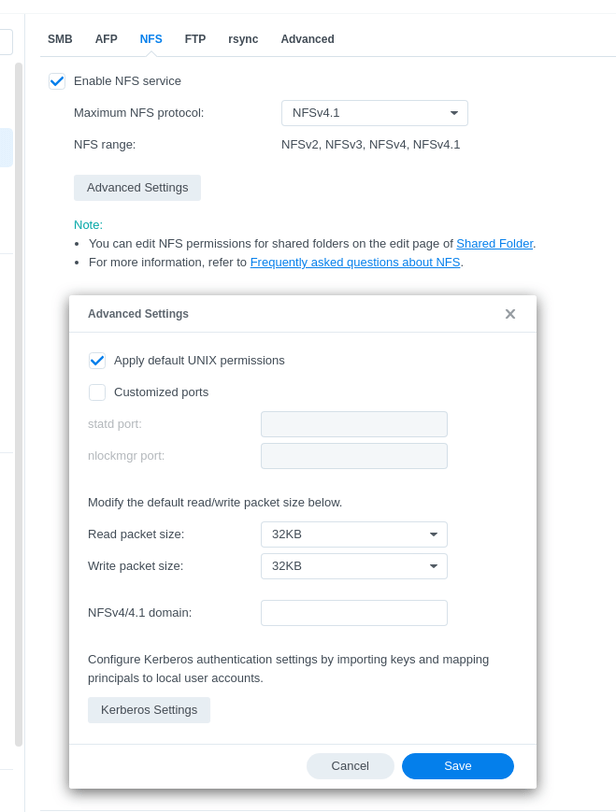
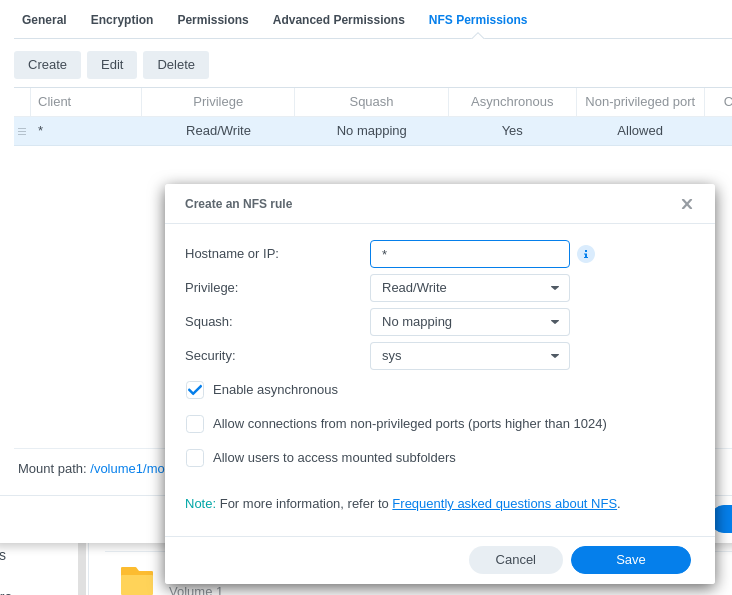
– Syno → Control Panel - File Services - NFS - Enable NFS
Now mount the volume on MacOS and give it a different entry under Volumes (Think you can still do this?)
Go into PMS
Create a new test library section
Point it at only that NFS shared folder
Turn off all the Advanced options in Plex (we want the bare basics here)
Let PMS ingest what it finds.
When it’s done, compare between the SMB and the NFS library mounted sections.
If the problem is the SMB driver (which is the default on MacOS then
NFS mount will not have any problems.
This is why I’m not 100% convinced MacOS 15 is blameless because I sit here in the “Developer seat” with my Support hat on.
On Monday, Apple released its latest computer operating system update called macOS 15, or Sequoia. And, somehow, the software update has broken the functionality of several security tools made by CrowdStrike, SentinelOne, Microsoft, and others, according to posts on social media, as well as messages posted in a Mac-focused Slack channel.
At this point, it’s unclear exactly what is the issue, but it appears to affect several products made by companies that provide software for macOS users and enterprises, which has caused frustration among people who work on and with macOS-focused security tools.
“As a developer of macOS security tools, it’s incredibly frustrating to time and time again have to deal with (understandably) upset users (understandably) blaming your tools for breaking their Macs, when in reality it was Apple’s fault all along,” said Patrick Wardle, the founder of Mac and iOS security startup DoubleYou, and a longtime expert on macOS security.
I was having the same issue(s) as several others. I took the drastic step of doing a clean install of macOS Sonoma 14.7 [downgrading from macOS Sequoia 15.0] and doing a fresh install of Plex Media Server.
After several hours of effort and reloading all my libraries [a couple thousand movies, tons of TV episodes and over 10,000 music tracks] I can say that I am not seeing the issue anymore.
Might be too early to call it a success but I am going to bed and will report back tomorrow AM to let everyone know if this solved the issue for me.
Just a refresher, I had 6 different libraries in PMS and ONLY my HD Movies Library was having the issue of disappearing movies [approx 2/3 of the movies were not showing up]. Scanning and rescanning would bring some back but they would disappear again pretty quickly.
My 4k Movies Library, my 4k TV Library, HD TV Library, Music and the other libraries were NOT affected by this issue for some reason - thankfully!
I will report back in the morning. I hope this helps someone…
Thx.
MacStudio M1 Max, 64GB running macOS Sonoma 14.7 (as of now)
Synology 1819+
PMS Version 1.41.0.8992
@ChuckPa… Thank you for the time you’ve put into this. I just have a few questions, If this was really an issue with macOS, and possibly SMB, why isn’t Emby having this issue right now?
I’m running Emby on the same server and pointing to the exact same libraries as Plex. Emby has no issues. What’s more is that like many others in here, this Plex issue is not affecting all my libraries.
Furthermore, something I noticed this morning, all the movies of mine that had the trashcan no longer do. And now I can play the movies. So at some point, subsequent scans will bring the content back, and other scans they will disappear. Does this behavior align with what you’d expect from the Sequoia issues you’re referencing?
Edit: I meant to add that it’s also not at all affecting newer content for me. Only titles I added 3 months back or more. Thought that was interesting.
UPDATE: Woke up this AM and the first thing I did was check my PLEX libraries. I am happy to report that all is good.
I recommend that everyone having issues downgrade back to Sonoma 14.7 [last version of Sonoma]. You’ll need to create a bootable installer on a USB thumb drive to do this. If you are unsure how to create one I highly recommend using the instructions provided here:
The guy has some good tutorials as well as multiple versions of macOS going back to macOS Sierra.
Ok just wanting to lay out all the observations we have so far.
Affected Environment:
MacOS 15
Synology NAS
One NAS or multiple NASs
SMB mount
One mount or multiple mounts
Behavior:
Some files go missing after a library scan
in some cases it’s an entire library goes missing (entire share)
in some cases only specific number of files go missing (not the entire share)
Potential work around
Disable any and all automatic scanning options for now.
Settings > Server Settings > Library
Disable Scan my library automatically
Disable Run a partial scan when changes are detected
Disable Include music libraries in automatic updates
Disable Scan my library periodically
Save
It has been reported that if you readd the same path to any of the affected libraries the missing files should be restored.
Select Edit Library
Select Add Folders
Select Browse for Media Folder
Select the same existing folder
Save
I would like others to confirm temporary work around. Obviously if you are adding new media to these libraries and want them scanned in, you might need to jump through these hoops a couple times in order to get them in.
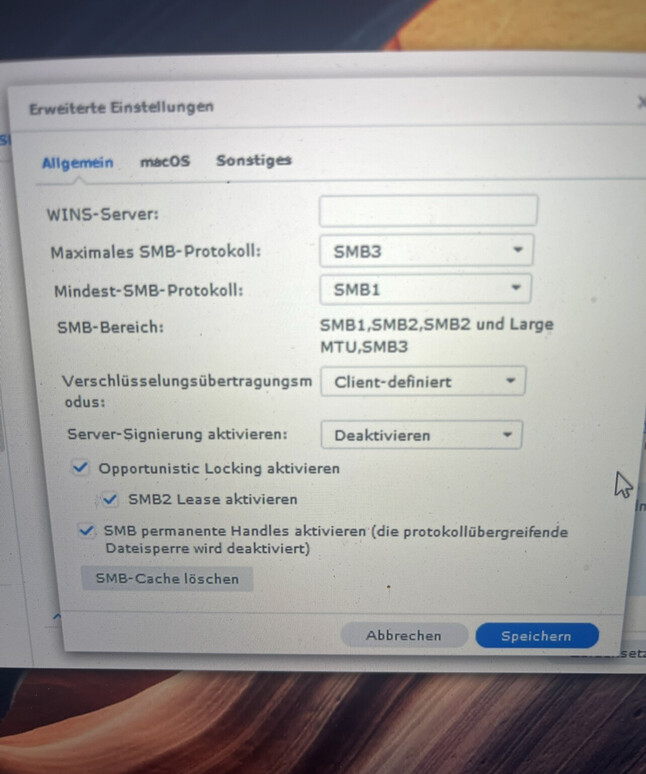
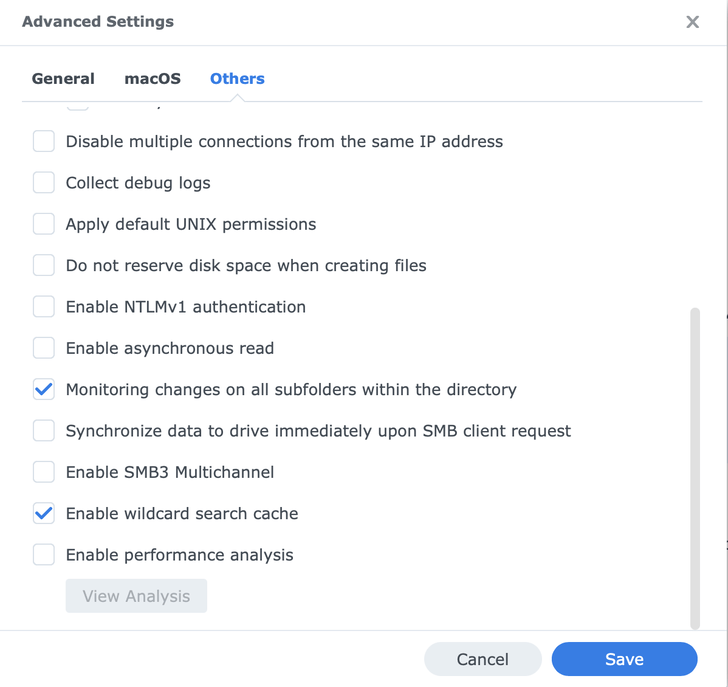
Another data point to have from any affected users here, is your SMB settings from Synology.
I have a Mac Mini M1 with Sonoma 14.6.1, with Plex Media Server 1.41.0.8994, and a Synology NAS DS1817+ with DSM 7.2.2-72806. It works great, and before updating it to Sequoia I did the following:
I have updated a MacBook Pro M1 Max to Sequoia, installed Plex Media Server, and connected to the same Synology NAS. I have added my libraries (Movies, with 2.927 movies on it, and 480 TV shows), and the Sequoia machine has the same items than the Sonoma one.
I want to share my Synology and the MacOS configs, to see if it helps.
SMB config on the Synology:
Has anyone else tested switching their Synology SMB settings to a max level of SMB2 yet? I’m curious if this might actually temporarily address the issue as scanja500 noted above. I’m going to try this later this evening.
If it does, would point to an issue / change that Apple introduced with MacOS1 15.0 and their SMB3 protocol possibly.
I already tried this during my initial troubleshooting, and it’s NOT Synology.
If you’re gonna keep troubleshooting Apple and Synology to eliminate everything it could be before looking at your own code, I’m just gonna revert back to Sonoma and leave it to others to help you solve this.
It’s in your code. I don’t know how many times I have to say this… IT’S ONLY PLEX that isn’t working properly,. Infuse, VLC, IINA, QuickTime, etc all work. If it was Sequoia or Synology then these would have similar problems.
I haven’t stated that it wasn’t. I’m only asking for more data points to try to reproduce the issue. So far I have not been able to. We are looking at all paths here. Clearly there is an issue with this specific environment of MacOS 15 and Synology shares and how Plex operates within this environment. This is not affecting every user using this environment either. So getting a way to reproduce the issue is going help us reveal the why.
I’ve dug through the majority of the folders / files that my system has been tagging as ‘missing’ on the library scan and compared against files / folders that it never lists as missing … and unfortunately I haven’t been able to determine a common factor as of yet.
My earlier theory of the additional files in the ‘missing’ folders has been disproven, as I’ve now identified ‘missing’ movies that were also just single .mkv files.
Nothing consistent across date added ranges, file name structure, file sizes, file formats, etc.
 temporary work around. Obviously if you are adding new media to these libraries and want them scanned in, you might need to jump through these hoops a couple times in order to get them in.