Intro
Hi All, I am at my wit’s end with a problem in the Plex player for Android TV (Shield Pro 2019). Simply, the app is not using enough bandwidth to play smoothly and buffers about every 5 seconds. I have spent a fair amount of time trying to diagnose the problem, but couldn’t find anything.
The Setup:
My devices are split between two networks (My house and my family’s house ~50 miles away):
Network A (Fios 1000Mbps down / 1000Mbps up)
- Fios Quantum gateway
- TrueNAS 12 Server
- A few devices that all work as expected
Network B (Xfinity 200Mbps down / 15Mbps up)
- Netgear router and modem
- Android Tablet
- Windows Player
- Shield Pro 2019
The server has a Cat 6 connection directly to the router, but all the other devices are on 5 GHz Wi-Fi.
The Behavior:
All devices perform great on network A, and use a local connection.
On Network B, all devices except the Shield work great and can play the file. To illustrate this, I captured a bandwidth graph of playback the same 2 minutes of a file (48 Mbps average bitrate) on 3 devices on Network B:
Windows:

Android Tablet:

Shield Pro:
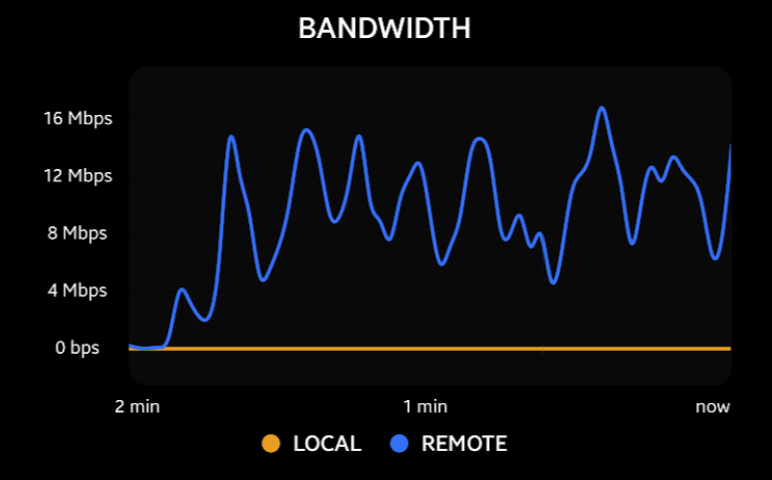
What makes this even more confounding is that maybe 1 day out of 10, the Shield does work as expected and can stream fine. However that is the exception and not the rule, so I am effectively unable to use the device.
Things I’ve Ruled Out
Transcoding: The content is direct playing on all devices.
Relay: I have disabled the option to use relays in the server.
Shield Network: This was a big one, the Sheild gets a full 200 Mbps to Netflix, speedtest.net and an SFTP connection directly to the machine running the Plex server. Also, it gets ~300 Mbps connectiong to the windows PC on the local network.
The 9.0 Update This has been happening since just BEFORE the 9.0 upgrade for Shield, and it still is happening on 9.0.1
App Corruption I have re-installed the app numerous times, cleared the app data, and cleared the cache.
System Corruption I factory reset the Shield after the 9.0 Update.
Finale
I’m just overall frustrated with this problem because I have spent a good bit of time trying to solve it, but am still unable to use my main playback device.
Does anyone have any idea what’s going on? Have you seen behavior like this before?
Thanks for reading, any help is welcome. Let me know if I left anything out or clarification is needed.
TL;DR The Plex player on my Shield Pro 2019 is refusing to use the bandwidth available to it, leading to constant buffering.
