Update - Plex Media Server 1.19.1.2589
FIX(ES):
(Library) Don’t include search results on home screen for libraries which don’t have “include in dashboard” enabled.
This is NOT a fix.
You have “fixed” a problem that was never a problem to begin with.
Plex dev team you have broken a major function of PMS.
How can you even call it a global search when it doesn’t search globally?
This new fix made it very inconvenient to search for anything in PMS.
I have converted nearly my entire physical library that I have collected for decades of 700+ Movies, TV shows and home movies. I have 58 libraries. Moving all of libraries to the dashboard is not a solution nor is it helpful to me the USER of Plex. This is because I don’t want it EVERYTHING queued up on the dashboard but I do want it available, say for instance I want to watch an old movie or TV show.
I am not unreasonable, I just want the previous GLOBAL SEARCH function back as an option, if possible.
I love Plex as a product and I don’t want to have to find another media server software.
Thank you.
I agree completely! Why are these “fixes” done without the ability to revert to the way it was? This will be the last update for me if this is not sorted out soon. I will use another media server that doesn’t think it knows what I want better than I do. I have used Plex for years and these changes have made me regret every buying a lifetime pass, because now I will have to trash something I have already paid for.
PLEASE put the search function back to the way it was ASAP!!!
We are aware of changes resulting in search not returning results as expected when “Include in dashboard” is disabled for the library. The option was always meant to also remove things from search because we thought that if you did not want it on your dashboard you probably would not want it to show up in search unless specifically browsing that library. (For example, not showing search results for an adult library on the family TV.)
Taking into account user feedback about the change, we will be bring back the feature as it behaved before but also adding another option for those that choose to use it. The new option allows you to exclude the library contents from search results. This change should be available in an upcoming beta and then public after that.
Thank you! As something to think about going forward, please don’t assume you know what we want. If there is doubt, put it in as an option for those that do want it. There are MANY reasons you would not want items to show up on the dashboard but being able to find something globally should always be available.
Yes, having it as a settable option for people is the better solution. That way if they want stuff from a particular library not to show up in a global search they can flag the library thus.
I totally thought this was a bug in the TestFlight betas… that I couldn’t search like I used to be able to before from the home screen. I’m glad to hear there will be a fix to this and I’d highly stress that the default behavior should be how it worked before. I have a lot of libraries (including many genre-specific music ones) that I unpin by default but I still want to easily be able to find stuff in them.
Hopefully the changes/reverting will land soon in a TestFlight beta…
This is a bigger issue and search is broken all around. In addition to the concerns and workarounds here it still fails to properly search for titles directly in libraries.
For example. I have a library entitled “Movies (archive)” which contains several folders of older movies that I don’t regularly pull up. Let’s use for example the movie “Winter’s Bone”
Because this library is not included in the dashboard anymore it fails to pull up even on a global search. I believe this is the root issue you have already addressed. However, it is more crippled than that. If I manually go into this library via the Web Client and type “winter” it will show up in the quick search. However if you then click “all sources” that hit in quick search fails to populate in the full search results. That is a major usability issue that needs fixing. But wait…there’s more…
Typing “bone” in the search directly in that library doesn’t pull it up in the search results.
Why? Well seemingly because there are 3 other movies with “bone” in the title pull up before, and because the list only allows for 3 titles in the search, “Winter’s Bone” won’t show up at all. If you try to see the full list by searching “all sources” you have the problem described above.
So basically, there are issues searching even for movies directly in their own library!
But wait, there’s more:
On the mobile client on Android, the search doesn’t work at all going into the direct library. To clarify - If I browse directly to the “Movies (archive)” library and then hit the magnifying glass search next to the library’s name, a search for “Winter’s Bone” or any derivation thereof fails to find anything.
Yes, all of these issues can be fixed by choosing the library for the Dashboard, but as already stated that isn’t an acceptable solution. In the meantime search is incredibly broken even when searching within the specific library for the specific title you want (especially on Mobile client).
How goes the battle with fixing this “fix”?
I only ask because I’ve run into this issue within the last couple of days and am not sure if it just hasn’t quite been un-“fixed” yet; or if it has, but there’s a bug I need to report. (I can’t quite recall the details of all the changelogs since april)
Once they put in the library options to control how search works, I haven’t seen anyone complain. If you are having search trouble and have a fully up to date server then I’d double check the library options next. I can say for my server, the updated search options fixed everything.
Now I’m starting to feel like this is me at the grocery store all over again—where I can’t find something until I ask for help.
So, I’m running Version 4.30.2 (update: PlexMediaServer-1.19.4.2935-79e214ead-x86_64.spk) off of Synology DSM version 6.2.3-25426.
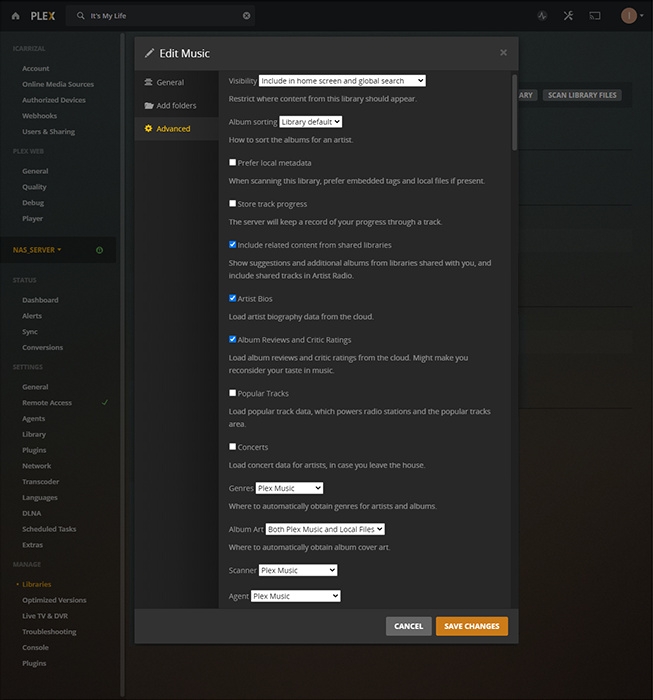
Using Plex Web, I’m looking at both the “SETTINGS:Library” and the “MANAGE:Library” but not finding any option for that. When I look into the “Advanced” tab of the specific library: “Music,” I DO see a “Visibility” option, but it appears to indicate that this library is included in “global search.” So, looks like I struck out there too.
Now, if grocery store logic applies, I won’t see the answer until after posting this or (at latest) until the precise moment somebody replies, pointing out the obvious. (basically, whatever maximizes my feelings of stupidity usually wins out.)
Yep, that looks correct to me. You have the same version of PMS as I do and mine does what you are expecting from yours. Now, mine is run on a different platform, but you would think they would operate the same. I would try doing some more searches with simpler names just to make sure but you may have an actual issue. At least I don’t see any glaring issues with your config anyway.
What’s odd is that it finds the original version of the song, but not the remake. They are both in the same library and under the same main file folder: “Music”. They branch off after that, but should that matter?
I’ve included the XMLs for both tracks (in TXT format), just in case there’s something weird in there. (They are different file types, but, again, should that matter?)
1- is found by global search
0- is not found by global search
I went ahead and compared the two files myself in Notepad++ and the only difference I found was in the “grandparentGuid” for both tracks. The"title" fields appear to have been assigned different apostrophes. (Well, technically only one was given an apostrophe while the other, a right-single-quotation-mark.)
All I can say is “Ho.Ly.Crap.”
I don’t even know what to do with that. I mean the names and metadata for both files themselves use 39. I don’t know where 8217 came from. But it derailed the whole thing.
Also the global search gives pretty inconsistent results in any case. I search for “My Life” on one occasion and got only one of the songs, but did it again later and the both showed up.
I search for “Life” and neither of them are included in the results. Are searches limited to 30 results? If so, why? Can that be changed by users through Plex Web?
That’s all I have for now. Any ideas on what I should do now.
Again, I guess I need to know which combination of bug, feature, and my ignorance is this issue?
Thanks!
Interesting. Sounds to me like you had a file with some metadata in it that used Unicode. I’d fire up those tracks in mp3tag and look at the metadata on them. As for the search limit, not sure there. It didn’t dawn on me that I was hitting a limit but now that you mention it, it does seem to be right. Yep, 30 per library for me as well. I can’t say I’ve seen any settings that govern that. I may go poke around the Plex DB a bit and see if its in there.
Yeah, I did that too. I looked at the metadata with mp3tag, in windows file explorer properties, notepad++ character internet search, dbpoweramp id, foobar, and musicbrainz picard. They all show the text in my files’ title metadata as being identical.
This begs the question: Since I know where I got my file metadata and it’s all legit, where exactly does plex get its Guid data and why does THAT source use inconsistent characters which subsequently breaks the search feature? (maybe that’s closer to 2 questions)
EDIT: Global Search seems to have this same problem anytime directional single or double quotation marks are used.
I wonder if there is any way Plex can just ignore punctuation entirely when it comes to searching? Or at the very least, be quote agnostic?
I have a couple of thoughts that come to mind. I ran into an issue with my setup a while back where I had somehow set the language setting to something other than my actual locale. I found that when doing meta data matching I was getting some strange results so that may be at play here. That also leads me to wonder if this is meta data coming in via matching then maybe you could mitigate it by changing the ordering of your metadata agents. If your local metadata is more trustworthy you may be able to get away with relying on that first, then downloaded metadata as a backup. As for the search, well, I’m no SQL wiz but I do know that incorporating not alpha numeric characters into an input used in a search can be problematic. But then, the Plex programmers are a capable bunch so you would think they could work with that.