Plex GPU Transcoding vastly different transcode times, similar HW

Server Version#: 1.18.4.2171

I have 2 systems, that are overall very similar in HW specs, mainly CPU, that I am seeing greatly different transcode times when doing a sync to my IOS device, sync setting is to original quality.

System 2 when doing a sync, the GPU is showing 70-80% utilization for Intel GPU during the transcode part of the sync, and it completes much much faster than System 1. System 1 shows the Intel GPU at only 20-25% utilization.

System 1 - Name in logs is Plex-Server
Windows 10
CPU Core I7-8700K with Intel UHD 630 Graphics
Radeon RX Vega 64 8GB Dedicated GPU
32GB RAM
256GB NVME for OS
Various Seagate Iron Wolf 2-4TB spinners using Drive Pool for storing media.
I am forcing Plex to use the Intel GPU via Windows Display Settings, setting plextranscoder.exe to use Intel GPU

System 2 - Named Plex-VM in logs, VM running on ESX 6.7 using GPU Passthru from Hades Canyon Nuc, AMD GPU disabled, only using Intel HD630
Windows 10
CoreI7-8809G
4GB RAM
VM storage is NFS running on Synology DS918, Media files are also on same NAS. Network for everything is 1GB.

My expectation would be that System 1 would be slightly faster than system 2, not the other way around, it has higher passmark scores and is a more powerful CPU. I’m wondering why I would only see around 25% GPU utilization on system 1 compared to system-2, when both systems aren’t doing anything else expect Plex.

Some examples using the same source file within each test, but different source for each test.:

Test 1 TV Show X
5:03 Start 5:27 End - PLEX-SERVER = 24m
5:11 Start 5:30 End - Plex-VM GPU PT = 19m

Test 2 TV Show Z
5:39 Start 6:00 End - Plex-Server =21m
5:39 Start 5:45 End - Plex-VM = 5m

Plex-Server Media Server Logs_2019-12-31_19-28-52.zip (3.9 MB) Plex-VM Media Server Logs_2019-12-31_19-28-28.zip (3.2 MB)

Change your graphs, video processing to video encode (click the tiny upside down caret)

You may find that only one is actually gpu encoding.

Looking at the transcoder logs the 8700k is using “Windows (Media Foundation)” for the encoder and the other one is using Quicksync. I’m not familiar with the first one but I suspect that could be the source of the performance loss.

1 Like

Doesn’t look like there is an option for Encode, but 2 options for Decode. I changed the graphs to Video Decode on 2 graphs, both systems, and nothing is showing up on the 2nd Video Decode graph, just on the first on, on both.

Are you meaning in the Plex Transdoer Ststistics.Log file, this part?

Plex-VM
transcodeHwEncoding=“qsv” transcodeHwDecodingTitle=“Windows (DXVA2)” transcodeHwEncodingTitle=“Intel (QuickSync)” transcodeHwFullPipeline=“1”>

Plex-Server
transcodeHwEncoding=“mf” transcodeHwDecodingTitle=“Windows (DXVA2)” transcodeHwEncodingTitle=“Windows (Media Foundation)” transcodeHwFullPipeline=“0”>

The only thing I see different between the 2 machines is the one using Quick Sync, is running Win 10 Enterprise, while th other is Win 10 Pro. I’m going to switch the Pro to Enterprise and see what happens. the actual OS build version on both is identical.

Pro /enterprise won’t matter.

The difference is virtualization.

That is weird about the encode not showing up, that would indicate windows itself is not detected for encode.

You should pull the Radeon from the server and see what happens.

You said one of them is running Windows on a hypervisor, that’s a fairly big difference. Are you sure the gpu is passed through properly?

First you would have to determine if both servers are running the DCH or Legacy driver. If you right click on the open screen and see “Intel Graphics Settings” you have the legacy.

If the monitor on Server one is plugged into the Radeon, you will still get some interaction. AMD has a stated philosophy that “any modern CPU can do h.264” and their drivers reflect it, their drivers are very efficient with H.265 but not much faster than a cpu with h.264.

Yes it is passed thru properly, the one running on ESXi is the faster of the 2, way faster, but spec wise for the CPU in ESX vs the standalone Windows box CPU I78700k, it shouldn’t be.

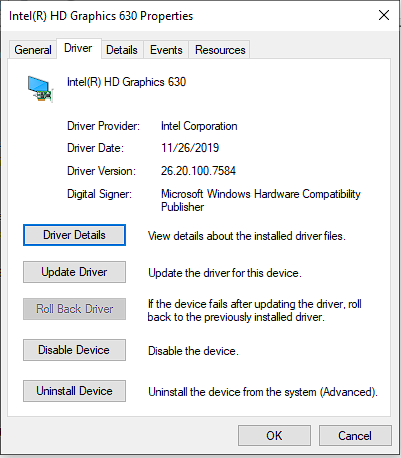
I don’t have an Intel Graphics settings on either machine when I right click the desktop. On the one with the Vega, I have the Radeon settings, which I guess I would expect since I am directly connected to the Radeon machine, and monitors hooked to it. The driver versions are the same for Intel for the HD and UHD630 on each machine.

HD630 Driver UHD630 Driver

if you don’t have a monitor or dummy plugged connected to the intel display out, don’t expect it to work right.

I’ve got dummy HDMI plugs, having them in or out, has no effect on transcoding.

Also tried removing the Dedicated GPU. Once I pull the Vega, the UHD 630 does transcode, using about 75-80% of the GPU like expected. I also see it in the logs.

transcodeHwRequested=“1” transcodeHwDecoding=“dxva2” transcodeHwEncoding=“qsv” transcodeHwDecodingTitle=“Windows (DXVA2)” transcodeHwEncodingTitle=“Intel (QuickSync)” transcodeHwFullPipeline=“1”>

Is there no way to force which GPU to have Plex use for HW transcoding in multi GPU systems? So far the only thing I have found, is this, but I’m not a coder.

I’m sure there’s a more elegant solution but one possibility is to run plex in a docker container and not pass the gpu to the container. I had to do this on Linux, but I was planning on using docker anyway.

Once you put the Radeon back in, go to Display > Graphics Settings and create a Graphics Performance Preference for the Plex exe’s. Set them to the 630 which will probably be the power saving option.

This topic was automatically closed 90 days after the last reply. New replies are no longer allowed.