I support that. Right now I have to use an older version to use this feature.
It only worked for me on 1.0.0 and I don’t know how to stop it auto-updating.
I still have problems with some videos having black bars. The only thing that helps here is autocrop. Because just zooming in cuts of subtitles(so no option for me). Suprisingly scripts don’t work with Plex HTPC’s mpv so I’m using Jellyfin with Jellyfin-Desktop now which lets you configure an external mpv-client. This were the perfect solution but will likely never come for Plex HTPC.
I agree, external player option is the right pathway, unless there is great improvement for video processing which i doubt will ever come, i just don’t see plex htpc being a viable option. it can be a very good windows 10 app for laptop’s, but not for the home theater experience.
Don’t speak for everyone. Not everyone use this for the maximum video quality. I use it for ChannelsDVR recordings and the quality is fine for that purpose.
Thanks @evanars1 , agreed, but i think it would be good to maybe poll home theater users to see the general consensus if video quality matters to them in the home theater room or setup.
Even just including an MPV build that supports the more advanced options available on Windows would be a big help. If you try to invoke options like gpu-context= those options are not parsed, which makes specifying d3d11 difficult. On Windows it should be at least possible to get MPV to create a DXGI swapchain for HDR support. When I try to swap out the mpv-1.dll file manually to a more complete build, I can get the options to parse, but playback crashes.
While picture quality will likely not eclipse madVR, the “guts” are there for major image quality improvements (scaling algorithms, external shaders, etc). I’d personally prefer external player support to use madVR, but I just don’t see that happening. Using external players has never really been engaged when brought up and I’m sure there is a reason for that.
Hopefully gapless playback is the first priority rather than hdr. I am not really a video guy but I do use Kodi for 4k along with PlexKodiConnect.
We all have our preferences obviously, but when it comes to an app intended to function as a home theater interface, why wouldn’t film/tv features be prioritized higher than music features?
With that said, gapless playback is likely easier to implement and so I would be surprised if HDR support arrived first.
Agree, There may not be one option that makes everyone happy and thats ok. I was assuming or hoping (wrongfully of course…lol) the PLEX HTPC being geared to home theater users wanting a good and common front end gui, to browse local media files for movies \ tv shows and play via the great video processing they already have setup.
the plex uno is the wife approved gui for android tv, roku, shield tv etc. so it makes sense for me to “try” and give her that in the theater room as well.
I do sadly agree with everyone that external player will most likely not be an option again for plex. it is just wishfully thinking on my part, so for now we will still continue with madvr with composite for kodi as the front end gui, i like the look and feel and it is a decent substitute, even with it not being wife approved!
The Plex HTPC app is still good regardless and will most likely make the larger percent happy, even though i feel some of the users will be using on their laptop , and not home theater pc. but will still keep testing as updates come out to see what it may offer.

I’ve been using the the older version of PMP and it works really well. I’ve notice there are some features missing that weren’t included with the plex HTPC. I had to roll back to the older client.
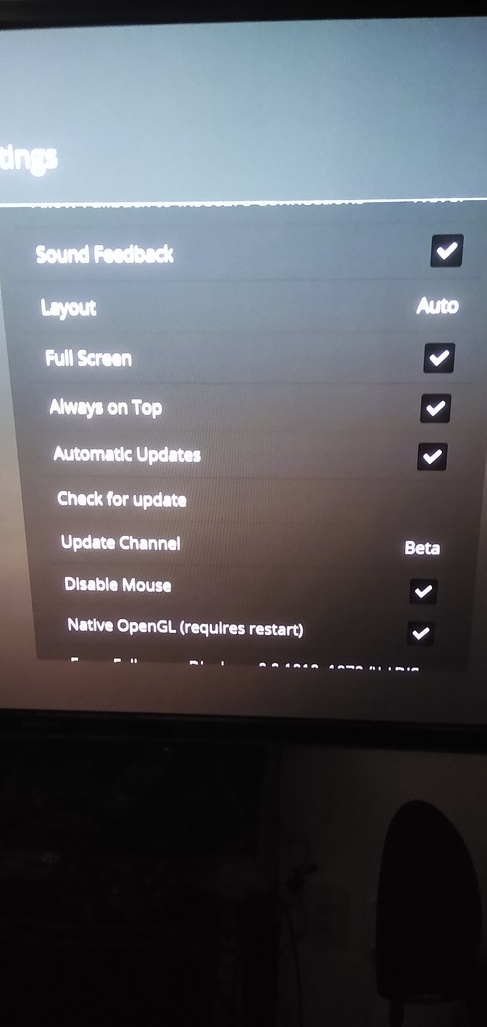
Under settings Main
Missing from Plex HTPC
Option for full screen
Disable Mouse
Native Open GL(require restart) Please bring back ASAP
I use a HP mini desktop 400 along with Pepper Jobs W10 GYRO Air TV Remote,QWERTY Keyboard Fly Mouse for Win 10. The older PMP version runs flawlessly on the hp mini using Native Open GL, please bring the features from the older PMP back to the new client.
Maybe include the watch together feature down the line.
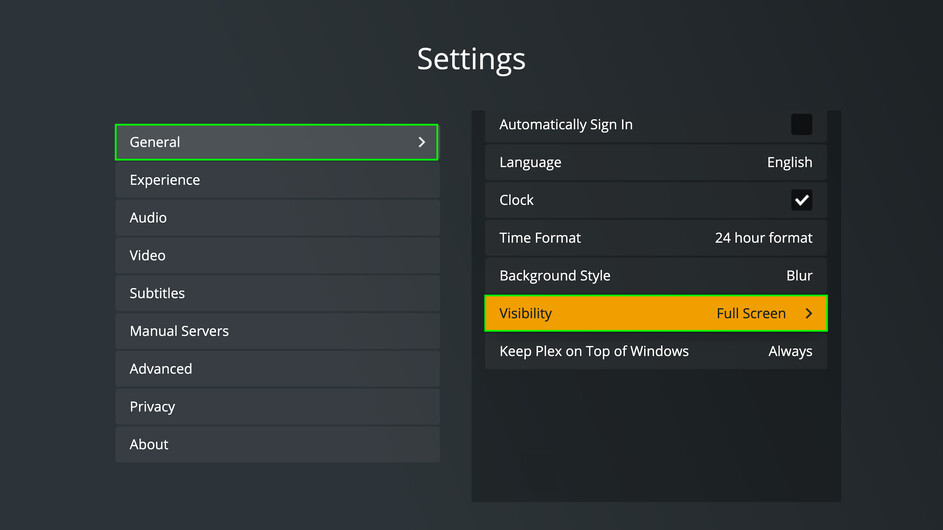
I can’t get this to go truly fullscreen on my setup. The taskbar, which is auto-hide, is available. The problem is that although it is mostly hidden, there is a white line from one edge of the screen to the other. The line is the edge of the taskbar. Doubt I will use this until I can fix that.
What does the OpenGL/WebGL do exactly? It did fix picture flickering wih my hp mini? Also the mouse option needs to come back. I notice playback didn’t run so well with 4k playback with the new version.
Do I need to disable hardware decoding on the client? I have hardware transcoding enable on the plex server synology ds1019
I just found a solution. I changed the scaling to 100 from 110 and it works as expected.
No player is perfect but Plex HTPC does some things well.
I have the same thing happen as your experience with the always on top setting.
Plex HTPC is beautiful, but I have performance issues compared to PMP v2.
specs:
mini pc Intel celeron N4100 (4 cores) with Intel HD600, Hardware decode ON
Testing with 2160p hevc 10bits movies
with PMP v2:
- PERFECT playing
- cpu usage: 30%,
- gpu usage: 50%.
- stats says hardware decoding: d3d11va
with Plex HTPC:
- playing too slow (50% frames drop)
- cpu usage: 100%
- gpu usage: 50%.
- stats says hardware decoding: dxva2-copy
What could the problem be? I was waiting for this new version of plex for htpc but I am forced to continue using pmp v2
Have same problem with pmp v3 preview (cpu 100% with hardware decoding dxva2-copy)
What video adapter are you using for 4k (just curious)
Read my last reply… Intel uhd600
I’m having issues with autoplay/start of play on any show/movie, but only with the HTPC client.
Open a move/show, it sits there on a blank black screen, when checking the progress bar it shows 0:00 seconds. If I skip forward once (30 seconds) it plays fine, and I can even then skip back to the start (0:00/0:01). Once playing it continues to play fine, but if its a series, the next episode will have the same issue. This only happens in the HTPC client. Any advice?
Once it is playing, 1080P seems fine, and the remote functionality works perfectly for me with my Harmony Elite setup. Using an Intel Pentium Silver J5005 with Intel UHD620 graphics.
