Edited as saw the installers and update blocking
Shame The update broke playback. Oh well.
also been Absolutely dying for watch together feature, so hopefully that’s not far off
Edited as saw the installers and update blocking
Shame The update broke playback. Oh well.
also been Absolutely dying for watch together feature, so hopefully that’s not far off
Just wanted to add that with version 1.3 i also get the black screen when trying to play majority of my media. I did follow the steps to disable updates and installed 1.2.
1.2 works but is not perfect either. Most of my 4k content stutters a lot and is unwatchable. Any 1080p and lower content appears to be fine though.
Hopefully the next update will be soon and might fix both of these issues! Until the next update I’ll probably continue to use the old PMP client on my HTPC.
1.3.1 fixes playback. 1.3.0 will auto update, 1.3.1 installer linked above as well.
The bug hid in code that affected starting playback from the beginning of a file. Core use case for certain; we’ll remember to play from beginning and not just accept the default resume behavior in the future.
We apologize for the trouble caused.
Hi @MediaHorder, instead of pressing Z there’s a global Video > Zoom setting now that I’m hoping works for you. We keep mpv.conf.md up to date with settings that are overridden by our app.
We’ll set the equivalent of keepaspect=true in mpv.conf for all Zoom settings except Stretch.
You’d want to select the right Zoom setting in our UI then add monitoraspect=21:9 in your mpv.conf (remove any other keepaspect lines from your conf too).
Works?
Thanks for the prompt turnaround
Great to see a fix implemented so quickly.
Will test it later on
Thanks for 1.3.1 fix
Will the preview thumbnails be fixed at some point? When scrubbing through the time line quickly they just turn into an empty black thumbnail until you slow down and the images are displayed again.
1.3.1 working fine here now, cheers
Thank you for the quick fix. Playback issue has been fixed.
Dear Team,
Thanks for bringing the love back to PC.
Unfortunately, I can not find the Passthrough settings for audio.
So far it’s only working in 5.1 in PMP in TV MODE.
Not working in:
Plex for windows
PMP Non TV mode
Plex HTPC
I am not sure if I am blind but the sound is normally important if you want to do home theatre.
I have tried this now with 1.3.1
With monitoraspect=21:9 as the only option in the mpv.conf…
If I have Zoom set to Zoom, the screen is filled correctly for 2:35:1 content.
It however zooms in anything else… 16:9, 2.00:1 etc which is not “keeping the aspect ratio”.
The ideal scenario would be to not have any zoom set aka the default of Normal and it would just fill the aspect ratio correctly which is what the monitoraspect=21:9 should do but it is not doing that.
Click audio device kind, after you select a specific audio device, and choose HDMI or SPDIF. The passthrough options will then show up.
Hey, first of all a big thanks for this amazing app. It works wonderfully so far.
The one minor gripe I have is that a running Plex HTPC will not recognize an Xbox One controller I just connected. I checked that the app is focused. Instead I have to (re)start the app while the controller is already connected to get it to work
Imo it would be nice to be able to have the controller work in Plex HTPC even if I connect it mid-way. Especially for systems where Plex is the first thing that starts, say HTPCs, I’d deem this to be crucial.
If however this isn’t a bug, is there anything I can do right now to try to fix it?
I found i had to change the “type” to something other than SIMPLE… HDMI i think, then a bunch of tickboxes for DTS-HD and various other encoding types became availabale to enable
Voikla, passthru works and no longer just PCM
I do notice that sometimes it reverts to SIMPLE, i think that happens when i power on the HTPC and the amp is offline or some such thing
Thank you <3
I´ve found a small cosmetic bug. In Plex HTPC movie files with a DTS soundtrack are shown as DTS-HD, whereas everywhere else it shows (the correct) DTS track.
HTPC =>  Web =>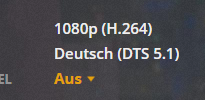
I am having a weird issue while playback of some 4K HDR content. The media is local, on the same PC. It starts transcoding the content with the error that there isn’t enough bandwidth. However I can direct play the same media without transcoding through my LG TV Plex app.
I don’t remember seeing this error before. Is there some setting I should be looking at, within Plex or in the OS?
I’m running Plex HTPC 1.3.1 on Windows 10 21H1, fully up to date drivers and OS.
Intel i7 7700, Geforce 1060 6GB, 32GB RAM.
HDR, DV or HDR+ has been buggy for me as well with Plex HTPC. for my setup no reason for it to transcode the local file, as other apps don’t need to. But other apps can transcode with no issue for reference.
So glad to see Plex Home Theatre back. Been Using OpenPHT for years because PHT was no longer a thing,
2 Things i would like to see added if at all possible
But so far loving the navigation with keyboard and mouse. Sleek and smooth like the layout on my Media box, and the lay out on my Android TV
Yes, for me strangely it’s not all 4K HDR media. Just some of the BD Remuxes. And they play fine on the TV client and on VLC for windows.

