Not sure if it’s been reported but see video for a bug. When at the end of a library the last item can disappear and reappear based on certain browsing movements. Doesn’t bother me but I just happened to notice it. If it is a true bug someone could look into it.
Hello all
I have just started using Plex HTPC today and it is working great, I particularly like the fact that the Music is now persistent so I can be listening to Music, then watch a Movie and when the Movie finishes the Music starts again from where it left off 
One beginner question though.
There are no Update Options that I can see, will Plex HTPC Update to the Latest Version automatically or will I need to manually Download Updates?
Thanks in advance
Kevin
Plex HTPC will update automatically if there’s a new version
Hello
Thanks for the reply and the information it is appreciated.
Kevin
Hey @ddefauville, I’m running into the same exact issue that you did, but with Pepper Jobs W10 Gyro remote. I have the same warnings in my logs:
    19 Aug 06, 2021 21:57:18.137 [77972] WARN - [InputManager/QHotkey/QHotkeyInput] Unable to map shortcut to native keys. Key: Qt::Key_MediaPause Modifiers: QFlags<Qt::KeyboardModifier>(NoModifier)
    20 Aug 06, 2021 21:57:18.137 [77972] WARN - [InputManager/QHotkey/QHotkeyInput] Unable to map shortcut to native keys. Key: Qt::Key_MediaTogglePlayPause Modifiers: QFlags<Qt::KeyboardModifier>(NoModifier)
Reading the thread, it looks like the solution is to:
- Add a Microsoft Keyboard as a device
- Map the play/pause buttons to the keyboard
Can you clarify what you did specifically? I’m sorry if I’m being dense, but I don’t quite follow. I have a Logitech keyboard connected to the computer as a device, but I wasn’t quite sure what the connect as a device step consisted of.
For mappings, I tried adding the following to inputmaps/media-keys.json, but no avail:
{
  "name": "Media keys",
  // Matches: Native Apple media keys and Windows media keys emitted by QHotKey
  // library.
  "idmatcher": "AppleMediaKeys.*|QHotkey.*",
  "mapping": {
    ...
    "KEY_MEDIAPAUSE": "space",
    "KEY_MEDIATOGGLEPLAYPAUSE": "space",
    "Key_MediaTogglePlayPause": "space"
  }
}
Any help would be appreciated!!
One extra oddity is that in Plex HTPC.log, there is not log for a keypress on the play/pause bbutton — either from my remote or my logitech keyboard. Any advice would be helpful! In the mean time, I remapped the “Move Up (Alt+Up)” to “play_pause” and that does the trick — though somewhat unconventional.
When using a Harmony remote, you must configure it by using a specific Harmony software.
The Harmony software allows you to configure/map the different buttons of the remote and I mapped the Play/Pause buttons to emulate the space bar key of Microsoft keyboard using that Harmony software. I did not modify any json files.
Ahh, okay. Sounds like that solve won’t help me then. Thanks for the reply!
If anyone else has any suggestions, please let me know 
So, looking at this more, the issue seems to be with Plex HTPC not sensing the “Toggle Media Play/Pause” key. I took a look at the logs for Plex Media Player and it displayed:
2021-08-07 12:57:42 [ DEBUG ] InputComponent.cpp @ 160 - Input received: source: "Keyboard" keycode: "Toggle Media Play/Pause" : InputBase::InputkeyState(KeyDown)
2021-08-07 12:57:42 [ DEBUG ] InputComponent.cpp @ 229 - Emit input action: ("play_pause")
2021-08-07 12:57:42 [ DEBUG ] InputComponent.cpp @ 160 - Input received: source: "Keyboard" keycode: "Toggle Media Play/Pause" : InputBase::InputkeyState(KeyUp)
I tried to add the Toggle Media Play/Pause input mapping to Plex HTPC/inputmaps/default/keyboard.json as it is in PlexMediaPlayer/inputmaps/examples/keyboard.json:
...
// media keys from the FLIRC and on Linux keyboards
"Toggle Media Play\\/Pause": "play_pause",

// Microsoft Windows Media Center SE; Logitech Harmony device
"Media Pause": "pause",
"Media Play": "play_pause",
"Media Stop": "stop",
"Media Rewind": "seek_backward",
"Media Fast Forward": "seek_forward",
"Media Previous": "step_backward",
"Media Next": "step_forward",
"Back": "back",
...
But the added mapping still did not resolve the issue.
This may be related to the InputManager warnings I’m seeing in the Plex HTPC logs on boot —
Aug 06, 2021 21:57:18.137 [77972] WARN - [InputManager/QHotkey/QHotkeyInput] Unable to map shortcut to native keys. Key: Qt::Key_MediaPause Modifiers: QFlags<Qt::KeyboardModifier>(NoModifier)
Aug 06, 2021 21:57:18.137 [77972] WARN - [InputManager/QHotkey/QHotkeyInput] Unable to map shortcut to native keys. Key: Qt::Key_MediaTogglePlayPause Modifiers: QFlags<Qt::KeyboardModifier>(NoModifier)
So, this appears to be an issue with Plex HTPC’s InputManager not receiving the Toggle Media Play/Pause input at all, rather than a mapping issue. @gbooker02 @sLumpy @deactivated — would you please help add this to the Plex HTPC bug roadmap?
Let me know if there is more information needed — I’m happy to provide.
If I’m away from my TV for awhile, sometimes when I come back the Plex screensaver won’t go away. (I’m using the “Entertainment” screensaver type.)
The longer it’s been, the more likely the problem happens — for instance, when having the TV off overnight (the HTPC itself is never off), the issue is almost always present the next day when I turn the display back on.
It’s not a complete freeze — pressing buttons on the remote, I can still hear the navigation sounds, as if everything was working…. But the screensaver persists (and the image doesn’t change).
Quitting and then relaunching the app solves it — until the next time the problem occurs. But that’s not easy to accomplish using just a remote when you can’t see the actual navigation because the screensaver is covering everything.
Other than this annoyance, I’m loving Plex HTPC … The performance is snappy, it’s got most of the best aspects of Plex Media Player, brings in updates from the other Plex apps, and even brings back some bits of PHT that I’ve missed for years… Nice work!
Looking forward to the next update (and hopefully a bug fix for the above).
Minor future wishlist items:
- Visualization options when playing music (like Plex Amp!).
- A combo “entertainment + photos” screensaver that randomizes the screensaver between the two (a nonessential but nifty little feature that OpenPHT used to have).
Currently using:
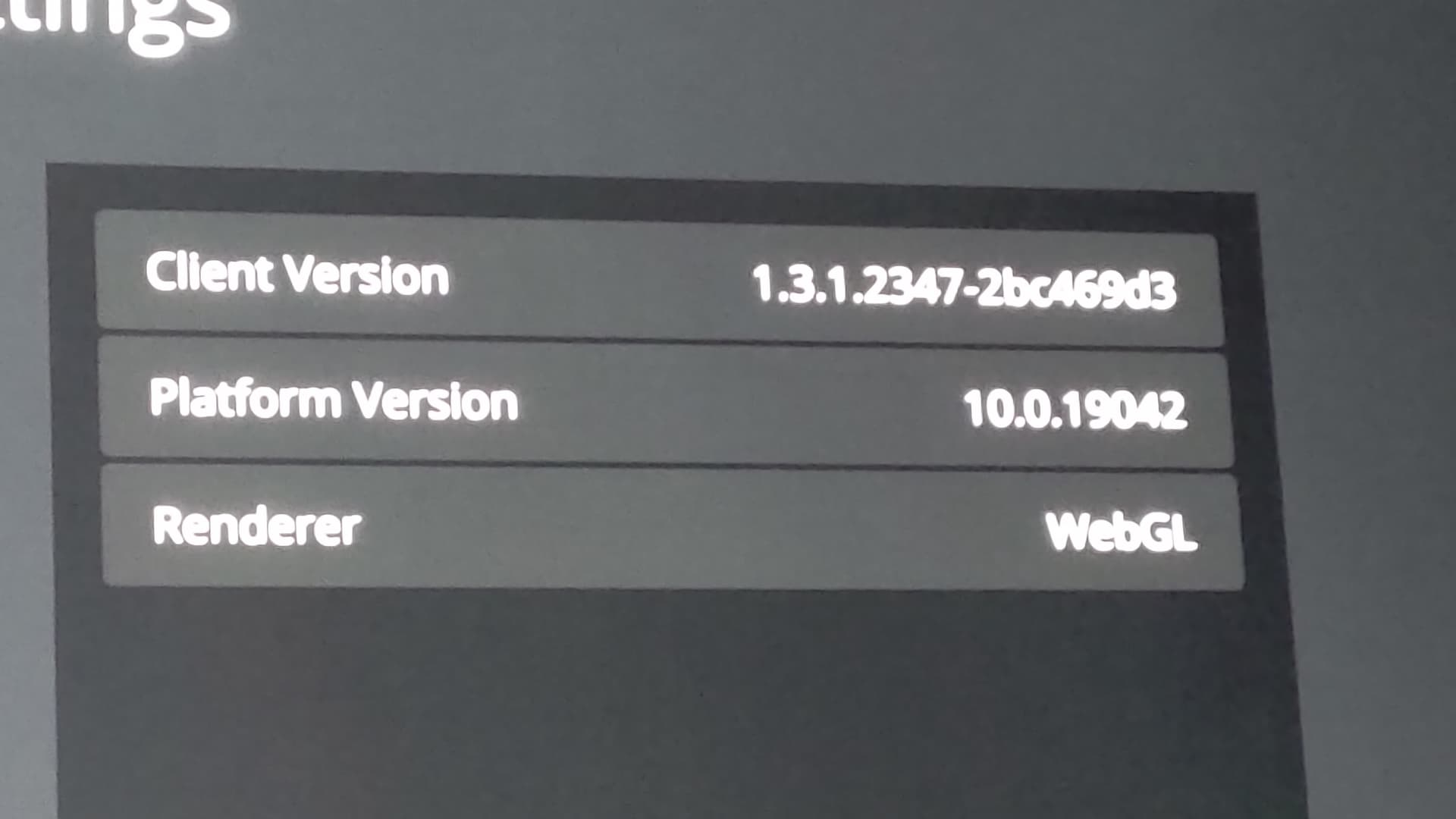
Plex HTPC 1.3.1.2347-2bc469d3
MacOS 10.15 (on an old MacMini)
Renderer: WebGL
Probably the wrong place to put this, but for my feedback can I just give a BIG thankyou for this? I use an LG CX48 OLED as my PC monitor, PS5 display, and media machine with an Nvidia Shield. Switching inputs and audio sources all on this one screen gets so tedious, and with this HTPC app I have all but eliminated my need for the Shield.
With my PC for primary gaming and now media, things have become so much easier for me. It works perfectly for my needs and I love it.
I’m having audio issues on my intel NUC - the old app still (usually) works but the new one won’t play audio with the same settings, and I notice it puts my AVR in "multi-in’ mode rather than showing the codec that’s being played
One of my 4k HDR (High bitrate) movie, stutters a lot and is unwatchable (other lower bitrate 4k HDR plays fine). The movie works fine when played on the old PMP.
I can see that dxva2-copy is being used for hwdec; is it possible to force plex HTPC to use d3d11 for testing (as this seems to be the only difference between plex HTPC and PMP)?
My HTPC is a i7-7500U with intel HD Graphics 620, and is perfectly capable of HW decoding 4k (hevc) material (wich is evident when playing through PMP).
Plex HTPC version is 1.3.1
Are there plans for Plex HTPC to add the “skip ads” button?
Like I mentioned previously, I get very noticeable choppiness in Plex HTPC compared with Plex Media Player. This happens already at relatively low bitrates (<3Mbps) during Direct Play.
It seems HTPC and PMP handle DirectPlay videos differently.
Anyone else with choppy playback issues in Plex HTPC?
No, I’m not seeing choppiness at all. I’m using Windows 10 x64, Intel on-board graphics. I direct play all files from a separate PMS on the LAN.
I am also seeing choppiness in HTPC for titles running smoothly in PMP.
I have compared log files, and the one big difference I can see is the use of dxva2-copy instead of d3d11va as hwdec.
I am attaching log files from both PMP and HTPC for reference.
Plex HTPC.log (147.5 KB)
PlexMediaPlayer.log (156.7 KB)
Ok, good to know I’m not alone.
It’s really too bad Plex HTPC does not have smooth playback like PMP because I really like the new snappy interface and functions like Skip Intro in TV Shows, etc.
This reminds me:
I used to have some stuttering every 30 seconds in PMP until somebody in the forums suggested to set the PMP file storage.json as read-only.
That workaround solved the stuttering issues in PMP for me.
Could there be a similar problem/workaround in Plex HTPC?
I am also attaching both log files from my Win10 x64 system.
I hope these logs can be helpful to Plex staff.
Give us a shout if you need more log files.
Plex HTPC.log (142.0 KB)
PlexMediaPlayer.log (225.9 KB)
PS: I have Plex players (PMP and HTPC) and Plex Server on the same Windows machine. Having two different machines for Player and Server is not an option for me.
Just curious if @hnernes also have Players and Server on the same machine?
I have both PMP and Plex HTPC on the same machine (Windows 10), but I run PMS on a seperate server/fileserver (running Ubuntu) with GB LAN connection.
Short of a fresh install of Windows you can try to remove all the Video drivers and install using Display Driver Uninstaller Download version 18.0.4.2. Be sure to read all the instructions.
I should also mention include the audio drivers in the uninstall/reinstall.
I just found out that Plex HTPC doesn’t even use HW decoding at all when trying to decode my 4k HDR material (PMP use HW decode). I have not tried any other types, but I now assume there is something broken with regards to the initializing of hwdec.
I tried to play the same file in MPV 0.33 directly, and it is smooth when HW decoding (with d3d11va), but it is acting the same as in Plex HTPC when I turn off HW dec (ctrl+h).
Maybe this is type specific to my hardware, but I would assume my HW is really common as it is a intel HD620 inbuilt graphics card.
PS: I also see this behavior in Plex for Windows, i.e. NOT hw decoding my video.
