I have an older Intel NUC hardware with an integrated Intel HD Graphics 4400.
I’ve never had any issues playing high bitrate content (<20Mbps) with PMP 2.58.
When I play TV shows with a bit rate content of approx 3Mpbs in HTPC, it seems to struggle.
Perhaps Plex HTPC has higher system requirements than PMP. If so, it would be interesting to know what these requirements are.
This (and others reporting similar in this thread) is due to MPV using dxva2-copy on Windows. For those that don’t know this means that when the hardware has decompressed a video frame, it is copied (hence the name) from the GPU to the CPU. Then to actually display the frame it is then rendered into the frame buffer (which will then go back into the GPU). The reason this is occurring is because the toolchain to build MPV is missing several headers/libraries to use more efficient methods.
As a test I built ANGLE (which is fun for certain definitions of the word) and inserted it into the build toolchain (not the correct solution but sufficient to test) and then rebuilt MPV. This enables MPV to use dxva2-egl which avoids the copying back and forth. Adding support for d3d11egl requires adding shaderc and spirv-cross which is another undertaking.
I’m testing the build with just ANGLE locally and in my limited testing it appears to remove the occasional stuttering that I would see on a 10th gen NUC.
As an aside, sometimes disabling hardware decoding can perform better until the no-copy hardware decoding is available depending on the speed of the CPU. Most H.264 on recent hardware should be decoded fast enough in the CPU.
On Mac MPV is currently using videotoolbox-copy which has similar implications. Fixing this requires some changes in the build infrastructure to build different versions of MPV for different applications so the version built for Desktop/HTPC can target a newer version of MacOS than other applications (which is required to make MPV build with cocoa enabled which is the requirement for non-copy hardware decoding).
Not sure I understand all the technical terms but it seems you have found something and you are working on a solution. That’s great! Thank you!
I hope we’ll be able to get a new version of HTPC for Windows soon so we can get a nice smooth player.
Thanks again for investigating this issue, I really appreciate it.
Nice to hear that this is being adressed. For clarification, this is not just occational stuttering, this is unwatchable as it stutters all the time and CPU usage is through the roof. Also there is no difference when toggeling the hardware decode switch in settings, so I assume that Plex is not HW decode at all?!
I have a question: why is mpv 0.33 (downloaded from mpv.io) using d2d11va as hwdec when used as standalone player? It seems like the behaviour of using dxva2-copy is only when used through plex (both Plex for windows and Plex HTPC).
Question 2: Why is the toolchain to build MPV missing several headers/libraries to use more efficient methods? Is it not possible to add theese libraries? It seems like you are asking for bad perfomance by not doing this?
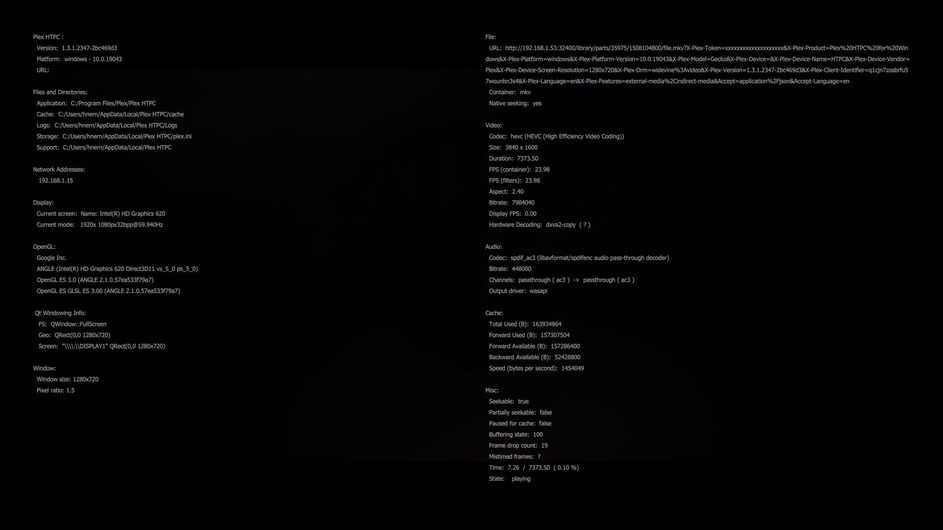
Also I would like to know how to defintive check wether the video is being hw decoded, because in the information-overlay when playing video, there is no mention of hwdec (like there was on PMP). I would assume that if it were hwdecoded, it would be displayed in that info?
Aug 11, 2021 10:28:49.209 [9208] INFO - [MPVEngine/mpv] vd: Using hardware decoding (dxva2-copy).
I mentioned earlier the performance impact of this. As per software decoding your logs indicate you are decoding HEVC is which creates a much higher load on the CPU over AVC.
I had a several paragraph long post answering this exact question.
There are things that belong in a toolchain and things that do not. A third-party library written by Google as part of the Chromium project absolutely qualifies as the latter. The former is essentially limited to the base OS SDK (Windows 10 in this case) from a single party (Microsoft in this case). I put in in the toolchain on my machine only to test to see if this worked at all before pursuing the steps to make it into a proper library dependency.
Now if you want to really get into what should be in the toolchain, then you can chide Microsoft for intentionally making the deficiency which required the creation of ANGLE in the first place. Instead, they should’ve included the necessary pieces in their OS and by extension, their toolchain, to make this work without third-party gargantuan libraries (of which only a tiny piece is desired).
See previous answer.
HTPC has the same information overlay as PMP toggled via the debug input command (default mapped to ctrl-shft-d/cmd-shft-d). Second column, end of the second section (Video) where it says Hardware Decoding. You’ll see the same info there that I quoted from your logs at the top of this message.
Thanks for yet another good and thorough reply. I must say, I got my ass handed to me, and that is a good thing, as I now know more than I did before.
Since this clearly is not an easy fix, I just have to live with PMP for the time being, as this was obviously build with all the toolchains necessary for HW dec with d3d11-egl, and works perfectly fine (although it lacks the features added in later releases).
PS: I did compare the debug/info overlay between PMP and PHTPC and I am a bit puzzled by the “?” (question mark) in the info reported in PHTPC as opposed to PMP (wich states the actual d3d backend?):
PHTPC: Hardware Decoding: dxva2-copy ( ? )
PMP: Hardware Decoding: d3d11va (d3d11-egl-rgb)
This may not be a problem, but I find it odd anyway.
(I have attached the two screenshots of the overlays)
Good work on sharing, to help make the app better. it has been a tough road to get playback where it needs to be, and hopefully in the future it will work out. Even with some UI issues, most issues from what i have read here, are all playback related. I am hopefully one day to be able and use Plex for the Home theater so all devices in our home have the same UI, but for now something as minor as it uses the wrong gpu, is a road block.
Hi @deactivated sorry for the 2 months delayed reply. I remembered the issue when it happened again for me. I get the error very randomly on media that plays well on HTPC most times.
To recap: some 4K HDR media at times (seemingly random) starts transcoding and the transcode reason is “Not enough bandwidth for direct play of this item. Required bandwidth is ****** and only ***** is available.”
Attached is the log file from yesterday when I got the same error while playing back Avengers Age of Ultron 4K HDR. Today when I played the same file it was totally fine and direct playing on the exact same PC.
Thanks again @gbooker02 for testing alternatives by building ANGLE for Plex HTPC.
But do you mean the playback issues in Plex HTPC are caused by Microsoft and Windows and that the playback issues will probably never be solved for HTPC in Windows?
If that is what you mean, then I don’t understand why Plex PMP 2.58 is playing back everything smoothly on the same Windows 10 system when Plex HTPC is struggling.
Wouldn’t it possible to use the same PMP “libraries” in Plex HTPC to achieve the same smooth playback?
Somewhat. The ANGLE library only exists because of a situation that Microsoft intentionally created. If they hadn’t, there wouldn’t be a need for ANGLE in the first place to work around these deficiencies in their OS.
PMP was built on machines which had previously built and installed ANGLE. Making build nodes in this manner is inherently fragile and things tend to get lost over time (such as ANGLE did) vs. a proper toolchain and library setup where everything is built/packaged in repositories and doesn’t require certain things to be installed on the build nodes. We’ve transitioned to the latter and now our build nodes only require basic pieces installed.
Okay, I think I understand the dilemma…
Although I love the new features and the snappy interface in Plex HTPC, right now, the current version of HTPC 1.3.1 is unfortunately unusable for me due to the extremely choppy playback issues.
I hope you’ll get this sorted because I really enjoy Plex and would love to use Plex HTPC with all its features on my system soon.
You’re talking about the Plex Media Player… this app has indeed not been updated for some time and is about to be replaced by Plex HTPC which is currently available in preview.
I suggest you download Plex HTPC instead of the old PMP…