I’ve added it to the agenda to discuss in our meeting next week since setting up the store page may take longer than expected.
Yeah, in the old PMP, the option had to be done manually in the conf file. So I did try variations of the of the old PMP parameter in the Plex HTPC conf file and setting it to “false” or “0” but nothing worked. But that’s all I can think of going at it blindly.
I downloaded this version of Plex use 7zip to open the install file and copy libiconv-2.dll to C:\Program Files\Plex\Plex HTPC.
Then it works.
Here is the uploaded DLL to save directly on to C:\Program Files\Plex\Plex HTPC.
libiconv-2.zip (670.8 KB)
Unfortunately the video playback performance is very poor on my 10th gen NUC. Other competing products do not have any such issues. Tried everything.
Hoping for Linux release soon.
this saved me
I have a weird issue where PLEX HTPC refuses to use 127.0.0.1 to access the stream (server is on same system) The regular windows PLEX app uses it just fine. Instead it uses the LAN IP 192.x.x.x to play the stream, as I only have an old slow WiFi stick on the telly PC it frame drops trying to play any file of semi reasonable quality while the file is making the unneeded round trip to the router.
There are some issues in HTPC that should be easily solved, given they do not occur in PMP etc.
This menu customization matter for example.
HTPC’s inability to pick up new content (reported by quite a few).
Stuttering.
To clarify, this is the IP address of the computer which is running both the server and HTPC, right? In that case, the data does not go to the router, doesn’t traverse the WiFi, nor does it even leave the computer at all. A computer talking to one of its own IP addresses is shortcuted in the OS to not leave the machine.
Hi gbooker02,
Thanks for the reply, still learning my way round Plex, coming from Emby it was something that used to happen on there if you did not have things set just right. You are correct and there is no external LAN traffic during playback (used Task Manager to check), also server and apps were both on same system.
What threw me off was the difference in how the WEB Player and Plex Desktop present the file playback information (both showed D:\movies\mymovie\mymovie.mkv instead of http://192.x.x.x/blah/blah/mymovie.mkv)
I found what the issue was, it appears that the HTPC app when set to Maximum Quality for video playback was causing stutter which does not appear in WEB or DESKTOP with the same settings. Setting it back to Normal seems to have done the trick with no discernable quality drop. This was with any 5mb-ish 50fps 720p files from the state television channel in the UK, maybe even though local, the bitrate is a bit much for the HTPC app at present to handle smoothly. The same files play without issue on the same system in WEB, DESKTOP and through PotPlayer.
Version 1.11.0 has been released for Plex HTPC for Windows and Plex HTPC for Mac previews.
-
Plex HTPC for Windows (Windows 10 or later, 64 bit only)
-
Plex HTPC for macOS (macOS 10.13 or later, 64 bit only)
NEW:
- Added setting to rewind number of seconds before resume
- Restructured video rendering in a sub window/view to remove from Qt’s rendering
FIXED:
- Fixed rows duplicating when returning to the Home screen
- Fixed extra padding on episode number indicator on episode screen items
- Live TV: Fix playback failure in some rare cases
- Sidebar: Fixed new source items not showing until after an app restart
- Sidebar: Fix source item reorders sometimes ending in wrong position
- Sidebar: Fixed possible broken state when reordering items soon after startup
- Force the locale earlier before calling any Qt code
Version 1.11.0 also has a Linux snap version which we are releasing now as a forum preview:
Plex HTPC for Linux (snap, x86_64 only)
See the first post for a script which we use to install this snap. This is just to connect plugs which would be automatically connected when you install the snap from the store.
For those not on Linux (nothing in this post will apply to the Linux version):
Version 1.11.0 contains the layering changes. The rendering of video no longer goes through Qt’s pipeline and is no longer subjected to their rendering pipeline thread timings. This should resolve the stuttering that people have seen. I have been testing this version myself for a few months now as it was being refined from hack quality code to production quality. In that time, I have only seen stutter in two playbacks and in both cases the stutter is in the actual file itself (I verified this in both cases by stepping through frame-by-frame on a computer).
As such, the vo is no longer libmpv but now gpu. On Windows this is still using the gpu-context=angle and it does not yet support other contexts. However, the next version will support gpu-context=d3d11 (it will default to angle) so you can experiment with that by adding that line to the mpv.conf file.
Enjoy.
Unfortunately I’m experiencing stuttering on this version 1.11.0 on windows.
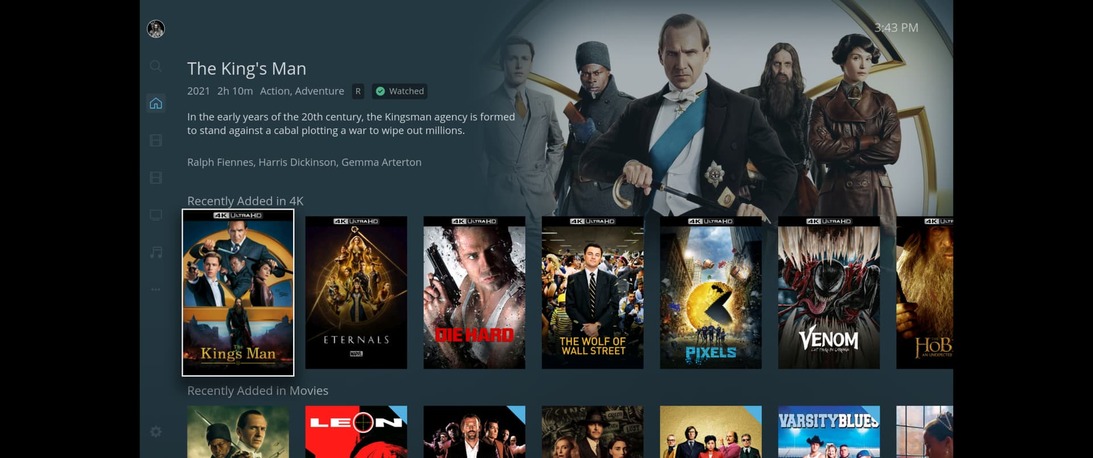
Yes. The HTPC UI is forever locked to 16:9.
Well, by definition, Plex HTPC is designed for a home theatre so 16:9 is all that is really needed 
Not sure an UW 32 inch screen was in consideration.
Well, movies comes in a wide variety of aspect ratios and there have been made wider than 16:9 TVs in the past. I agree that there isn’t many displays in the marked today that does have a different ratio than 16:9, but it does seem like an arbitrary limitation of the UI, imo. But I guess if for example IMAX format TVs became a thing Plex could update their UI accordingly down the road. 
I’ve still got some 4:3 displays 
I’ve recently discovered the impact of “Video Playback Quality” setting on GPU usage. My GPU is used for a number of things (Plex transcoding, Plex optimized versions, and Tdarr), so it’s somewhat important to me. Normal is about 20% GPU load on a 1080p file; Maximum is 35-40%.
What is the difference between Low/Normal/High/Maximum? How much am I sacrificing of Normal vs. Maximum, for example?
