Plex HTPC - Movie covers flash/reload sometimes - UI Bugs

Hm, so i just upgraded to 1.51.1.4020-26074e51 and checked the behavior of the missing cast at the end of playback… And yep still there. After that I deleted:

C:\Users\xxxx\AppData\Local\Plex HTPC\cache\qmlcache
C:\Users\xxxx\AppData\Local\Plex HTPC\cache\QtWebEngine
C:\Users\xxxx\AppData\Local\Plex HTPC\QtWebEngine

And e voilá the issue is fixed. (well at least in 95% of testing cases)

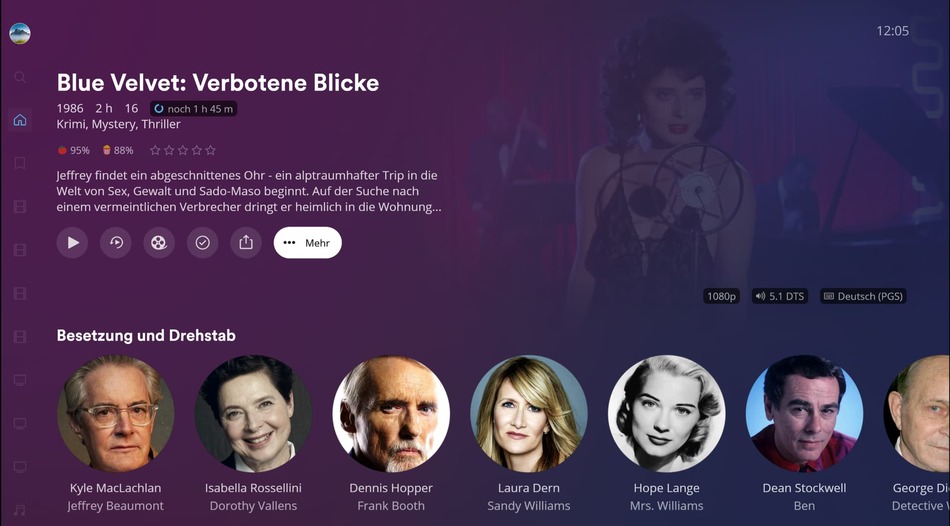
In the other 5% the movie overview screen shows this =>

Instead of the cast, the movie is shown… definitely wrong…

The issue from above is still present, (on all of my 3 machines!!) also on the latest version v.1.53.0.4063-cdc1f574…

But now there is a new regression…

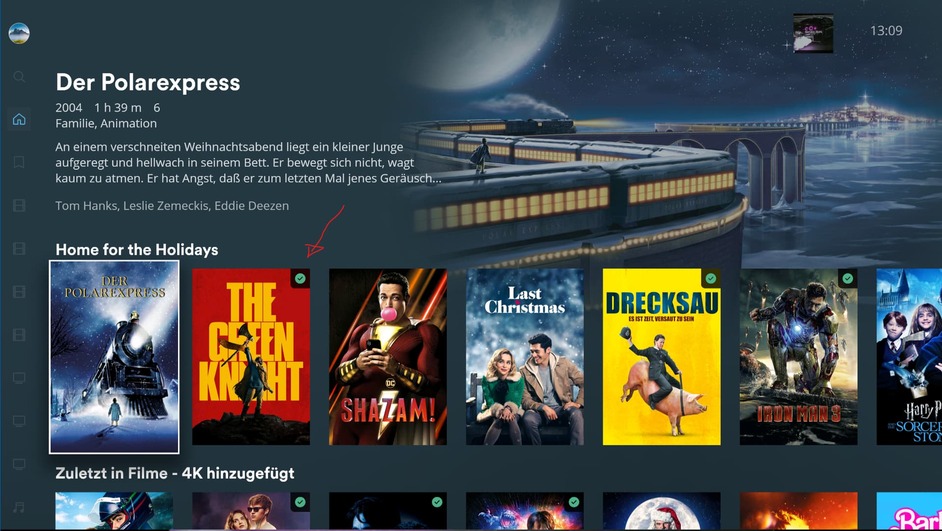
Whenever a new item is selected in the “home screen” that has been viewed and is marked as viewed, the green checkbox disappears and does not come back when selecting the next item… This does not happen when browsing in a library…

Man, please “gui team” fix this mess!

I can verify that the disappearing green check mark is also happening on the home screen and recommended tab. I have a stock config (Windows 10)

Both versions below

1.52.1.4.4035-e0b6ca16

1.53.0.4063-cdc1f574

If I navigate to other libraries or into the settings it seems to reappear once and while but it’s random

I was almost sure that I was missing cast pictures sometime last week but I didn’t pay attention close enough to recollect. It seems ok with the items I looked at but I can’t say it doesn’t exist

1 Like

Only just started for me and also in Web app. All started after I played with custom themes in Plex HTPC but dont see how that could impact Plex Web unless themes are linked across apps.h

Doesnt really bother me as I hate the green watched tick LOL.

Not getting any of the other issues listed in this thread

Hmm, on my end the issue now appears (or better “the cast disappears”) every time, even on untouched stock installs.

The issue with the green “watched item” is also present on the LG app… I will check if the loss of actors after playback is also present there.

##Edit:

The loss of actors after playback is also present on the LG app… I will open a separate “bug” in the TV forum section.

Bump, still present…

Let’s hope that we see a new update for Plex HTPC soon - hopefully with a fix for this…

Version 1.54.0.4072-cf4808cc disappearance of the cast still happening…

Hmm, it´s also somewhat suspicious that we don´t have a changelog for version 1.54.0.4072…
The release.xml file only states “Bump to web-tv-client/5.75.1-608fec0b3”

Whatever, it is really frustrating that such an awesome app falls behind only because of UI bugs… The framework is perfect… (propper HDR support, mode switching, etc…), and then such a buggy UI - damn! The issue with the missing cast after playback is almost 3 months old now and still not fixed - how is this possible? The issue is not even exclusive to Plex HTPC…

Please can someone from the web-tv-client team acknowledge this one and that they are working on it? Please fix the stuff before introducing new features…

Not all of us are having your issues.

Version 1.54.0 has been released for Plex HTPC for Windows, Mac, and Linux.

NEW:

*** [Discover Together] Added profile privacy settings to settings screen**

FIXED:

*** Fixed VSS modal prompting to managed users after watch or rating actions**
*** Update bookmark icons on zero-state Watchlist screen**
*** [Discover Together] Fix pre-play activity feed missing artworks**
*** [Search] Fix PMS Live TV search types not displaying on Top Results**

The text format in the new Account section in Settings is off but unimportant to the function of the app.

Edit - I do agree though that UI updates and improvements in general have slowed considerably. However, the development and implementation of the new UI coming is clearly getting attention. I’m very close to reverting back to Kodi. I can live without external streaming. I just don’t see the value in JF or Emby after using them side by side for a few years. Plex HTPC is just too locked down and changes to the UI is causing issues. I’ll miss Plex as it really is clean and functional. I’m just not happy with where everything is going with the company and the offering.

1 Like

Hm, that’s interesting. The cover flashing issue has vanished… The “viewed indicator bug” I can not test currently but I guess it’s still there…

But the disappearance of the cast after a short time of playback is there on all of my machines. I just tested it in Windows Sandbox and the cast disappears as it does on any other client. (= all my Windows clients and my LG Oled, haven’t tested my shield)
So it’s surprising that you are not seeing this one…

Anyway for a company that (should) care about its users, I would expect to at least get in touch with the user and be interested in reproducing the issue… For the framework stuff of Plex HTPC that is the case (thanks to gbooker!) but for the UI stuff - nothing - new (unwanted?) features are introduced and bugs are too… And nobody cares about them…


That’s an issue I can not reproduce. On my end, it looks fine… Weird.


I´m currently also exploring alternatives due to the UI bugs and where Plex is heading. I just read that they want to introduce “movies to buy”… wow, I was shocked… Plex has lost its identity - very sad.

But the alternatives are not on par with plex… I will stick to Plex (HTPC) until it completely falls apart… The base is rock solid only UI bugs make it bad… (and the UI looks very nice and clean - such a bummer)

Too much off-topic talk ^^

May I ask if you could test again if you could reproduce the issue with the missing cast after playback? Play a movie for at least 2 minutes and then exit the movie… Then you should only see a single “circle” with the name of the movie or an actor… (Should look like the picture here => Plex HTPC - Movie covers flash/reload sometimes - #21 by Mitzsch)

Just tested and can’t reproduce your issue sorry.

I really think Plex HTPC is interacting differently with different setups.

I did a clean install and still getting the messed up forgetting in the Account setting (first item in Settings)

I am currently running it on Win 11 23H2 machine with an RTX 4060 and a 13th Gen i7.

Okay, so the “movie watched indicator missing after selecting the item” issue is also still there…

New version 1.55.1 bugs are still present…

And another bug… seems fixed, was happening due to a downtime plex was having

Click on “more” and then for a minute or so there is nothing… =>

After a minute the selection pops up…

Server is running latest beta (1.40.0.7997) - can this be the reason?

Log:

Feb 10, 2024 12:13:10.140 [23228] INFO - [Web] 01/06/2024 12:13:10:139 [Mitzsch:hknor6tv4ew3w7ydugf1epkq] INFO Opening modal: MetadataItemOptionsScreen
Feb 10, 2024 12:13:10.144 [23228] INFO - [Web] 01/06/2024 12:13:10:144 [Mitzsch:hknor6tv4ew3w7ydugf1epkq] INFO Opened modal: MetadataItemOptionsScreen
Feb 10, 2024 12:13:34.548 [23228] INFO - [Web] 01/06/2024 12:13:34:547 [Mitzsch:hknor6tv4ew3w7ydugf1epkq] INFO [Server Retry] Starting connection retries to TheMovieBox (ready)
Feb 10, 2024 12:13:36.078 [23228] INFO - [Web] 01/06/2024 12:13:36:078 [Mitzsch:hknor6tv4ew3w7ydugf1epkq] INFO [Server Retry] Starting connection retries to Discover (ready)
Feb 10, 2024 12:13:36.078 [23228] ERROR - [Web] 01/06/2024 12:13:36:078 [Mitzsch:hknor6tv4ew3w7ydugf1epkq] WARN MetadataItemViewModel: Failed to get user state
Feb 10, 2024 12:13:36.549 [23228] INFO - [Web] 01/06/2024 12:13:36:548 [Mitzsch:hknor6tv4ew3w7ydugf1epkq] INFO [Server Retry] Retrying connection to TheMovieBox (ready)
Feb 10, 2024 12:13:37.204 [23228] ERROR - [Web] 01/06/2024 12:13:37:204 [Mitzsch:hknor6tv4ew3w7ydugf1epkq] WARN MetadataItemViewModel: Failed to get user state
Feb 10, 2024 12:13:37.437 [23228] ERROR - [Web] 01/06/2024 12:13:37:437 [Mitzsch:hknor6tv4ew3w7ydugf1epkq] WARN MetadataItemViewModel: Failed to get user state
Feb 10, 2024 12:13:38.079 [23228] INFO - [Web] 01/06/2024 12:13:38:079 [Mitzsch:hknor6tv4ew3w7ydugf1epkq] INFO [Server Retry] Retrying connection to Discover (ready)
Feb 10, 2024 12:13:40.146 [23228] INFO - [Web] 01/06/2024 12:13:40:145 [Mitzsch:hknor6tv4ew3w7ydugf1epkq] INFO [Server Retry] Starting connection retries to Discover (ready)
Feb 10, 2024 12:13:40.146 [23228] ERROR - [Web] 01/06/2024 12:13:40:145 [Mitzsch:hknor6tv4ew3w7ydugf1epkq] WARN MetadataItemViewModel: Failed to get user state
Feb 10, 2024 12:13:42.146 [23228] INFO - [Web] 01/06/2024 12:13:42:146 [Mitzsch:hknor6tv4ew3w7ydugf1epkq] INFO [Server Retry] Retrying connection to Discover (ready)
Feb 10, 2024 12:13:42.752 [23228] INFO - [Web] 01/06/2024 12:13:42:752 [Mitzsch:hknor6tv4ew3w7ydugf1epkq] INFO [Server Retry] Starting connection retries to Discover (ready)
Feb 10, 2024 12:13:42.752 [23228] ERROR - [Web] 01/06/2024 12:13:42:752 [Mitzsch:hknor6tv4ew3w7ydugf1epkq] WARN MetadataItemViewModel: Failed to get user state
Feb 10, 2024 12:13:44.753 [23228] INFO - [Web] 01/06/2024 12:13:44:753 [Mitzsch:hknor6tv4ew3w7ydugf1epkq] INFO [Server Retry] Retrying connection to Discover (ready)
Feb 10, 2024 12:13:47.742 [23228] INFO - [Web] 01/06/2024 12:13:47:741 [Mitzsch:hknor6tv4ew3w7ydugf1epkq] INFO [Server Retry] Starting connection retries to Discover (ready)
Feb 10, 2024 12:13:47.742 [23228] ERROR - [Web] 01/06/2024 12:13:47:742 [Mitzsch:hknor6tv4ew3w7ydugf1epkq] WARN MetadataItemViewModel: Failed to get user state

EDIT: Clicking on a Setting also takes ages to load…

with the following log:

Feb 10, 2024 12:17:54.213 [9764] INFO - [InputManager] [InputConnector] Sending actions to UI: ["enter"]
Feb 10, 2024 12:17:55.105 [9764] INFO - [Web] 01/06/2024 12:17:55:104 [Mitzsch:hknor6tv4ew3w7ydugf1epkq] INFO [Server Retry] Retrying connection to Discover (ready)
Feb 10, 2024 12:17:58.245 [9764] INFO - [Web] 01/06/2024 12:17:58:245 [Mitzsch:hknor6tv4ew3w7ydugf1epkq] INFO [Server Retry] Starting connection retries to Discover (ready)
Feb 10, 2024 12:17:58.245 [9764] ERROR - [Web] 01/06/2024 12:17:58:245 [Mitzsch:hknor6tv4ew3w7ydugf1epkq] WARN MetadataItemViewModel: Failed to get user state
Feb 10, 2024 12:18:00.246 [9764] INFO - [Web] 01/06/2024 12:18:00:246 [Mitzsch:hknor6tv4ew3w7ydugf1epkq] INFO [Server Retry] Retrying connection to Discover (ready)
Feb 10, 2024 12:18:03.596 [9764] INFO - [Web] 01/06/2024 12:18:03:595 [Mitzsch:hknor6tv4ew3w7ydugf1epkq] INFO [Server Retry] Starting connection retries to Discover (ready)
Feb 10, 2024 12:18:03.596 [9764] ERROR - [Web] 01/06/2024 12:18:03:595 [Mitzsch:hknor6tv4ew3w7ydugf1epkq] WARN MetadataItemViewModel: Failed to get user state
Feb 10, 2024 12:18:05.597 [9764] INFO - [Web] 01/06/2024 12:18:05:597 [Mitzsch:hknor6tv4ew3w7ydugf1epkq] INFO [Server Retry] Retrying connection to Discover (ready)
Feb 10, 2024 12:18:08.621 [9764] INFO - [Web] 01/06/2024 12:18:08:620 [Mitzsch:hknor6tv4ew3w7ydugf1epkq] INFO [Server Retry] Starting connection retries to Discover (ready)
Feb 10, 2024 12:18:08.621 [9764] ERROR - [Web] 01/06/2024 12:18:08:620 [Mitzsch:hknor6tv4ew3w7ydugf1epkq] WARN MetadataItemViewModel: Failed to get user state
Feb 10, 2024 12:18:10.622 [9764] INFO - [Web] 01/06/2024 12:18:10:622 [Mitzsch:hknor6tv4ew3w7ydugf1epkq] INFO [Server Retry] Retrying connection to Discover (ready)
Feb 10, 2024 12:18:13.993 [9764] INFO - [Web] 01/06/2024 12:18:13:993 [Mitzsch:hknor6tv4ew3w7ydugf1epkq] INFO [Server Retry] Starting connection retries to Discover (ready)
Feb 10, 2024 12:18:13.994 [9764] ERROR - [Web] 01/06/2024 12:18:13:993 [Mitzsch:hknor6tv4ew3w7ydugf1epkq] WARN MetadataItemViewModel: Failed to get user state
Feb 10, 2024 12:18:15.995 [9764] INFO - [Web] 01/06/2024 12:18:15:994 [Mitzsch:hknor6tv4ew3w7ydugf1epkq] INFO [Server Retry] Retrying connection to Discover (ready)
Feb 10, 2024 12:18:19.296 [9764] INFO - [Web] 01/06/2024 12:18:19:295 [Mitzsch:hknor6tv4ew3w7ydugf1epkq] INFO [Server Retry] Starting connection retries to Discover (ready)
Feb 10, 2024 12:18:19.296 [9764] ERROR - [Web] 01/06/2024 12:18:19:295 [Mitzsch:hknor6tv4ew3w7ydugf1epkq] WARN MetadataItemViewModel: Failed to get user state
Feb 10, 2024 12:18:21.298 [9764] INFO - [Web] 01/06/2024 12:18:21:296 [Mitzsch:hknor6tv4ew3w7ydugf1epkq] INFO [Server Retry] Retrying connection to Discover (ready)
Feb 10, 2024 12:18:21.757 [9764] INFO - [Web] 01/06/2024 12:18:21:756 [Mitzsch:hknor6tv4ew3w7ydugf1epkq] INFO [Server Retry] Starting connection retries to TheMovieBox (ready)
Feb 10, 2024 12:18:23.759 [9764] INFO - [Web] 01/06/2024 12:18:23:758 [Mitzsch:hknor6tv4ew3w7ydugf1epkq] INFO [Server Retry] Retrying connection to TheMovieBox (ready)
Feb 10, 2024 12:18:24.358 [9764] INFO - [Web] 01/06/2024 12:18:24:357 [Mitzsch:hknor6tv4ew3w7ydugf1epkq] INFO [Server Retry] Starting connection retries to Discover (ready)
Feb 10, 2024 12:18:24.358 [9764] ERROR - [Web] 01/06/2024 12:18:24:357 [Mitzsch:hknor6tv4ew3w7ydugf1epkq] WARN MetadataItemViewModel: Failed to get user state
Feb 10, 2024 12:18:24.369 [9764] ERROR - [Web] 01/06/2024 12:18:24:368 [Mitzsch:hknor6tv4ew3w7ydugf1epkq] WARN MetadataItemViewModel: Failed to get user state
Feb 10, 2024 12:18:24.382 [9764] INFO - [Web] 01/06/2024 12:18:24:381 [Mitzsch:hknor6tv4ew3w7ydugf1epkq] INFO Opening modal: ActionsModal
Feb 10, 2024 12:18:24.399 [9764] INFO - [Web] 01/06/2024 12:18:24:397 [Mitzsch:hknor6tv4ew3w7ydugf1epkq] INFO Opened modal: ActionsModal

Version 1.56.1 seems to have fixed the cast disappearance issue… Finally… thanks!

Also the “marked as played bug” has been fixed… (The occasional reload/refresh of items is still there but it is not bugging me anymore - maybe its also because of my server… ^^)

Anyways Version 1.56.1 is a very good release! (Which should have been there way sooner…)
Thanks Plex!!

But there is something new - UI corruption which is caused by the newest Nvidia driver (551.61) only on Windows 10…

When hitting enter while playback is running, it looks something like this. When hitting pause it looks fine again, hit play again, and it’s broken again. This only happens when mode switching is on. (doesn’t matter if resolution or refresh rate or both is on…)

The HDR passthrough option and the different handling on how the overlay is rendered is not affected - there it looks perfectly fine.

Tried different things. (cleared Plex HTPC cache, installed an older version of Plex HTPC, cleared nvidia driver cache, reinstalled the new driver from scratch, swapped the GPU ( RTX 3050 ↔ RTX 3060Ti)) but no difference. The issue is still there. Then I reinstalled the old 531.61 driver and it was fine again…

On my Windows 11 machine (same driver - running the RTX 3060Ti) I´m not seeing the issue…

Update on that one.

I´m now also able to reproduce the issue with Windows 11 and other non-plex Apps, like MS Edge (YouTube the play/pause bar also has a wrongly rendered “shadow”). I probably found the reason that triggers that weird behavior.

The main resolution is 2160p@60Hz@8Bit@RGB(limited) whenever the resolution is switched to a mode where the color space is switched the “UI wrong rendering bug” occurs. In my case, its switched to 2160p@23Hz@10Bit@YCbCr444.

Note that the bit depth is also changed. I need to quantify this a bit more but I assume it is more of a colorspace issue,

When switching to 2160p@50Hz@8Bit@RGB(limited) the bug does not occur.

Something I need to tell Nvidia.

This topic was automatically closed 90 days after the last reply. New replies are no longer allowed.