Plex HW Transcoding fails on web player, works on iOS

Yes, I realized that today which is why I have it running with only the encode and decode libraries. That’s what I meant in my reply Plex HW Transcoding fails on web player, works on iOS - #17 by Brenex_1

I also saw dkms involved and trying to build modules, so I set forth on trying to figure out exactly what libraries it needed, since that didn’t seem correct. I was able to narrow it down using “–no-install-recommends” and find I just need two libraries in the container (libnvcuvid1 and libnvidia-encode1). It looks like that’s all I need to access the host gpu correctly. I should probably have just deleted that image in my earlier post.

I’ve also come across that blog and that is to activate intel drivers. The challenge has been with nvidia cards.

At this point, I don’t have a strong reason to believe the container including permissions is not set correctly since I can transcode freely, with encoding and decoding capabilities, to ios and I can see the gpu encode and decode correctly using webui when I transcode a video when it gets set to convert automatically:

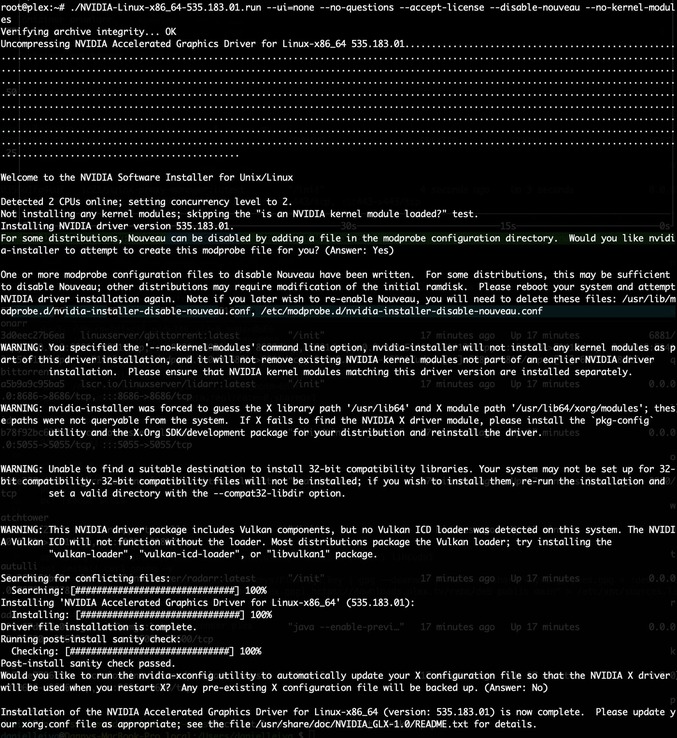
If you’re going to use the Nvidia .run file, you can do it this way inside the container.

./NVIDIA-Linux-[...].run --no-kernel-modules

The run script will put the runtimes only in the container.

Since it’s a container, it doesn’t matter if uninstallation is problematic.

That’s what I was using before, but this is even easier installing just the two library files. It didn’t have a positive effect on transcoding, if I remember correctly. I could try again if that would be helpful

Just remember to include that --no-kernel-modules option.

That’s critical inside a container.

what you had showed me was with the kernel modules.

I tried again on a clean LXC debian container using .run file drivers as follow:

Same issue, dies on webui transcoding (I tried downsampling to 480p)
Plex Media Server Logs_2024-08-29_08-39-46.zip (40.8 KB)

I will try to find time today (I’m :fire_engine: on QNAP right now) to create a new container and run this to ground.

A couple of thoughts here. I have a server with an nvidia GPU and spent some time playing with plex LXC containers on it. Here are my notes:

  • For privileged LXC containers, you want to make sure to use the same NVIDIA installer script on the host and container, but use the option “–dkms” on the host, and “–no-kernel-module” when run inside the container.
  • You need to pass all the nvidia devices, and ensure the cgroup2 permissions are enabled. I found this to be a good guide: Using an Nvidia GPU with Proxmox LXC (yomis.blog)
  • However, if you are using an unprivileged LXC container (which is generally recommended for security reasons), then you can use the nvidia-container-runtime to manage GPU passthrough.
  • Instructions on how to install the nvidia-container-runtime can be found here: Installing the NVIDIA Container Toolkit — NVIDIA Container Toolkit 1.16.0 documentation
  • When using the nvidia-container-runtime, in your lxc.conf instead of the cgroup2 allow commands and the device passthrough commands, add the following:
lxc.hook.pre-start: sh -c '[ ! -f /dev/nvidia0 ] && /usr/bin/nvidia-modprobe -c0 -u'
lxc.environment: NVIDIA_VISIBLE_DEVICES=all
lxc.environment: NVIDIA_DRIVER_CAPABILITIES=compute,utility,video
lxc.hook.mount: /usr/share/lxc/hooks/nvidia

(this does not work for privileged containers)

For either method, you can validate the container can see the gpu by running nvidia-smi command inside the container.

I managed to find some time (between 2-3am haha) to get some work done)

  1. N100 CPU - AlderLake-N GPU (B-Link miniPC)
  2. PMS in container

Don’t know what else to volunteer so please do ask.

This is not an intel transcode issue. This is an nvidia, quadro in my case, issue. That for sure is a factor. It works fine and without issue with iOS. It breaks down with web transcoding. Maybe it’s a browser profile selection issue, but at least seems like a Plex logic issue when dealing with web transcoding

On my AlderLake w/ RTX2000,

[chuck@lizum Downloads.2003]$ nvidia-smi
Sat Aug 31 16:36:09 2024       
+-----------------------------------------------------------------------------------------+
| NVIDIA-SMI 550.90.07              Driver Version: 550.90.07      CUDA Version: 12.4     |
|-----------------------------------------+------------------------+----------------------+
| GPU  Name                 Persistence-M | Bus-Id          Disp.A | Volatile Uncorr. ECC |
| Fan  Temp   Perf          Pwr:Usage/Cap |           Memory-Usage | GPU-Util  Compute M. |
|                                         |                        |               MIG M. |
|=========================================+========================+======================|
|   0  NVIDIA RTX 2000 Ada Gene...    On  |   00000000:01:00.0  On |                  Off |
| 30%   43C    P2             18W /   70W |    1364MiB /  16380MiB |      2%      Default |
|                                         |                        |                  N/A |
+-----------------------------------------+------------------------+----------------------+
                                                                                         
+-----------------------------------------------------------------------------------------+
| Processes:                                                                              |
|  GPU   GI   CI        PID   Type   Process name                              GPU Memory |
|        ID   ID                                                               Usage      |
|=========================================================================================|
|    0   N/A  N/A      4153      G   /usr/lib/xorg/Xorg                            376MiB |
|    0   N/A  N/A      5043      G   /usr/bin/gnome-shell                          163MiB |
|    0   N/A  N/A    338946      G   gnome-control-center                          100MiB |
|    0   N/A  N/A    419323      C   ...lib/plexmediaserver/Plex Transcoder        612MiB |
+-----------------------------------------------------------------------------------------+
[chuck@lizum Downloads.2004]$

Does it continue hardware transcoding if you change the playback transcode target bitrate during playback?

NO. That is a known bug. The web app’s not communicating with PMS correctly.

The unfortunate temp solution is to set the target bitrate then start playback.

1 Like

seems like is the issue I’m having, specifically. I didn’t realize it was a known issue.

I’m just wondering if there is anything else I can contribute to help work on this issue?

@Brenex_1

Unfortunately, there is nothing you or I can do.

The issue has been diagnosed down to the API calls level (the traffic between Web & Server) .

We know exactly what the web player is NOT doing when the setting is changed.

The challenge is, and has always been, to get the Web team’s attention long enough to actually deem it of importance and fix it.

This topic was automatically closed 90 days after the last reply. New replies are no longer allowed.