Plex HW Transcoding fails on web player, works on iOS

Server Version#: 1.40.4.8679
Player Version#: Web 4.135.1

Wanted to call out a potential issue. I was on Nvidia driver 550.107.02, passing through a GPU to my plex VM, and was having issues with hw transcoding working, but only within the plex web player. I thought this was because I recently installed a new GPU and had misconfigured something, but I noticed some other threads which clued me into testing and lo and behold, transcoding on iOS was using the GPU fine.

I rolled to an older driver patch (535.183.01) and plex for web is transcoding properly and working fine.

Wanted to call this out for anyone who may come across this issue soon.

I presume you’re using Ubuntu as your OS given the difficulties you had.
PMS always does better with the Ubuntu-vetted drivers. History has shown the ā€˜bleeding edge’ drivers to be somewhat unpredictable.

The Plex/web server is a simple player with no inherent capabilities so the server must do all the work whereas the other players (iOS, Nvidia, etc) have local procesing capabilities and offload transcoding by the server.

I am using/testing the next release of PMS here and am still using 535.183.01

[chuck@lizum Downloads.2020]$ nvidia-smi
Fri Aug  2 01:30:26 2024       
+---------------------------------------------------------------------------------------+
| NVIDIA-SMI 535.183.01             Driver Version: 535.183.01   CUDA Version: 12.2     |
|-----------------------------------------+----------------------+----------------------+
| GPU  Name                 Persistence-M | Bus-Id        Disp.A | Volatile Uncorr. ECC |
| Fan  Temp   Perf          Pwr:Usage/Cap |         Memory-Usage | GPU-Util  Compute M. |
|                                         |                      |               MIG M. |
|=========================================+======================+======================|
|   0  Quadro P2200                   On  | 00000000:07:00.0 Off |                  N/A |
| 48%   38C    P8               4W /  75W |      1MiB /  5120MiB |      0%      Default |
|                                         |                      |                  N/A |
+-----------------------------------------+----------------------+----------------------+
                                                                                         
+---------------------------------------------------------------------------------------+
| Processes:                                                                            |
|  GPU   GI   CI        PID   Type   Process name                            GPU Memory |
|        ID   ID                                                             Usage      |
|=======================================================================================|
|  No running processes found                                                           |
+---------------------------------------------------------------------------------------+
[chuck@lizum Downloads.2021]$

I will update as Ubuntu releases updated drivers --AND-- I need to.
In most cases with Nvidia drivers, ā€œIf it’s not broken, don’t fix itā€.

Thanks Chuck! And yes, Ubuntu 24 which I know is/was having some other HW transcoding issues itself.

I’ll stick with this config for a solid amount of time and wait for other vetted versions going forward. Is there a good list to follow somewhere for future reference of what driver versions are stamped as acceptable?

It’s been a while since I’ve setup fresh but apt install nvidia-drivers is the start of the package group. You will then need, one time only, to install libnvidia-encode and libnvidia-decode.

I did check with some folks last night and the 545 drivers (installed via apt) work ok.

I don’t know if you used the .run file or from the repo but the repo works better in most cases.

Here is what I have installed on 22.04-server

ii  gpustat                                0.6.0-1                                  all          pretty nvidia device monitor
ii  libnvidia-cfg1-535-server:amd64        535.183.01-0ubuntu0.22.04.1              amd64        NVIDIA binary OpenGL/GLX configuration library
ii  libnvidia-common-535-server            535.183.01-0ubuntu0.22.04.1              all          Shared files used by the NVIDIA libraries
ii  libnvidia-compute-535-server:amd64     535.183.01-0ubuntu0.22.04.1              amd64        NVIDIA libcompute package
ii  libnvidia-decode-535-server:amd64      535.183.01-0ubuntu0.22.04.1              amd64        NVIDIA Video Decoding runtime libraries
ii  libnvidia-encode-535-server:amd64      535.183.01-0ubuntu0.22.04.1              amd64        NVENC Video Encoding runtime library
ii  libnvidia-extra-535-server:amd64       535.183.01-0ubuntu0.22.04.1              amd64        Extra libraries for the NVIDIA Server Driver
ii  libnvidia-fbc1-535-server:amd64        535.183.01-0ubuntu0.22.04.1              amd64        NVIDIA OpenGL-based Framebuffer Capture runtime library
ii  libnvidia-gl-535-server:amd64          535.183.01-0ubuntu0.22.04.1              amd64        NVIDIA OpenGL/GLX/EGL/GLES GLVND libraries and Vulkan ICD
ii  libnvidia-ml-dev:amd64                 11.5.50~11.5.1-1ubuntu1                  amd64        NVIDIA Management Library (NVML) development files
ii  nvidia-compute-utils-535-server        535.183.01-0ubuntu0.22.04.1              amd64        NVIDIA compute utilities
ii  nvidia-cuda-dev:amd64                  11.5.1-1ubuntu1                          amd64        NVIDIA CUDA development files
ii  nvidia-cuda-gdb                        11.5.114~11.5.1-1ubuntu1                 amd64        NVIDIA CUDA Debugger (GDB)
ii  nvidia-cuda-toolkit                    11.5.1-1ubuntu1                          amd64        NVIDIA CUDA development toolkit
ii  nvidia-cuda-toolkit-doc                11.5.1-1ubuntu1                          all          NVIDIA CUDA and OpenCL documentation
ii  nvidia-dkms-535-server                 535.183.01-0ubuntu0.22.04.1              amd64        NVIDIA DKMS package
ii  nvidia-driver-535-server               535.183.01-0ubuntu0.22.04.1              amd64        NVIDIA Server Driver metapackage
ii  nvidia-firmware-535-server-535.183.01  535.183.01-0ubuntu0.22.04.1              amd64        Firmware files used by the kernel module
ii  nvidia-kernel-common-535-server        535.183.01-0ubuntu0.22.04.1              amd64        Shared files used with the kernel module
ii  nvidia-kernel-source-535-server        535.183.01-0ubuntu0.22.04.1              amd64        NVIDIA kernel source package
ii  nvidia-opencl-dev:amd64                11.5.1-1ubuntu1                          amd64        NVIDIA OpenCL development files
ii  nvidia-prime                           0.8.17.1                                 all          Tools to enable NVIDIA's Prime
ii  nvidia-profiler                        11.5.114~11.5.1-1ubuntu1                 amd64        NVIDIA Profiler for CUDA and OpenCL
ii  nvidia-utils-535-server                535.183.01-0ubuntu0.22.04.1              amd64        NVIDIA Server Driver support binaries
ii  nvidia-visual-profiler                 11.5.114~11.5.1-1ubuntu1                 amd64        NVIDIA Visual Profiler for CUDA and OpenCL
ii  xserver-xorg-video-nvidia-535-server   535.183.01-0ubuntu0.22.04.1              amd64        NVIDIA binary Xorg driver
[chuck@glockner ~.2004]$ 

I’m actually noticing the exact same issue when trying to set this up on my VM Debian server under proxmox with full GPU passthrough. I tried both the more recent 550 drivers and also the 535.183.01 drivers and have the same issue. Nvidia GPU transcoding works fine when switching transcoding options on the fly on iOS, but on the web player it may work only once with switch transcoding options. If I were to switch transcoding one more time, it crashed and the transcode runner dies.

I’ve attached clean logs of a movie starting and being transcoded without issue and then switching transcode formats and the movie no long playing.

Plex Media Server Logs_2024-08-20_10-24-45.zip (38.0 KB)

I’m running linux kernel 6.1.0-23-amd64 and installed the Nvidia drivers from the official debian sources. This also happens if I use the run install files from Nvidia as well.

I am not able to reproduce from my P2200-based machine (Ubuntu server headless).

I am receiving a Nvidia RTX 2000 ada generation today and will have it installed in the Dragon Canyon by tonight.

I’ll then be able to test more configurations.

@Brenex_1

Your logs are showing me PMS is detecting the GPU and launching correctly.

Aug 20, 2024 10:23:51.908 [139895672064824] DEBUG - [Req#47/Transcode] Found session GUID of k2xl87eht7m0v8mkh5v8rinz in session start.
Aug 20, 2024 10:23:51.908 [139895672064824] DEBUG - [Req#47/Transcode] Cleaning directory for session k2xl87eht7m0v8mkh5v8rinz ()
Aug 20, 2024 10:23:51.909 [139895672064824] DEBUG - [Req#47/Transcode] Starting a transcode session k2xl87eht7m0v8mkh5v8rinz at offset -1.0 (state=3)
Aug 20, 2024 10:23:51.909 [139895672064824] DEBUG - [Req#47/Transcode] TPU: hardware transcoding: using hardware decode accelerator nvdec
Aug 20, 2024 10:23:51.909 [139895672064824] DEBUG - [Req#47/Transcode] TPU: hardware transcoding: zero-copy support present
Aug 20, 2024 10:23:51.909 [139895672064824] DEBUG - [Req#47/Transcode] TPU: hardware transcoding: using zero-copy transcoding
Aug 20, 2024 10:23:51.909 [139895672064824] DEBUG - [Req#47/Transcode] [Universal] Using local file path instead of URL: /home/plex/Media/My_Movie.mkv
Aug 20, 2024 10:23:51.909 [139895672064824] DEBUG - [Req#47/Transcode] TPU: hardware transcoding: final decoder: nvdec, final encoder: nvenc
Aug 20, 2024 10:23:51.910 [139895672064824] DEBUG - [Req#47/Transcode/JobRunner] Job running: CUDA_CACHE_PATH="/var/lib/plexmediaserver/Library/Application Support/Plex Media Server/Cache/Shaders/CUDA" FFMPEG_EXTERNAL_LIBS='/var/lib/plexmediaserver/Library/Application\ Support/Plex\ Media\ Server/Codecs/b8ae7ab-0d1793f7046f5e4affa102c2-linux-x86_64/' X_PLEX_TOKEN=xxxxxxxxxxxxxxxxxxxxxxxxxxxxxxxxxxxxxxxxxx "/usr/lib/plexmediaserver/Plex Transcoder" -codec:0 h264 -hwaccel:0 nvdec -hwaccel_fallback_threshold:0 10 -threads:0 1 -hwaccel_output_format:0 cuda -hwaccel_device:0 cuda -codec:1 ac3 -analyzeduration 20000000 -probesize 20000000 -i /home/plex/Media/My_Movie.mkv -filter_complex "[0:0]hwupload[0];[0]scale_cuda=w=718:h=298:format=nv12[1]" -map "[1]" -codec:0 h264_nvenc -b:0 1267k -maxrate:0 1690k -bufsize:0 3380k -forced-idr:0 1 -r:0 23.975999999999999 -force_key_frames:0 "expr:gte(t,n_forced*8)" -filter_complex "[0:1] aresample=async=1:ochl='stereo':rematrix_maxval=0.000000dB:osr=48000[2]" -map "[2]" -metadata:s:1 language=eng -codec:1 aac -b:1 208k -f dash -seg_duration 8 -dash_segment_type mp4 -init_seg_name 'init-stream$RepresentationID$.m4s' -media_seg_name 'chunk-stream$RepresentationID$-$Number%05d$.m4s' -window_size 5 -delete_removed false -skip_to_segment 1 -time_delta 0.0625 -manifest_name "http://127.0.0.1:32400/video/:/transcode/session/k2xl87eht7m0v8mkh5v8rinz/51505883-f460-4017-b936-f12e0ee2a11e/manifest?X-Plex-Http-Pipeline=infinite" -avoid_negative_ts disabled -map_metadata -1 -map_chapters -1 dash -start_at_zero -copyts -vsync cfr -init_hw_device cuda=cuda:pci:0000:01:00.0 -filter_hw_device cuda -y -nostats -loglevel quiet -loglevel_plex error -progressurl http://127.0.0.1:32400/video/:/transcode/session/k2xl87eht7m0v8mkh5v8rinz/51505883-f460-4017-b936-f12e0ee2a11e/progress

I’ll see if I can figure out the Plex/web issue tonight.

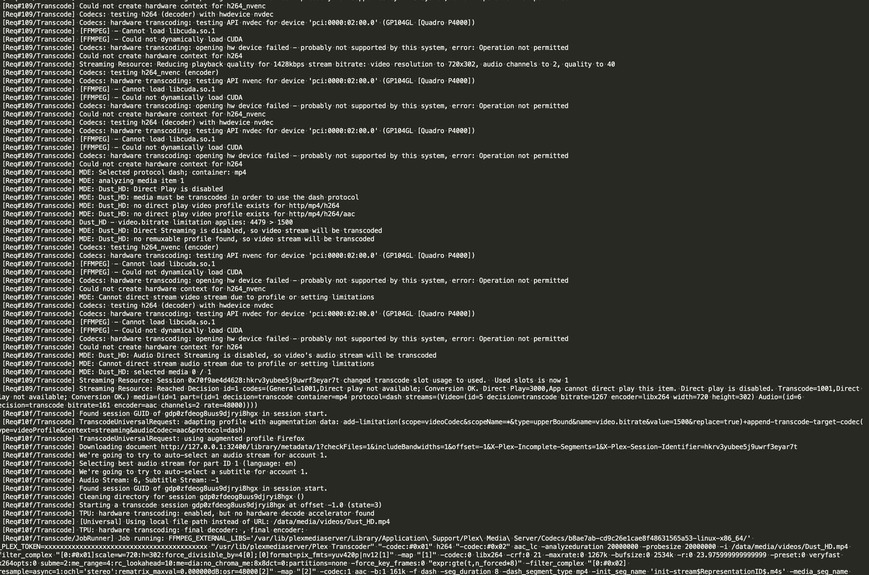
Successful:

Compared to when not successful:

I wonder why the ā€œTranscode runner appears to have died.ā€

So, I’ve been working on this for the past few days trying various combinations of drivers on the proxmox host in addition to various combinations on the lxc container. Using the webui player, I can not get the transcode engine to start when requesting a downsampled transcode from the server. If I request a ā€œconvert automaticallyā€ quality, the transcode engine starts fine for playback using the web player.

This is a problem isolated to playback on the webui player. iOS downsample transcodes without issue. I’m commited to helping fix this issue if you’re available. @ChuckPa We can discuss the various iterations of trial and error I’ve run on host+lxc and host+VM if that information helps as well. This problem occurs regardless of using debian repository drivers or Nvidia direct .run time drivers and regardless of the presence of cuda drivers+toolkit on host±lxc

I was looking at this thread: NVIDIA hardware acceleration inconsistently working with web streaming - #52 by Minxster

and it seems that turning off, ā€œUse hardware-accelerated video encodingā€ also fixed the issue for me. Thoughts?

May I have DEBUG logs please which capture the failure?

What I’m looking for:

  1. CPU
  2. Runtime environment
  3. MDE output
  4. TPU section
  5. FFMPEG invocation command.
  6. First few exchanges with the client (player)

This first file is when the server fails with hw encoding on:
encoding_on-Plex Media Server.log (138.7 KB)

This next file is when the server succeeds in transcoding with encoding off:
encoding_off-Plex Media Server.log (200.0 KB)

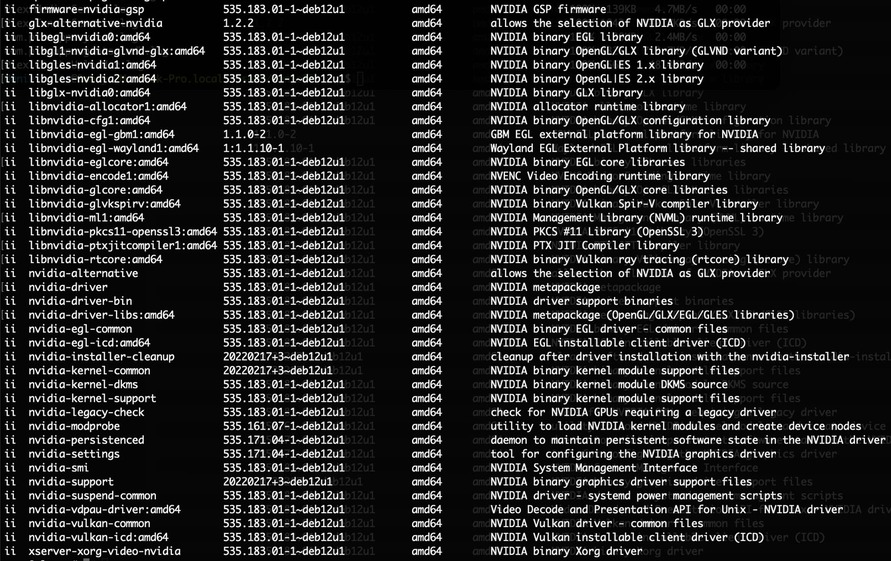
Installed host and LXC drivers:

These two files might be easier to scan through, I’ve selected only the Transcoder entries:
encoding_on-Plex Media Server.log (13.9 KB)
encoding_off-Plex Media Server.log (45.1 KB)

The reached decision with encoding off:

Reached Decision id=4 codes=(General=1001,Direct play not available; Conversion OK. Direct Play=3000,App cannot direct play this item. Direct play is disabled. Transcode=1001,Direct play not available; Conversion OK.) media=(id=3 part=(id=3 decision=transcode container=mp4 protocol=dash streams=(Video=(id=17 decision=transcode bitrate=1267 encoder=libx264 width=720 height=302) Audio=(id=18 decision=transcode bitrate=161 encoder=aac channels=2 rate=48000))))

The reached decision with encoding on:

Reached Decision id=4 codes=(General=1001,Direct play not available; Conversion OK. Direct Play=3000,App cannot direct play this item. Direct play is disabled. Transcode=1001,Direct play not available; Conversion OK.) media=(id=3 part=(id=3 decision=transcode container=mp4 protocol=dash streams=(Video=(id=17 decision=transcode bitrate=1267 encoder=h264_nvenc width=720 height=302) Audio=(id=18 decision=transcode bitrate=161 encoder=aac channels=2 rate=48000))))

The same file with encoding on being transcoded successfully on the iphone reaches the following decision:

Reached Decision id=4 codes=(General=1001,Direct play not available; Conversion OK. Direct Play=3000,App cannot direct play this item. Direct play is disabled. Transcode=1001,Direct play not available; Conversion OK.) media=(id=3 part=(id=3 decision=transcode container=mkv protocol=hls streams=(Video=(id=17 decision=transcode bitrate=1697 encoder=h264_nvenc width=720 height=302) Audio=(id=18 decision=transcode bitrate=206 encoder=libopus channels=2 rate=48000))))

when putting PMS in a LXC,

Need:

  nvidia.driver.capabilities: all
  nvidia.require.cuda: "true"
  nvidia.runtime: "true"

Then, when PMS is installed in the container, PROVIDED the group which owns /dev/dri/renderD128 is NOT ā€˜root’, the installer will add PMS to that group.

In the case where renderD128 is owned by ā€˜root’, the installer doesn’t know it’s in a container so it opts for safety and doesn’t open the whole machine to PMS (security violation).

In these cases, where you know it’s in a container, manually adding PMS (plex:plex) to the ā€˜root’ group is ok because it can’t get out of the namespace.

Here you can see the Nvidia is not sufficiently accessible for HW transcoding.

Aug 26, 2024 22:12:52.683 [123240458496824] DEBUG - [Req#6e/Transcode] MDE: Dust_HD: no remuxable profile found, so video stream will be transcoded
Aug 26, 2024 22:12:52.683 [123240458496824] DEBUG - [Req#6e/Transcode] Codecs: testing h264_nvenc (encoder)
Aug 26, 2024 22:12:52.683 [123240458496824] DEBUG - [Req#6e/Transcode] Codecs: hardware transcoding: testing API nvenc for device '' ()
Aug 26, 2024 22:12:52.756 [123240571743032] DEBUG - [HttpClient/HCl#2e] HTTP/1.1 (0.3s) 200 response from GET https://104-136-55-230.e9a3501c806742e4b848c1c90b3cd69a.plex.direct:32400
Aug 26, 2024 22:12:53.012 [123240458496824] DEBUG - [Req#6e/Transcode] [FFMPEG] - CUDA texture alignment: 512
Aug 26, 2024 22:12:53.028 [123240599006008] WARN - JobManager: Could not find job for handle 7559
Aug 26, 2024 22:12:53.040 [123240599006008] WARN - JobManager: Could not find job for handle 7560
Aug 26, 2024 22:12:53.052 [123240599006008] WARN - JobManager: Could not find job for handle 7561
Aug 26, 2024 22:12:53.208 [123240458496824] DEBUG - [Req#6e/Transcode] MDE: Cannot direct stream video stream due to profile or setting limitations
Aug 26, 2024 22:12:53.208 [123240458496824] DEBUG - [Req#6e/Transcode] Codecs: testing h264 (decoder) with hwdevice vaapi
Aug 26, 2024 22:12:53.209 [123240458496824] DEBUG - [Req#6e/Transcode] Codecs: hardware transcoding: testing API vaapi for device '' ()
Aug 26, 2024 22:12:53.209 [123240458496824] DEBUG - [Req#6e/Transcode] Codecs: hardware transcoding: opening hw device failed - probably not supported by this system, error: Generic error in an external library
Aug 26, 2024 22:12:53.209 [123240458496824] DEBUG - [Req#6e/Transcode] Could not create hardware context for h264
Aug 26, 2024 22:12:53.209 [123240458496824] DEBUG - [Req#6e/Transcode] Codecs: testing h264 (decoder) with hwdevice nvdec
Aug 26, 2024 22:12:53.210 [123240458496824] DEBUG - [Req#6e/Transcode] Codecs: hardware transcoding: testing API nvdec for device '' ()
Aug 26, 2024 22:12:53.460 [123240458496824] DEBUG - [Req#6e/Transcode] Codecs: Testing with profile 'High'

This needs to be resolved first.

The issue is still present regardless of modifying permissions when I only expose /dev/dri/card1 and /dev/dri/render128. Unless you want me to try also exposing the native nvidia device/drivers from the host proxmox system. I added plex to groups video (44) and sgx (which is what group 104 render is mapped to in the lxc group 104) and it’s the same.

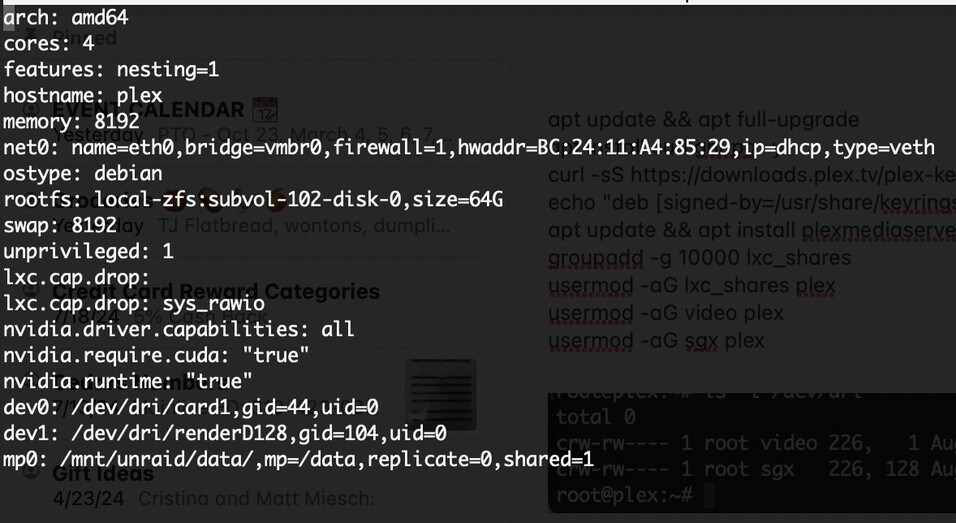
I remade my plex container to start fresh to help troubleshoot through this. My new container has the following conf:

then ran some updates and plex install::

apt update && apt full-upgrade
apt install curl gnupg -y
curl -sS https://downloads.plex.tv/plex-keys/PlexSign.key | gpg --dearmor | tee /usr/share/keyrings/plex.gpg > /dev/null 
echo "deb [signed-by=/usr/share/keyrings/plex.gpg] https://downloads.plex.tv/repo/deb public main" > /etc/apt/sources.list.d/plexmediaserver.list
apt update && apt install plexmediaserver -y
groupadd -g 10000 lxc_shares
usermod -aG lxc_shares plex
usermod -aG video plex
usermod -aG sgx plex


I’ve noticed that it seems that proxmox/lxc doesn’t support those specific flags in the conf file. The following gets removed when cycling the lxc container:

nvidia.driver.capabilities: all
nvidia.require.cuda: "true"
nvidia.runtime: "true"

Running plex gives the following error now:

I didn’t get a chance to install the nvidia 535 drivers in the container before sleeping so I am going to try that, as well as an ubuntu container, and see if there are any changes.

If these are getting removed, then the Nvidia drivers (runtime modules) won’t get passed into the container.

Alternatively, for SOME GPUs, you can pass it by GID which owns /dev/dri/renderD128 & card0

Gid="$(stat -c %g /dev/dri/renderD128)"
lxc config device add $Container gpu gpu gid=$Gid

I am tracking down the iOS vs Web problem.

Using an ubuntu container, passing along the nvidia device drivers which I remapped to the render group in ubuntu 993:

dev0: /dev/nvidia0,gid=993,uid=0
dev1: /dev/nvidiactl,gid=993,uid=0
dev2: /dev/nvidia-uvm,gid=993,uid=0
dev3: /dev/nvidia-uvm-tools,gid=993,uid=0
dev4: /dev/nvidia-caps/nvidia-cap1,gid=993,uid=0
dev5: /dev/nvidia-caps/nvidia-cap2,gid=993,uid=0

with these packages installed in the container:

allows me to transcode down once, but if I try again, the transcode runner dies. I think this is basically the same position now as I was in my first post above after having rebuilt with new containers.

Plex Media Server.log (281.0 KB)

I can definitely confirm that iOS is dramatically forgiving when it comes to the decision engine and, that through all of this, it works normally with encoding and decoding both on the quadro card. Switching resolution back and forth as well.

As far as I can tell, lxc containers in proxmox do not have a command to add by gid.

I hate to double post, I just want to give you the most updated information to pin down this issue.

I have pretty much completely simplified the process of setting up a container correctly to where it transcodes multiple times to iOS without issue, and it transcodes to webui, sometimes once, without issue, but more often than not does not transcode once. If I try to change the transcode again, the stream dies.

After setting up correct permissions on the container and passing through both the dev/card1 and render device, in addition to the five nvidia device files to allow cuda access, the only drivers needed in the container are libnvcuvid1 and libnvidia-encode1.

The following is a fresh log in which I performed the following watch actions:

  1. Began stream My_Movie.mkv in webui

  2. Transcode to 480p - fail, stopped

  3. Began stream Dust_HD in webui

  4. Transcode to 480p - fail, stopped

  5. Began stream My_Movie.mkv in ios

  6. Transcode to 480p - success

  7. Transcode to 720p - success

Plex Media Server.log (766.0 KB)

Just so we’re understanding –

  1. You say container but what you’ve done only works in a VM – but not fully.
  2. You show you’ve installed server-side drivers, in the container.

This isn’t how it’s done.

  1. Host gets ALL the drivers
  2. Runtime-only gets passed into the container

If youve created a VM, that would explain why you can’t pass the runtimes

I have an extra 4x4 brick now. I’ll setup ProxMox

I’ve created both an Ubuntu and Debian based LXC container in proxmox, unprivileged, to try to make this work. As an aside, even running an Ubuntu and Debian VM instance also had the same issue with full gpu pass through and only drivers installed on a vm blacklisting all drivers on the proxmox host as well.

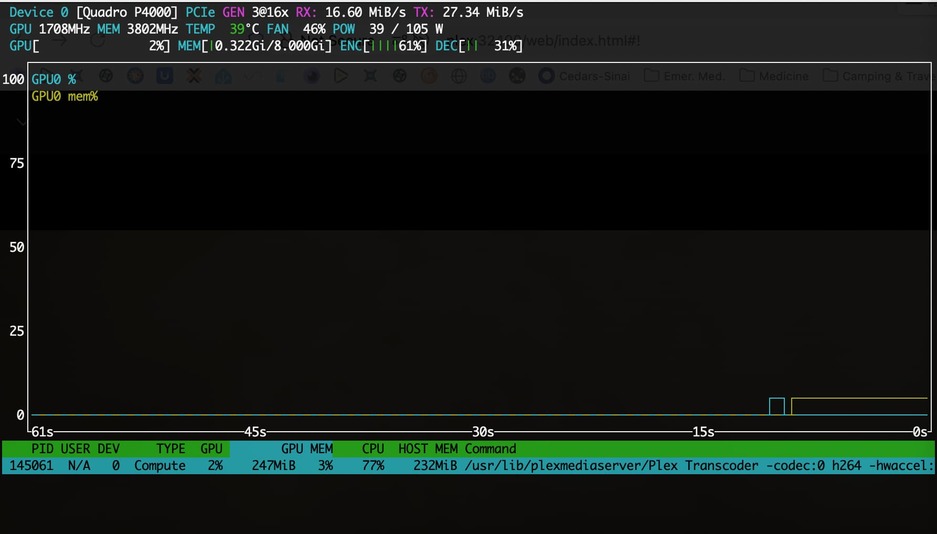
Without installing the libraries, Plex does not detect a cuda-capable gpu. This is even with the host, also Debian based as it is proxmox, having passed all devices through to the LXC container with appropriate permissions. As soon as I installed the decode and encode libraries, it worked fine from the perspective that Plex identifies a cuda capable gpu able to encode and decode, at least when requesting a file with iOS. That is what is show in the last NVTOP screenshot above.

I’m not using docker, if that’s where some confusion is coming from, I don’t think so but I figure I would clarify. I know some people nest containers, but that’s not what I’m doing.

This is the problem point.

  1. Container
  2. But you’re trying to install the full driver – which contains kernel DKMS modules. – That won’t work You do not put kernel models and the card’s full driver in the container. The container has no kernel. It shares the host’s kernel. The full driver is to be installed on the host.
  3. All you want/need is the runtime libraries from the full driver to be passed into the container.
    (There are posts here in the forum how to do this. I can’t remember where but think you can search and find them)

. My ProxMox box will be here on Thursday. I decided to get one I can keep dedicated.

From what I can find, the container must be privileged (to access the card?)

I also found this.

As I’m not familiar with Proxmox yet (I use Nvidia in Ubuntu LXC on Ubuntu)
I hope this helps.