Plex HW transcoding freezing the entire system

Server Version#: 1.18.9.2578
Player Version#: Android TV (7.30.1.16475)
Server HW: Intel NUC (Celeron J3455)
Server OS: Ubuntu 18.04.4 (4.15.0-91-generic)

I’m in a battle to find out what’s locking my plex system. So far, the main suspect is the HW transcoding.
The server is headless, not running X and run only the PMS. The entire system freezes randomly, without leaving traces on OS logs (syslog and kern.log).
I found a video that freezes every 7-8 minutes of playtime. Media info is attached.

ls /dev/dri/
by-path  card0  renderD128

mediainfo.txt (4.2 KB) Plex Media Server.log (2.2 MB)

Not much of a battle. The trick is knowing what to look for

  1. The hardware acceleration is being located and used
  2. Subtitle burning is required ( This is the killer on a J-series CPU)
  3. Audio conversion is also required (EAC3 6 -> 2 channels is a bit heavy but not worst)

This is where the decision was made:

Apr 07, 2020 19:56:04.178 [0x7f4b44ff9700] DEBUG - Streaming Resource: Reached Decision id=1470 codes=(General=1001,Direct play not available; Conversion OK. Direct Play=3000,App cannot direct play this item. Direct play is disabled. Transcode=1001,Direct play not available; Conversion OK.) media=(id=3300 part=(id=3300 decision=transcode container=mpegts protocol=hls streams=(Video=(id=7065 decision=transcode bitrate=3747 encoder=h264_vaapi width=1920 height=800) Audio=(id=7066 decision=transcode bitrate=774 encoder=eac3_eae channels=6 rate=48000) Subtitle=(id=7062 decision=burn languageCode=por location=embedded))))
Apr 07, 2020 19:56:04.180 [0x7f4b690e5700] DEBUG - Completed: [192.168.1.105:51011] 200 GET /video/:/transcode/universal/decision?audioBoost=100&autoAdjustQuality=0&directPlay=0&directStream=1&directStreamAudio=1&fastSeek=1&hasMDE=1&location=lan&maxVideoBitrate=200000&mediaBufferSize=209664&mediaIndex=0&partIndex=0&path=%2Flibrary%2Fmetadata%2F1470&protocol=*&session=201543c37e6a761c-com-plexapp-android&subtitles=burn&subtitleSize=100&videoBitrate=200000&videoQuality=100&videoResolution=3840x2160 (15 live) TLS GZIP 276ms 3517 bytes (pipelined: 4)

Subtitle=(id=7062 decision=burn languageCode=por location=embedded))

But this is the freezing cause?
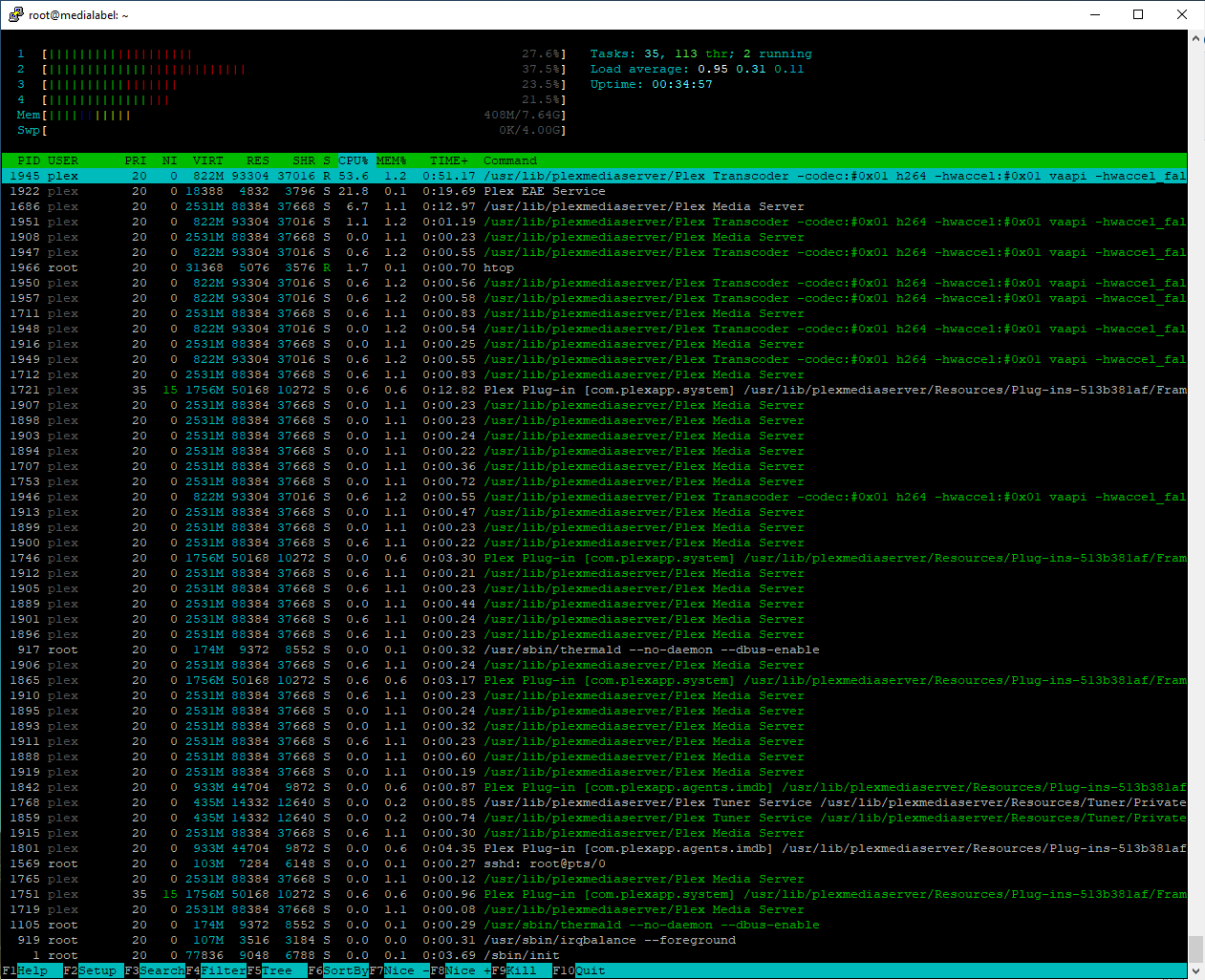
I was looking the server resources while playing this title and looks fine to me.

Showing individual threads only makes it more confusing.
The per-process totals (e.g. 245% or 380%) is more meaningful.
Regular top is, imo, better when doing this.

OK. Used top to take the attached screenshot.
I´m making some tests without the subtitle.

If subtitles are being burned-in, expect the transcoder to be 100% + normal transcoder workload. Subtitles are single-threaded.

Is there something i can do to use the subtitles?
Without it, the system didn´t freeze :pensive:

I have a fundamental problem. Let me walk through it with you and maybe we can figure this out .

The J3455 CPUs are common in NAS products (no gui, tuned kernel, trimmed down and targeted apps loaded only).

On those systems, when burning subtitles, a single CPU core will peg at 100%.
The transcoder and PMS will use the other cores as needed (audio transcoding & processing of the video file itself).

Those systems are ok except for the known limitation of their inability to cope with image based subtitles . The J3455 is HEVC capable so handles the video in hardware ASIC.

Those systems are also designed to tolerate thermal abuse.

Where I’m at in the mental checklist is:

  1. Is the RAM OK.
  2. Is the CPU overheating and locking up? (Intel PROC HOT flag)?

Since you have Ubuntu, testing both and proving out the hardware is easy.

  1. Memtest86+, bootable USB, run for the full extended suite, will certify the memory
  2. Prime95 “stress test” will test the CPU and, most importantly, the cooling and power supply.

After that, the next item on my list is OS loadout / updates.

See where I’m headed?

Hi,

I did a lot of tests, and the hardware is fine.

Prime95 - 16 hours running with no errors. Average temperature at 79ºC.
Memtest - All tests are OK. Took about 6hs to run.

The OS is a server install, fully updated with only the SSH and PMS. With PMS stopped, only 140MB of RAM is used.

That’s interesting. most of the installs used are Workstation installs albeit “minimal” mode.

Never tested with a “server” install.

Any tips for what i can do to at least stop freezing the system? Or a workaround for the subtitles problem?

working around the subtitles?

  1. Text based only - Set the players to burn “Only Image Formats”
  2. No PGS, VOBSUB, or DVDRIP . These are image based.
  3. If you don’t need them, strip them out.
  4. Use SRT subtitles (easiest to process). ASS and SSA are awkward formats & error prone from the internet.

1 . I didn´t know this option. I´m gonna try it.
2. I use only srt subtitles.
3. Wish i could, but it´s is not a option.
4. I use only srt subtitles.

Thanks for the help.

This topic was automatically closed 90 days after the last reply. New replies are no longer allowed.