I am new to owning an RV and just learned an expensive lesson. Most trailer parks have terrible (if any) wifi. Most of the time a Verizon connection will work. But streaming goes through the limited fast access very quickly.
I have hundreds of DVDs and have begun ripping (I can do 5 at a time with my DEV computer). I was thinking of getting a mini pc and using it as a media server with Plex. I can set it up at home (with connectivity) then bring it with me.
I do have Amazon devices in the trailer as well as a router. I was thinking that is another option though I don’t know where to attach the external hard drive.
First off, congrats. I’ve been renting travel trailers when it is simply too hot to tent camp. At some point I might decide to pull the trigger.
A few thoughts that may shake loose some ideas depending on what you have. Disclaimer - I haven’t actually done these:
If you have a Win or Mac laptop, install the new Plex application. It has the ability to download content similar to the iOS or Android Plex clients. I’ve read that there have been some issues with the download function, but I think it is better now… I haven’t used that function myself.
If that same laptop is reasonably powered, try installing the Plex server on it. Put the Plex app or PMP on it and you have a self contained Plex server and player. Direct Play or Direct Stream don’t use a lot of CPU, but test… and read up on using Plex without an internet connection.
If you have the laptop, and also have a smart TV (or TV with a Roku, ATV, or similar) then put a wifi router in your camper and you have a self contained Plex network. Again, read up on using Plex without an internet connection.
Thanks guys! I had not heard about the nvidia shield. It looks perfect. I already have an older version of that projector. Only thing, people usually go to bed early in the RV camps. I’m a coder and go to bed at 4:00 or 5:00 am when they are getting up.
Setting up my trailer required an enormous amount of research. If you need to be connected, it is a lot of work. This site explains the ins and outs. https://www.rvmobileinternet.com/ It does cost $90/year but it saved me so much time it was worth it for one year (I’m a very technical guy, I’ve coded for 35 years and work in Information Security.)
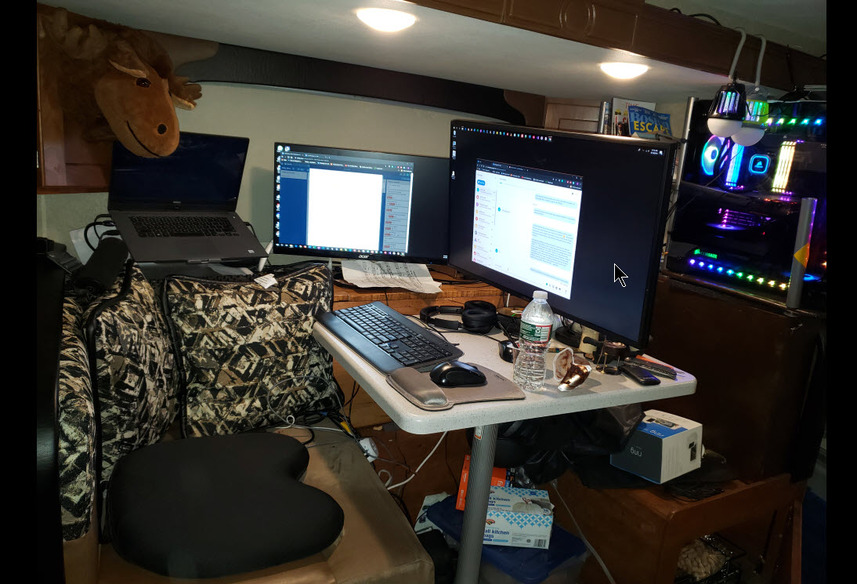
I work remotely and spend most of my time down my basement. Last year it occurred to me that my boss doesn’t care where I am as long as I am available 24/7. I had never been in an RV before purchasing one. I got a Lance 1575. It is kind of a high-end trailer, but it is the only one that is big enough for my needs and can be pulled by my Honda Ridgeline. It’s a great trailer for one or two people. I chuckle when people say they are “camping” in one of these. It’s like dropping a luxury condo in the woods.
I actually travel with a monster of a computer (12 core i9, 128n gigs ram) but I want the media server to be separate.
I would not have built a glass computer if I had known I would be traveling with it. I got a giant, padded back pack for it. It weighs like 50+ lbs. I pack up everything into the back of my truck when I move it. Even the monitor will not stay on the arm when I move it. Towards the back (under the window) is a trunk I made out of solid Maple (opens on the top). The physics of balancing the big monitor on an arm puts a lot of weight on one spot. Directly under where the arm attaches to the chest is a 30lb Kettlebell. The computer is sitting on the arm of the seat. It was way to heavy so I built kind of a shelf that has a base on the floor (most of the weight is on the floor). A lot of design time was spent making this work.
There is a router on the roof and inside. Devices connect to the router on the roof which the router inside finds a source to connect with. It is attached to a wi fi amplifier and a hot spot. The hot spot is attached to an antenna on the roof (the amplifier is on the roof as well). So, it first will try and connect with wifi. If that is no good, it connects through the hot spot. This is done so that all the devices inside only have to connect once to the roof. After that, the internal router can change to what ever is available in the campground. I park, setup, connect the internal router to what ever the campground offers and enter the password given. All other devices don’t have to enter a new password.
What killed me was Windows auto update and streaming. $300 over charge in a couple of weeks. After I disabled updates and stopped streaming it was fine. I lived way up in Maine near Baxter State Park for six weeks. Most productive coding I’ve ever done. Only issue was when … umm… the holding tanks got full. I had to disassemble everything to drive to the dump. After that I found out for $12 I could just pay a guy to pump it out. All was good in the world
I did design an anti-theft system that would fill the trailer with bear spray (pepper spray). But I was convinced it probably would not be a good idea to use it. What could go wrong ?
I mainly meant plugs inside the computer… It is getting rattled during moves, sometimes for days.
You don’t want to open it up everytime you arrive somewhere, to re-seat those plugs and extension cards, right?
Howdy, I have two youngish kids and my solution was a WD WIreless Pro HDD. Each one has a tablet and the HD has PLEX built in and works like a charm. Each can watch their own show. I have a battery pack for the trailer when we do not have live power. to recharge the HD. Has worked flawlessly for years. No router required. No computer required. (except for setting up the HDD) When you hit the road you JUST need the HDD.

 ?
?
